 Click to zoom
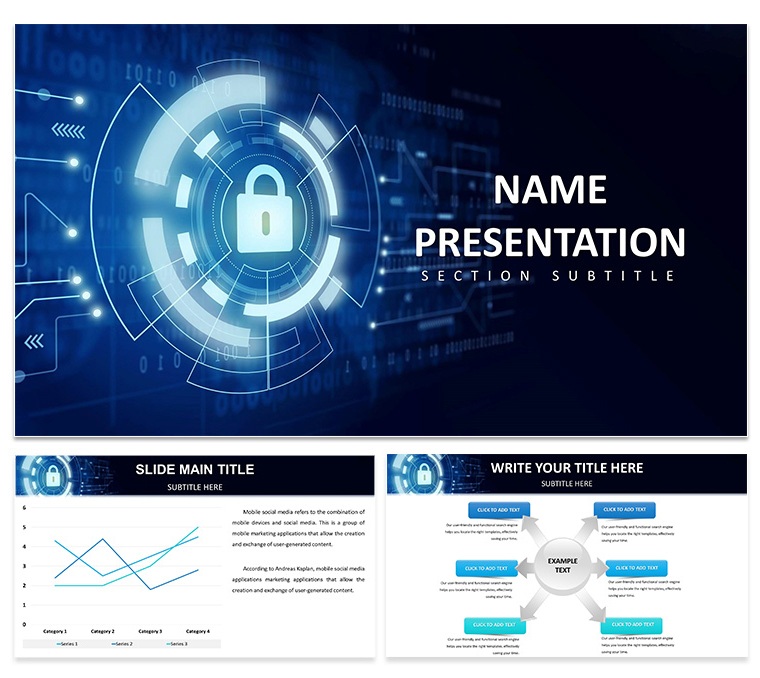
Cyber Security Keynote Template: Fortify Your Message with Ironclad Visuals
| Format | .pptx |
| Slides | 3 unique layouts |
| Aspect ratio | 16:9 |
| Compatibility | PowerPoint |
| Animated | No |
| Language | English |
| License | Commercial |
| File size | — |
| Version | v1.0 |
| Last updated | September 2024 |
What's inside
In the shadowy realm of digital threats, where one breach can unravel empires, your presentation must stand as a bastion of clarity and command. The Cyber Security Template for Keynote rises to that challenge, a dark-mode marvel engineered for guardians of the grid - IT managers, security analysts, and policy framers - who demand slides as resilient as their firewalls. With its brooding aesthetics and precision tools, it demystifies vulnerabilities, spotlights safeguards, and seals deals with unassailable authority.
Encompassing 28 diagrams that probe the perimeter of protection, this template is your tactical overlay for dissecting defenses. From fortress-like flowcharts charting incident responses to shadowed matrices assessing threat landscapes, it's built to convey complexity with calm assurance. Keynote compatibility means effortless armor-plating: layer in your logs, harden colors to your cipher, and deploy with the confidence of a patched system.
Fortress Features for Unbreachable Decks
Security starts with structure - three masters fortify your base: one for threat modeling, another for compliance audits, and a third for remediation roadmaps. Three backgrounds, veiled in midnight blues or encrypted grids, cloak content in professional menace without glare.
The arsenal of 28 diagrams includes radar charts scanning attack surfaces, hierarchical trees branching access controls, and sequence visuals timing breach simulations. Seven color schemes arm you with stealth - monochromatic for recon briefs or accented reds for alert escalations. A rich trove of icons - locks, shields, vectors for vectors - bolsters every slide, all high-fidelity for scrutiny under the spotlight.
- Threat Visualizers: Heat maps flagging hot zones, editable to your telemetry.
- Compliance Layouts: Checklist infographics ticking GDPR or NIST alignments.
- Dark Mode Mastery: Low-strain palettes for marathon monitoring sessions.
Locking Down Edits in Keynote
Integrate into Keynote like a seamless patch - vectors defy distortion, masters mandate uniformity. Share .key files for fortified collaborations, where edits encrypt across endpoints without leaks.
Battle-Tested Scenarios: Defend and Dominate
A CISO briefing the C-suite on phishing vectors: they erect a perimeter diagram, icons gating weak points, animations breaching then bolstering. The template transmutes terror into teachable triumphs, arming execs with actionable intel.
Consultants pitching protocols to clients harness layered onions for defense-in-depth, peeling risks reveal by reveal. Audiences emerge enlightened, not endangered.
- Risk Assessments: SWOT fortresses outlining exploits and countermeasures.
- Training Modules: Interactive paths simulating social engineering sidesteps.
- Incident Recaps: Timeline bulwarks chronicling containment conquests.
Superior to vanilla vaults, it vaults prep past pitfalls, prioritizing penetration over perspiration.
Hardened Hacks for High-Stakes Shows
Calibrate contrasts for command centers; animations as subtle as stealth scans. Embed hyperlinks to dashboards for live threat feeds. Audit accessibility - describe shields for the sight-impaired.
The Unyielding Advantage
This template triumphs by embodying vigilance - layered, lucid, lethal to lapses. It equips sentinels to shield stories, converting cipher to conviction. For audits or alerts, it's the encrypted essence of eloquence.
Scales to sentinels from screens to stages, fonts forged for focus. Collaborative ciphers sync sans seams.
FAQ
What icons are included in the Cyber Security template?
A collection of themed ones like locks and shields, over 30, all vector for sharp security visuals.
Keynote version requirements?
Supports 2016+, with dark mode leveraging recent macOS features.
Editing threat diagrams?
Click elements, swap data or icons - changes cascade securely across the deck.
For non-security topics?
Adaptable for risk management broadly, but optimized for cyber contexts.
Animation for simulations?
Yes, phased builds mimic attack progressions, customizable for pace.
Good for
- Project roadmaps and sprint plans
- Product launch timelines
- Quarterly or annual review decks
- Company history and milestone summaries
Licence
reviews
The icon set is consistent throughout the deck. Used this for a consulting presentation and the client liked the clean look. The color schemes are easy to switch.
The paid version includes all the diagrams which saved me a lot of time. The flowcharts are well-structured and the spacing is good. The .kth format imported into my existing presentation without any problems.
Honestly the free download was enough to get started. The 3 masters and 3 backgrounds gave me a solid base. Ended up upgrading because I needed more diagram variety.
The outline-based icons keep the slides uncluttered. Used this for a product roadmap and the hierarchical tree structures worked well. The master slide color controls are straightforward.
The lightbulb-tree motif is a nice visual anchor. Used this for a clean-tech presentation and the diagrams covered everything I needed. The paid tier at $20 is worth it for the full library.
FAQ
Will it work in Google Slides?
Are fonts embedded?
Can I use this for client work?
What's the refund policy?
Do you update the template after purchase?
Similar templates
See all Keynote templates →

All 1 slides