 Click to zoom
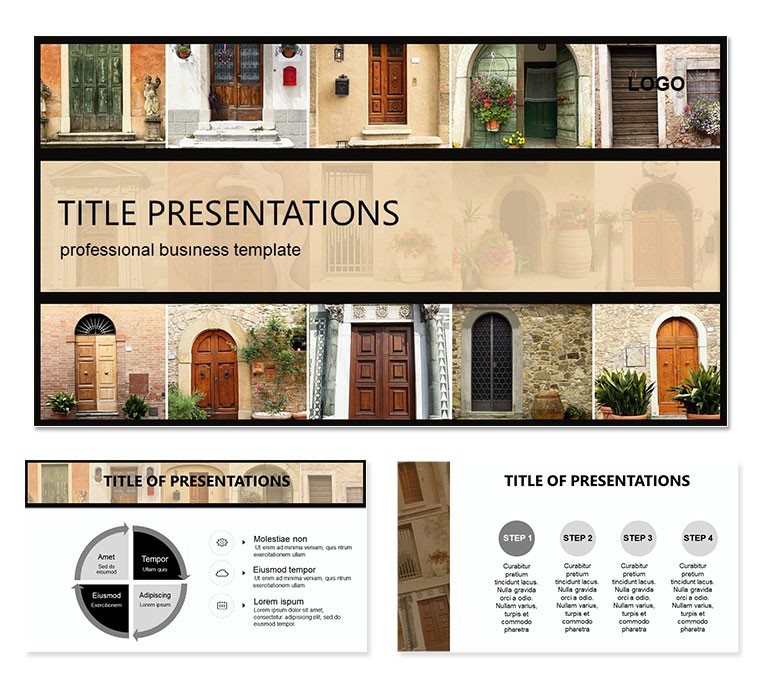
Architecture Entrance Doors PowerPoint Template: Fortify Your Design Discussions
| Format | .pptx |
| Slides | 3 unique layouts |
| Aspect ratio | 16:9 |
| Compatibility | PowerPoint |
| Animated | No |
| Language | English |
| License | Commercial |
| File size | — |
| Version | v1.0 |
| Last updated | October 2022 |
What's inside
Entrance doors aren`t just barriers - they`re the first line of style and security in any structure. Our Architecture Entrance Doors PowerPoint template captures this essence, offering 28 diagrams that blend aesthetic appeal with practical safety insights. Tailored for architects pitching renovations or homeowners evaluating upgrades, these slides make complex specs accessible, turning consultations into confident choices.
With three masters and backgrounds plus seven color schemes, the template adapts to urban lofts or suburban homes alike, fully editable in PowerPoint 2010+. For $22, you get a tool that safeguards your narrative as effectively as the doors it depicts - grab it today to reinforce your expertise in every slide.
Key Design Elements for Robust Presentations
The template`s architecture draws from real-world blueprints, featuring layered diagrams that dissect door components - from hinges to smart locks. Slide 4`s cross-section view, for instance, highlights material strengths, with editable labels for custom specs like steel reinforcements. The seven schemes range from earthy tones for traditional builds to metallics for contemporary facades, ensuring visual harmony.
In practice, use slide 10`s comparison matrix to weigh options side-by-side, inserting photos of door models to illustrate durability tests. This setup streamlines client walkthroughs, focusing on benefits like energy efficiency over jargon.
Adapting Visuals to Project Needs
- Scale Models: Resize vector illustrations to fit overview or detail zooms.
- Layer Controls: Toggle visibility for phased reveals, like unveiling security features.
- Text Overlays: Clean sans fonts for spec lists, keeping readability paramount.
These tweaks make the deck versatile for sales demos or educational seminars on building codes.
Targeted Scenarios: Pitches and Planning Sessions
For homeowners wary of urban vulnerabilities, the risk assessment slide (16) maps threat vectors with arrow annotations, editable to localize concerns like weather exposure. Architects appreciate the timeline for installation phases (slide 21), plotting from design to fit-out with drag-and-drop milestones.
Envision a renovation consult: Layer in client preferences via the modular gallery slide (8), curating door styles that align with interior themes, fostering decisions that feel personal yet informed.
Step-by-Step: Assembling a Door Spec Overview
- Define Criteria: List priorities - security, aesthetics, budget.
- Choose Framework: Base on slide 2`s spec table template.
- Fill Details: Input dimensions, materials; add hyperlinks to supplier sheets.
- Visualize: Apply scheme for contrast, e.g., red accents for alerts.
- Simulate: Test transitions to mimic walkthrough flow.
This process ensures presentations that build trust, one secure layer at a time.
Elevating Architecture Talks with Precision Tools
What sets this apart from stock slides is its focus on functionality - diagrams that echo CAD exports, ready for overlay with site plans. It complements software like AutoCAD by providing polished outputs for non-tech audiences, bridging technical gaps.
For pros in sustainable design, the eco-impact chart (24) quantifies insulation values, editable to spotlight green certifications, aligning with modern building standards.
Strengthen your portfolio - download the Architecture Entrance Doors template for $22 and design dialogues that endure.
Frequently Asked Questions
Does it cover smart door tech?
Yes, diagrams include sections for integrated locks and sensors.
Are images included or placeholders?
High-res placeholders; swap with your photos easily.
Compatibility with older PowerPoint?
Works from 2010, with full features in 2016+.
Can I print slides for handouts?
Absolutely - optimized layouts scale well to PDF exports.
How editable are the diagrams?
Fully - shapes, colors, and text adjust independently.
Good for
- Project roadmaps and sprint plans
- Product launch timelines
- Quarterly or annual review decks
- Company history and milestone summaries
Licence
reviews
Used the comparison matrix to show different door materials to a client who couldn't decide.
The cross-section views with editable labels were great for highlighting the steel reinforcements.
Slid in some photos of actual door models and the template held up pretty well.
A bit too focused on security features for my residential project but I made it work.
The risk assessment slide with the arrow annotations helped map out weather vulnerabilities for a coastal home.
FAQ
Will it work in Google Slides?
Are fonts embedded?
Can I use this for client work?
What's the refund policy?
Do you update the template after purchase?
Similar templates
See all PowerPoint Templates →

All 1 slides