 Click to zoom
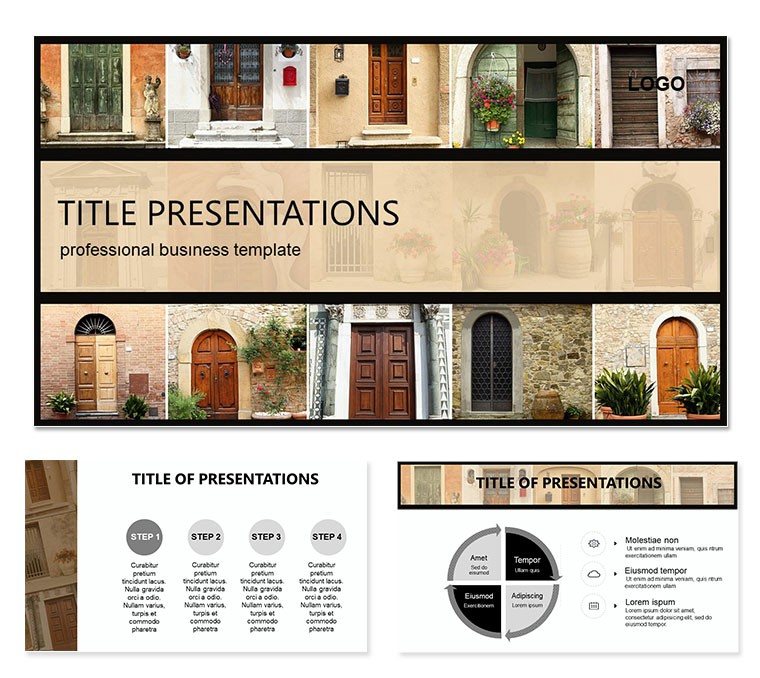
Entrance Doors Keynote Template
| Format | .pptx |
| Slides | 3 unique layouts |
| Aspect ratio | 16:9 |
| Compatibility | PowerPoint |
| Animated | No |
| Language | English |
| License | Commercial |
| File size | — |
| Version | v1.0 |
| Last updated | December 2018 |
What's inside
Every grand structure whispers its welcome through the door - a threshold where form meets function, security blends with style. The Entrance Doors Keynote Template captures this essence for architects, estate planners, and design firms presenting visions of welcoming facades. With 28 diagrams nestled in three masters and backgrounds, and seven color schemes drawing from wrought iron blacks to warm wood tones, it frames your concepts as inviting portals to innovation.
This template navigates the designer`s dilemma: articulating spatial drama without sketches overwhelming the pitch. Eschew rough drafts; these refined visuals - from elevation profiles to material swatches - embed your specs, elevating discussions. An architect unveiling a residential complex might layer pivot diagrams to rotate door perspectives, immersing clients in the entry experience. Or in estate bids, sectional views dissect hardware integrations, sealing deals with tangible allure.
Foundations of Design Excellence
Three masters form the frame: a panoramic for overviews, a detailed inset for specs, and a comparative split for options. Backgrounds evoke realms - a stone-veined texture for rustic, a glassy sheen for modern, a paneled wood for timeless.
- 28 Architectural Diagrams: Plan views of hinge mechanics, exploded assemblies for glazing - crisp lines for any projection.
- Seven Harmonic Schemes: Metallics for industrial, pastels for boutique - harmonizing with site palettes.
- Precise Adaptability: Scale architraves in isometric grids or hyperlink to CAD renders.
Aligned for Keynote 2016+, it dovetails with SketchUp links, streamlining from model to slide.
Framing Your Presentation: Layered Approach
- Establish the Entry: Initiate with the panoramic master to spotlight the facade focal.
- Embed Blueprints: Align floor plans in orthogonal charts; alignments snap to thresholds.
- Detail Dynamics: Annotate pivot points on swing diagrams, tracing arc sweeps.
- Tone the Threshold: Layer a bronze scheme, animating assemblies to unfold like invitations.
- Rehearse the Reveal: Full-screen tests gauge scale, mirroring client walkthroughs.
Designers affirm this method builds poise, reminiscent of a firm that door-ed a heritage project pitch to acclaim.
Thresholds to Application in Architecture
For urban renewals, radial diagrams orbit security features around communal entries, emphasizing flow. Boutique showcases benefit from layered transparencies, veiling privacy grades. Heritage restorations use timeline evolutions, chronicling stylistic shifts.
It unites trades too - coordinating with ironmongers via spec tables, visualized in shared stacks.
Portal-Specific Presentations
- Residential Reveals: Cross-sections slice jamb depths, assuring durability.
- Commercial Crossings: Flow maps route pedestrian paths, optimizing throughput.
- Estate Envisions: Mosaic tiles pattern material mixes, curating curb appeal.
Surpassing sketches, it renders relations - adjusted jambs recalibrate adjoining views.
Architect`s Angles for Alluring Advocacy
Invoke icons like Gaudi`s organic portals to ground grandeur, culling copy to cues like "hinge harmony." Interact with rotatable embeds, spinning views on demand.
Flexible scales and tonal shifts fit forums, from site sheds to salon critiques.
Unlock Architectural Allure
For shapers of sanctuaries, this Keynote Template is the key - unlatching presentations that usher in applause.
Turn for $22 and threshold triumph.
Frequently Asked Questions
Does it accommodate custom dimensions?
Yes; vectors resize freely, matching any door specs.
Are materials visualized realistically?
Textures simulate grains and sheens, editable for authenticity.
Can it link to 3D models?
Seamlessly; hotspots launch walkthroughs mid-slide.
How does it handle multi-view needs?
Multi-angle masters rotate perspectives effortlessly.
Is it suitable for collaborative edits?
Keynote`s sharing shines; co-edit in real-time.
Good for
- Project roadmaps and sprint plans
- Product launch timelines
- Quarterly or annual review decks
- Company history and milestone summaries
Licence
reviews
Used this for a quick sales update and the chart slides saved me some time. The arrows and layout were already enough so I barely changed anything.
Needed something fast for my university presentation and this worked okay. Some icons looked a bit old but overall fine.
I Mostly downloaded it for the graph pages. Data was easy to replace and the colors didn’t distract too much.
Pretty simple template but that’s honestly why I used it. Didn’t have to fight with weird animations.
The slide structure made sense for an office report. I just copied my numbers into the charts and sent it.
FAQ
Will it work in Google Slides?
Are fonts embedded?
Can I use this for client work?
What's the refund policy?
Do you update the template after purchase?
Similar templates
See all Keynote templates →


All 1 slides