 Click to zoom
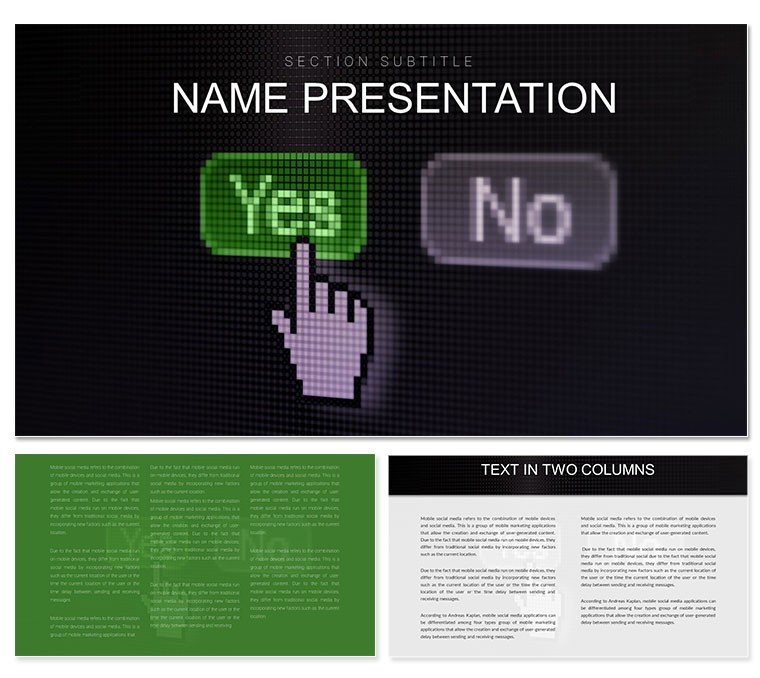
Yes No Choice Keynote Template for Decisions
| Format | .pptx |
| Slides | 3 unique layouts |
| Aspect ratio | 16:9 |
| Compatibility | PowerPoint |
| Animated | No |
| Language | English |
| License | Commercial |
| File size | — |
| Version | v1.0 |
| Last updated | January 2024 |
What's inside
Picture a team huddle where binary options - yes to expansion, no to risks - branch into vivid paths that clarify stakes and spark consensus. This Yes No Choice Keynote template turns that vision real, equipping decision-makers with 28 diagrams that gamify choices without games. With three masters and backgrounds, it's primed for brainstorming blasts or strategy sessions, making pros and pupils ponder paths interactively.
For Keynote 11+, toggles and forks are editable gold - flip yes/no labels or branch colors in seven schemes to reflect urgencies. Aimed at entrepreneurs weighing pivots or teachers polling ethics, it crafts slides where selections feel consequential, not checkbox chores.
Features That Tip the Scales in Your Favor
Launch with a balanced scale title slide, yes/no arms teetering invitingly. Pages progress to decision trees forking outcomes or sliders weighing pros/cons.
- Interactive Branches: Reshape flowcharts for scenario planning, linking yes to upsides with curved paths.
- Palette Balance: Seven schemes, neutral grays for impartiality to greens/reds for go/no-go vibes.
- Master Choices: Three for dilemma, poll, and resolution slides, ensuring logical progressions.
Page 14's pivot point diagram excels: Rotate axes for trade-off visuals, labeling with metrics like ROI for finance forks.
Navigating Choices Effortlessly
Open .key, grab a master; slot options into toggles. For a pitch, use page 9's poll bar - tally audience inputs live, bars updating in real time. Animate splits to diverge dramatically, echoing debate dynamics.
- Align scheme to decision tone.
- Insert icons for yes rewards, no cautions.
- Format text for crisp queries.
- Test hyperlinks for branch jumps.
This method accelerates ideation, honing in on how yes unlocks innovations, vital for agile workshops.
Decision Points in Action: Meetings to Mentorship
Visualize a startup founder deploying slide 6's yes/no matrix for feature votes - the grid sparks rapid buy-in, prioritizing roadmaps. In classrooms, facilitators tweak page 21's dilemma wheel for moral mazes, spinning sectors to explore ramifications collaboratively.
For HR evals, the balance graphic on page 27 weighs candidate fits, icons tipping toward hires. Beyond plain toggles, these vectors - like arrow divergences - add narrative pull, evading bland binaries.
Choice-Charging Strategies
Embed clickable paths for nonlinear nav, or shade branches by confidence levels. For multicultural groups, dual-language yes/no. Start with: "One choice reshapes futures - which is yours?" to galvanize.
Feed from survey tools for auto-populated polls, keeping corporate votes current. Yield? Sessions that don't deadlock but propel, from ventures launched to lessons learned.
The Decisive Difference This Brings
Motifs like forked roads edge frames, symbolizing crossroads subtly. Vectors adapt flawlessly, from mobile swipes to wall displays. Cloud-sync for group votes in real time.
Decision pros appreciate how it clarifies chaos, like a compass in crossroads. Snag this Yes No Choice Keynote template and steer toward yes.
Frequently Asked Questions
Supports live polling?
Yes, integrates with Keynote's hyperlinks for interactive yes/no.
Editable branch paths?
Fully, with bezier curves for custom decision flows.
For non-business uses?
Yes, great for therapy or game design choices.
Animation for reveals?
Built-in, unveiling branches sequentially.
Export for web?
To interactive PDF or HTML5 for online decisions.
Good for
- Project roadmaps and sprint plans
- Product launch timelines
- Quarterly or annual review decks
- Company history and milestone summaries
Licence
reviews
Used successfully for a startup investor meeting. Layouts guided the narrative well.
Visual elements have good balance and the overall theme feels contemporary.
One or two sections needed more flexibility than provided but core slides are excellent.
Saved hours compared to previous efforts.
Investors responded positively to the deck.
FAQ
Will it work in Google Slides?
Are fonts embedded?
Can I use this for client work?
What's the refund policy?
Do you update the template after purchase?
Similar templates
See all Keynote templates →

All 1 slides