 Click to zoom
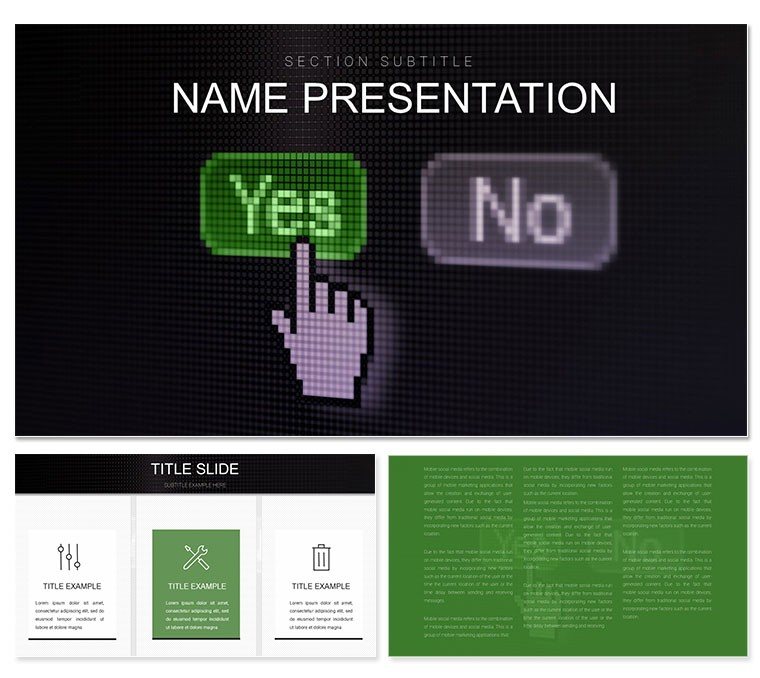
Decision Making PowerPoint Template: Chart Your Path to Choices
| Format | .pptx |
| Slides | 3 unique layouts |
| Aspect ratio | 16:9 |
| Compatibility | PowerPoint |
| Animated | No |
| Language | English |
| License | Commercial |
| File size | — |
| Version | v1.0 |
| Last updated | January 2025 |
What's inside
Picture a crossroads where options branch clearly, risks illuminate, and outcomes align like stars in a strategic constellation - that's the essence of the Decision Making PowerPoint template. Designed for executives, project leads, consultants, and educators navigating uncertainties, this template distills complexity into actionable visuals. With 28 diagrams encompassing decision trees, pros-cons matrices, and SWOT analyses, it equips you to facilitate workshops or sway boards with unerring logic. Optimized for PowerPoint 2016+, the three masters offer flexibility: minimalist for quick huddles, detailed for deep dives, and collaborative for team inputs. Tweak branches, weight factors, and animate escalations to reveal how choices cascade, making abstract deliberations tangible and team-aligned.
At heart, it's about empowerment through clarity. A core slide deploys a radial decision wheel, segments editable for stakeholder votes, turning groupthink into consensus. For risk assessments, the funnel diagrams narrow probabilities, layering mitigations to spotlight viable routes. These aren't off-the-shelf fillers; they're frameworks that echo methodologies from pros like those in McKinsey's strategy toolkits, adapted for everyday use.
Feature Spotlight: Instruments for Informed Choices
Delve into the suite: 28 diagrams span linear flows for sequential decisions to multi-axis radars for balanced evaluations, backed by seven color schemes - vibrant for brainstorming, subdued for reports. Backgrounds range from grid-patterned for plotting to flowchart-friendly whites, with masters enforcing brand fonts. Customization shines: expand a tree node with a click, or link cells in matrices to auto-update totals from linked sheets.
- Branching Trees: Hierarchical maps for scenario planning, with collapsible limbs for focus shifts.
- Risk Matrices: Quadrant grids plotting impacts versus likelihoods, color-coded for instant scans.
- Workflow Icons: Gears and arrows that snap into sequences, enhancing narrative drive.
This level of intuitiveness rivals dedicated software, but stays within PowerPoint's ecosystem for seamless sharing.
In Action: Scenarios Where Decisions Deliver
Consider a product manager at a tech firm: facing feature prioritizations, she employs the template's MoSCoW matrix, customizing quadrants to rank must-haves, sparking a sprint plan that unites devs and sales. In education, a workshop leader uses priority pyramids to teach ethical dilemmas, stacking layers for debate, fostering critical thinking without overwhelming slides.
For mergers, the comparative tables weigh synergies, with editable rows for financials - persuading C-suites through visual equity. It's this adaptability that turns potential paralysis into propelled progress.
Navigating Customization: Your Decision Roadmap
- Establish Foundation: Import the .potx, selecting the strategy master for embedded KPIs.
- Branch Out Options: Populate tree slides with alternatives, using formulas for branch probabilities.
- Balance Schemes: Choose a neutral palette, tweaking for accessibility in diverse audiences.
- Dynamic Links: Hyperlink outcomes to appendix details for drill-down explorations.
- Deploy Decisions: Animate reveals for guided walkthroughs, then save for cloud collab.
Far from PowerPoint's rigid tables, these fluid tools preserve logic across iterations, amplifying your influence.
The Decisive Difference: Choices That Click
Subtleties like auto-balancing scales or icon libraries from decision sciences add depth. For novices, guided placeholders ease entry; experts extend with macros for simulations. It's indispensable for turning "maybe" into "move forward."
Secure the Decision Making PowerPoint template for $22 and steer your strategies - clarity awaits your command.
Frequently Asked Questions
What types of decision tools are included?
From trees and matrices to radars and flows, covering strategic, risk, and ethical frameworks.
Is it suitable for team collaborations?
Yes, with shareable PPTX files and editable elements for real-time inputs.
How do I integrate external data?
Easily - paste from Excel into charts, with auto-refresh for live updates.
Can colors be adapted for branding?
Absolutely, seven schemes plus manual edits to align with your visual identity.
What's the minimum PowerPoint version?
2016+, ensuring full support for animations and vector edits.
Good for
- Project roadmaps and sprint plans
- Product launch timelines
- Quarterly or annual review decks
- Company history and milestone summaries
Licence
reviews
Used the hospitality charts for a hotel performance deck.
The occupancy rate trend is easy to read.
That RevPAR comparison chart is exactly what I needed.
Simple and works, no issues.
The guest satisfaction scores breakdown is helpful.
FAQ
Will it work in Google Slides?
Are fonts embedded?
Can I use this for client work?
What's the refund policy?
Do you update the template after purchase?
Similar templates
See all PowerPoint Templates →

All 1 slides