 Click to zoom
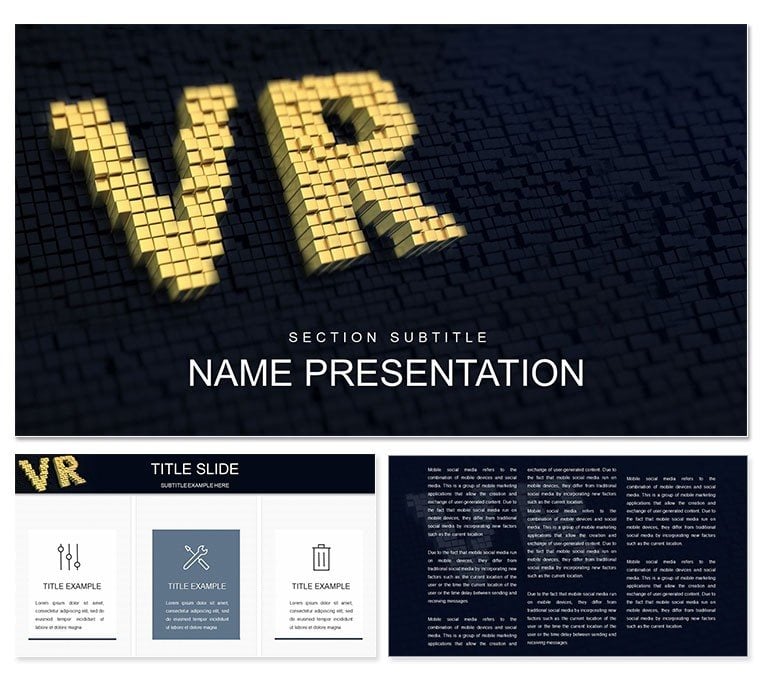
VR Technology PowerPoint Template
| Format | .pptx |
| Slides | 3 unique layouts |
| Aspect ratio | 16:9 |
| Compatibility | PowerPoint |
| Animated | No |
| Language | English |
| License | Commercial |
| File size | — |
| Version | v1.0 |
| Last updated | October 2021 |
What's inside
Step into the future where explaining virtual reality isn't a tech jargon overload but a visual journey that hooks your audience from the first slide. The VR Technology PowerPoint Template is crafted for those pioneering the next wave of digital experiences - developers, educators, and marketers who want to demystify VR without sacrificing style. With 28 dynamic diagrams spread across three master layouts and backgrounds, plus seven color schemes that evoke digital glows and matrix greens, this tool turns abstract concepts like immersive simulations into tangible takeaways.
At the heart of innovation lies clarity, and this template delivers it through slides that blend futuristic aesthetics with practical functionality. Envision a central hub slide aggregating VR ecosystem layers - from hardware headsets to software ecosystems - connected by sleek node diagrams that pulse with potential. Or the process flowcharts that sequence user interactions, from onboarding to deep immersion, each step illustrated with holographic icons that fade in sequentially, mirroring the very tech you're describing.
Harnessing Futuristic Visuals for Tech Narratives
This template's strength is in its forward-thinking design, where every element screams innovation. The timeline slides chart VR's evolution, from early prototypes to current metaverse blueprints, with milestones marked by evolving gear icons that scale in complexity. It's reminiscent of how tech conferences like CES showcase prototypes - clean, compelling, and conversation-starting.
Customization is effortless, with vector graphics that let you tweak node sizes or arc curvatures to fit your data narrative. Integrate multimedia by embedding video clips of VR demos directly into slides, syncing playback with transitions for a seamless demo flow. This isn't just presentation software; it's a canvas for your vision.
Essential Diagram Types for VR Exploration
- Network Maps for Ecosystem Overviews: Interconnected nodes representing hardware, software, and user interfaces, with customizable links that thicken based on integration strength.
- Cycle Diagrams for User Journeys: Circular paths detailing feedback loops in VR training, annotated with user personas like gamers or surgeons.
- Infographic Panels for Stats Display: Modular blocks stacking key metrics, such as adoption rates or latency benchmarks, with gradient backgrounds mimicking VR depth.
These tools ensure your deck scales from quick pitches to in-depth workshops, maintaining pixel-perfect rendering on any display.
Practical Scenarios in Virtual Reality Presentations
Picture a startup pitching to investors: the founder uses the comparison matrix to pit VR against AR, side-by-side panels highlighting immersion depths and use cases, from virtual tours to surgical simulations. The audience leans in as animations peel back layers, revealing cost-benefit analyses tailored to their queries.
Educators in computer science courses repurpose the mind map slides to branch out VR applications - education, healthcare, entertainment - with sub-nodes linking to case examples. Students then adapt the template for group projects, fostering creativity through editable branches that grow with their research.
For marketing teams, the product showcase slides become launchpads, featuring carousel diagrams that rotate through feature spotlights, embedding 360-degree previews for that wow factor in client meetings.
Your Roadmap to VR Deck Mastery
- Launch and Theme: Import the .potx into PowerPoint 2019+, select a color scheme that matches your brand's digital vibe.
- Populate Content: Drag data into placeholders; use shape tools to extend diagrams for custom VR scenarios.
- Add Interactivity: Layer hyperlinks between slides for non-linear navigation, like jumping from theory to demo.
- Finalize Output: Export to video for social shares or interactive PDF for handouts, preserving all embeds.
This workflow empowers you to iterate rapidly, turning concepts into polished prototypes in a fraction of the usual time.
Elevating Beyond Standard Slides
Where basic PowerPoint falters in tech talks - with clunky inserts and mismatched fonts - this template excels with pre-tuned typography and animation-ready elements. The icon set, inspired by circuit boards and neural networks, adds authenticity without overwhelming the layout.
Cross-platform harmony shines through Google Slides support, allowing global teams to co-edit VR strategy decks in sync. Accessibility features, like descriptive alt text for diagrams, ensure your message reaches every viewer, aligning with inclusive tech principles.
Secure this VR Technology PowerPoint Template today and architect presentations that don't just inform - they immerse. Transform your tech tales into triumphs.
Frequently Asked Questions
Are the VR-themed icons fully customizable?
Yes, all icons are scalable vectors; recolor them to fit your palette or swap with your own uploads via the replace shapes function.
Does this template support multimedia embeds?
It does - insert videos, audio, or hyperlinks directly into slides, with presets for smooth playback during presentations.
Is it suitable for educational VR content?
Perfectly; the modular diagrams adapt to lesson plans, from basic concepts to advanced simulations.
How many color schemes are included?
Seven schemes, ranging from neon accents to subtle metallics, all adjustable via master slides.
Can I use it with Google Slides?
Yes, full compatibility ensures real-time collaboration without losing diagram integrity.
What file formats are available?
Download in .jpg for previews, .potx for templates, and .pptx for editable files.
Good for
- Project roadmaps and sprint plans
- Product launch timelines
- Quarterly or annual review decks
- Company history and milestone summaries
Licence
reviews
Used the procurement management plan for a large purchase.
The make-or-buy analysis was helpful.
We saved money by following this.
The supplier selection criteria were clear.
FAQ
Will it work in Google Slides?
Are fonts embedded?
Can I use this for client work?
What's the refund policy?
Do you update the template after purchase?
Similar templates
See all PowerPoint Templates →

All 1 slides