 Click to zoom
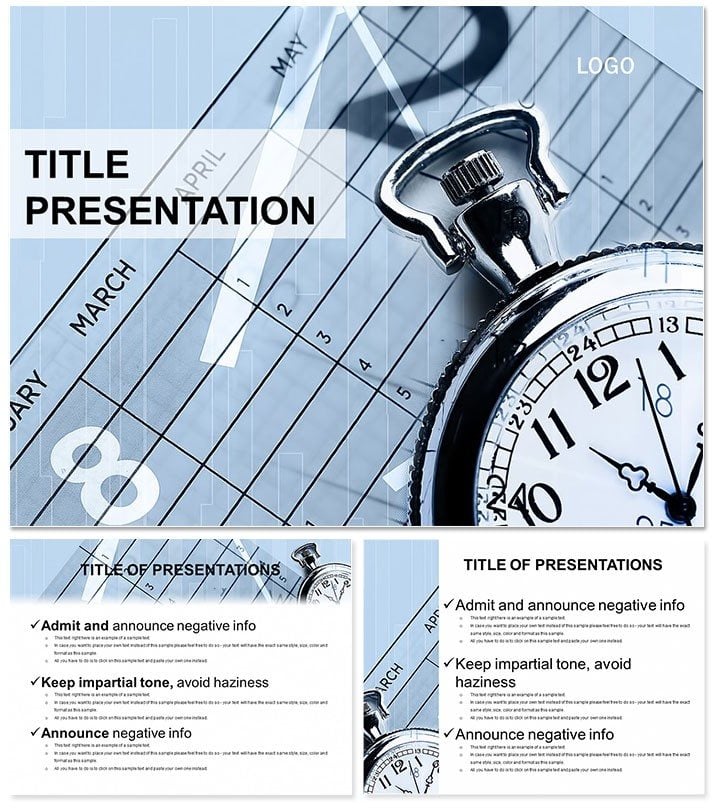
Time Concept and Types PowerPoint Template
| Format | .pptx |
| Slides | 3 unique layouts |
| Aspect ratio | 16:9 |
| Compatibility | PowerPoint |
| Animated | No |
| Language | English |
| License | Commercial |
| File size | — |
| Version | v1.0 |
| Last updated | October 2022 |
What's inside
Time slips through fingers like sand, but with the right visuals, you can grasp it, shape it, and share its lessons. This Time Concept and Types PowerPoint Template empowers that control, offering 28 diagrams with custom animations to dissect clocks, calendars, and cycles for business minds and life coaches alike. Featuring three masters, backgrounds, and seven color schemes, it`s tuned for PowerPoint 2016 on Mac/PC and even OpenOffice. Turn abstract notions into concrete strategies that resonate.
Understanding time types - linear deadlines, cyclical routines - unlocks productivity. This template`s vector icons for hourglasses and gears, plus editable inserts for media, make concepts vivid. Animate flows to mimic urgency, helping audiences internalize "time as resource" without overwhelm.
Robust Tools for Temporal Mastery
Animations breathe life into static ideas. Backgrounds suggest progression - fading horizons, ticking grids - while diagrams include spirals for recurring tasks, arrows for sequences. With 24 sample themes and seven editable slides, customization is boundless; JPG/.potx files support broad workflows.
- Animation Suite: Fades for phases, spins for cycles, tailored to time narratives.
- Icon Arsenal: Vectors for clocks, calendars to punctuate points.
- Edit Freedom: Alter hues, texts, photos with universal ease.
A project manager animated the cycle diagram for agile sprints, clarifying iterations vividly. This reflects methodologies from "Getting Things Done," visualized.
Structuring Time-Focused Slides
- Access the Base: Open .potx, align master with session goals.
- Chronicle Events: Feed timelines with dates, auto-adjusting scales.
- Infuse Motion: Sequence animations to unfold chronologically.
- Embed Extras: Add audio timers or video breakdowns.
- Sync Systems: Verify across compatibles like Mac 2016.
This blueprint, from productivity frameworks, streamlines creation.
Applications Across Time Domains
Consultants chart client milestones; teams map workflows with arrow paths. In personal development, spirals track habit loops, fostering accountability. Versatility extends to education, where types slides differentiate subjective vs. objective time.
Visualize a coach using priority matrices to balance workloads, easing overload. Emphasize relief: reclaim hours through clear depictions.
Fine-Tuning Temporal Visuals
Sync animations to speech rhythms for immersion. Echo timeless advice: make time your ally. Command your calendar: get this for $22 and time-travel your talks.
Frequently Asked Questions
What animation options exist?
Custom effects like rotations and paths for dynamic time flows.
Compatibility details?
PowerPoint 2007+ PC, 2016 Mac, OpenOffice.
Editable slide count?
Seven core editables plus 24 themed samples.
Vector icons included?
Yes, for time symbols to enrich diagrams.
Media insertion possible?
Fully - videos and audio integrate smoothly.
Color variations?
Seven schemes for mood-matching.
Good for
- Project roadmaps and sprint plans
- Product launch timelines
- Quarterly or annual review decks
- Company history and milestone summaries
Licence
reviews
It is okay, but I felt the distinction between 'linear deadlines' and 'cyclical routines' could have been clearer in the icons, though the editable text made it work.
Managed a project where deadlines were slipping, the time spiral diagrams and arrow sequences helped me visually show the team where we were losing hours.
The custom animations are nice but a bit glitchy on older versions of PowerPoint for Mac, but the vector icons for hourglasses and gears are very useful.
The cycle diagram for agile sprints was a lifesaver during our retrospective, it clarified the iteration timing perfectly for the stakeholders.
Very straightforward template, the 7 color schemes and 24 sample themes gave me enough variety to map out my daily productivity routine without overthinking the design.
FAQ
Will it work in Google Slides?
Are fonts embedded?
Can I use this for client work?
What's the refund policy?
Do you update the template after purchase?
Similar templates
See all PowerPoint Templates →


All 1 slides