 Click to zoom
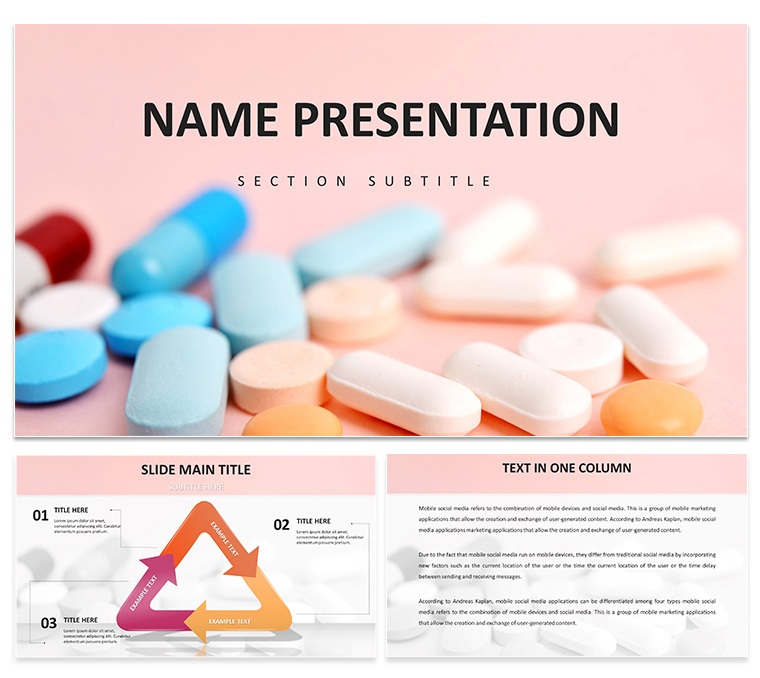
Modern Medicine Minimalist Keynote Template
| Format | .pptx |
| Slides | 3 unique layouts |
| Aspect ratio | 16:9 |
| Compatibility | PowerPoint |
| Animated | No |
| Language | English |
| License | Commercial |
| File size | — |
| Version | v1.0 |
| Last updated | September 2024 |
What's inside
Imagine stepping into a conference room where your slides don't just inform - they soothe and captivate. That's the power of the Modern Medicine Minimalist Keynote Template, crafted for healthcare leaders who need to convey complex ideas with quiet confidence. Whether you're a physician outlining treatment protocols, a researcher unveiling trial data, or a pharma executive pitching innovative therapies, this template turns dense information into digestible visuals that resonate. With 28 meticulously designed diagrams, three versatile masters, and three subtle backgrounds, it offers a clean canvas to highlight your expertise without overwhelming your audience.
At its core, this template embraces a minimalist ethos: think soft blues and grays evoking trust and serenity, paired with high-resolution medical icons like stylized stethoscopes and molecular structures. It's not about flashy effects; it's about precision. Replace placeholders with your data in minutes, tweak colors to match your hospital's branding, and watch as timelines of patient outcomes or flowcharts of drug interactions come alive. Designed for Keynote users on Mac, it's compatible across versions, ensuring seamless edits from concept to stage.
Unlock the Core Features That Set This Template Apart
Dive deeper into what makes this template a go-to for medical storytelling. Each element is user-tested for clarity, drawing from real-world decks like those used in AIA health summits where simplicity amplified key messages.
- 28 Editable Diagrams: From pie charts breaking down epidemiology stats to process flows mapping surgical steps, every slide is vector-based for crisp scaling. Swap in your photos of lab equipment or adjust node colors to differentiate risk levels.
- Three Masters for Effortless Consistency: Choose from title layouts that frame your talk's theme - perhaps a subtle heartbeat line under your name - or content masters with ample white space for bullet-pointed findings.
- Calming Color Schemes: Seven options let you select palettes that align with wellness vibes, like muted teal for mental health talks or warm neutrals for community outreach.
- Integrated Medical Icons: Over 50 resizable assets, including syringes for vaccination drives or DNA helices for genomics overviews, all in a flat, modern style that avoids dated clipart pitfalls.
- Responsive Layouts: Built-in animations for subtle reveals, like fading in study results, keep viewers engaged without distracting from your narrative.
These aren't just tools; they're shortcuts to professionalism. A clinic director once swapped this template's agenda slide for her quarterly review, transforming a routine update into a compelling case for expanded services - proving how minimalism spotlights substance.
Tailored Use Cases: Where This Template Shines in Healthcare
Healthcare demands clarity amid chaos, and this template delivers exactly that. Let's explore how it fits into your workflow, with step-by-step guidance to get you started.
Presenting Research Findings at Conferences
Picture this: You're at a medical symposium, armed with breakthrough data on immunotherapy. Start with the template's overview slide - a clean grid layout - to outline your hypothesis. Then, use the timeline diagram (Slide 12) to chart trial phases: insert milestones like recruitment dates and efficacy peaks, linking them with curved arrows for visual flow. Follow with a comparison chart (Slide 18) pitting your results against benchmarks; drag-and-drop your Excel data for instant updates. End on a call-to-action slide prompting Q&A, embedding hyperlinks to your full paper. The result? Attendees leave inspired, not buried in jargon.
Educating Teams on New Protocols
For internal training, leverage the infographic masters. Build a step-by-step process for hygiene protocols using the flowchart diagram (Slide 5): number each node from handwashing to PPE removal, adding icons for quick recognition. Customize the bullet hierarchy slide (Slide 22) to nest sub-steps under main actions, ensuring nurses grasp nuances at a glance. Animate transitions to reveal one layer at a time, mimicking the protocol's sequence. This approach, reminiscent of how Mayo Clinic structures e-learning modules, fosters retention without rote memorization.
Pitching to Investors or Stakeholders
In boardrooms, brevity wins. Open with the hero image slide, overlaying your logo on a blurred MRI scan background. Transition to SWOT analysis via the quadrant diagram (Slide 9), color-coding strengths in green and threats in red for immediate impact. For financial projections, the bar graph set (Slide 25) scales effortlessly - input ROI figures and let Keynote's smart guides align everything. Close with a testimonial quote slide, pulling in patient stories to humanize the numbers. It's the kind of deck that secured funding for a telehealth startup by blending data with empathy.
Beyond these, adapt it for patient education handouts - export slides as PDFs - or marketing collateral like webinar invites. The flexibility means one template serves multiple roles, saving hours on redesigns.
Practical Tips to Maximize Your Presentation Impact
To elevate from good to unforgettable, integrate these Keynote-specific tweaks:
- Layer Smartly: Use the template's grouped objects; ungroup only what's needed, then regroup to maintain editability. For instance, in the cycle diagram (Slide 15), isolate the drug approval loop to recolor phases independently.
- Enhance with Media: Embed short video clips of procedures directly into media-ready slides (like Slide 3), timing fades to sync with your voiceover for hybrid events.
- Test for Accessibility: Adjust font sizes to 24pt minimum on text-heavy slides and ensure high contrast - vital for diverse audiences, including those with visual impairments.
- Brand Seamlessly: Swap the default fonts (e.g., Helvetica Neue) for your institution's sans-serif choice via the master view, applying globally in one go.
These steps ensure your deck not only looks sharp but performs under pressure, much like a well-rehearsed consult.
Why Choose This Over Basic Keynote Builds?
Stock Keynote themes often feel generic, lacking the sector-specific nuance that builds instant credibility. This template bridges that gap with purpose-built elements - like anatomical icons absent in defaults - while offering seven diagram color variants for A/B testing visuals. It's lighter on your Mac's resources too, rendering smoother during live edits. Ultimately, it's about reclaiming time: instead of wrestling with alignments, focus on refining your message.
Ready to infuse your next talk with understated elegance? Download the Modern Medicine Minimalist Keynote Template for $22 and start crafting slides that diagnose success.
Frequently Asked Questions
Is this template fully editable in Keynote?
Yes, all elements including diagrams, text, and icons are fully customizable. Use Keynote's built-in tools to adjust colors, fonts, and layouts without losing quality.
What file formats are included?
You'll receive .key for direct Keynote import, .kth for theme application, and .jpg previews for quick reference.
Does it work with older Keynote versions?
It's optimized for Keynote 2016 and later, ensuring broad compatibility across macOS setups.
Can I use it for non-medical presentations?
Absolutely - its minimalist design adapts well to any professional context, though the medical icons suit healthcare best.
How many color schemes are available?
Seven schemes for diagrams, plus the three background options, giving ample variety for branding.
Is there customer support for customization?
Basic queries are covered in the included guide; for advanced help, reach out via the site's contact form.
Good for
- Project roadmaps and sprint plans
- Product launch timelines
- Quarterly or annual review decks
- Company history and milestone summaries
Licence
reviews
Used the modern medicine minimalist template for a treatment protocol presentation
the 28 meticulously designed diagrams with process flows mapping surgical steps and pie charts breaking down epidemiology stats were perfect. The calming color schemes with soft blues and grays evoking trust and serenity kept patient data readable without overwhelming. I just swapped in photos of lab equipment and adjusted node colors to differentiate risk levels. "The $22 template includes 28 meticulously designed diagrams
and 3 subtle backgrounds. Works for physicians outlining treatment protocols and researchers unveiling trial data. The integrated medical icons include over 50 resizable assets from syringes to DNA helices in flat modern style. Good for conference presentations and internal training."
The diagram set includes pie charts breaking down epidemiology stats and process flows mapping surgical steps with responsive layouts for subtle reveals. I used the integrated medical icons including over 50 resizable assets from syringes to DNA helices. The 7 color schemes let me switch from muted teal for mental health talks to warm neutrals for community outreach. Good for pharma executives pitching innovative therapies and educators.
Prepared a research findings presentation for a medical symposium and the 28 diagrams with process flows saved me time. I just used comparison chart pitting results against benchmarks with drag-and-drop Excel data for instant updates. The 7 color schemes with soft blues and grays kept patient data professional. Works for clinic directors presenting quarterly reviews and researchers.
The 3 masters provide foundation for title layouts framing talk themes and content masters with ample white space. I always change colors via slide master for consistent branding. A solid template for healthcare leaders who need to convey complex ideas with quiet confidence and minimalist ethos.
FAQ
Will it work in Google Slides?
Are fonts embedded?
Can I use this for client work?
What's the refund policy?
Do you update the template after purchase?
Similar templates
See all Keynote templates →
All 1 slides