 Click to zoom
Free SEO Marketing Keynote Template: Elevate Your Digital Strategies
| Format | .pptx |
| Slides | 3 unique layouts |
| Aspect ratio | 16:9 |
| Compatibility | PowerPoint |
| Animated | No |
| Language | English |
| License | Commercial |
| File size | — |
| Version | v1.0 |
| Last updated | February 2026 |
What's inside
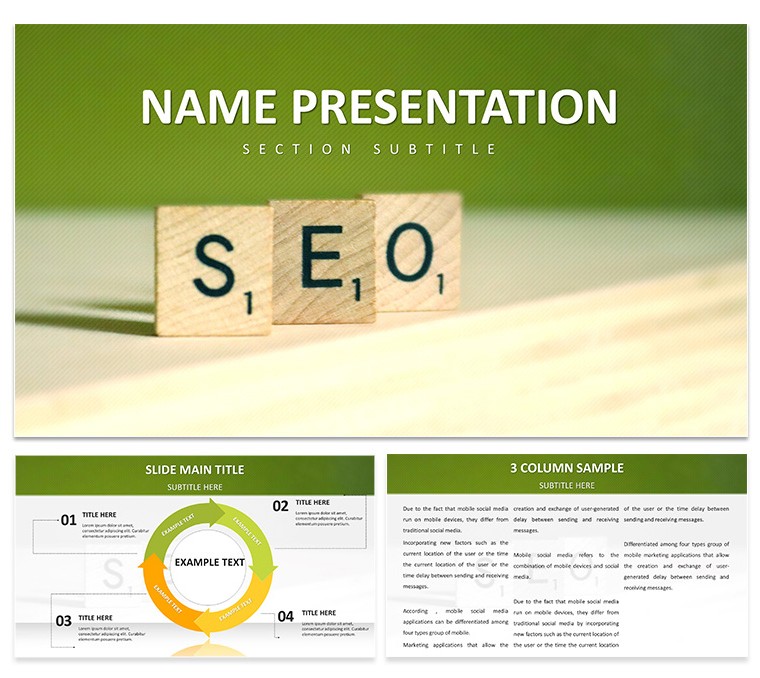
Imagine walking into a boardroom or client meeting where your SEO insights don't just inform - they inspire action. That's the power of a well-crafted presentation, and this free SEO marketing Keynote template is designed to make it happen without the hassle of starting from scratch. Tailored for digital marketers, agency pros, and growth hackers who need to showcase keyword strategies, traffic surges, and conversion funnels with clarity and flair, this template packs 28 versatile diagrams across seven color schemes. Whether you're pitching a new campaign to stakeholders or breaking down quarterly results for your team, these slides turn complex data into digestible stories that stick.
With three master layouts and three background options, you can align everything to your brand's vibe in minutes. Swap in your logos, tweak the hues to match your palette, and watch as editable charts breathe life into metrics like organic rankings or backlink growth. It's not just about looking sharp - it's about making your audience lean in, nod along, and leave ready to implement your recommendations. And since it's free, there's zero barrier to experimenting with professional-grade visuals that rival those from top-tier agencies.
Unlocking the Core Features of This SEO Keynote Template
Dive deeper, and you'll find this template isn't a one-trick pony. Each of the 28 diagrams serves a specific purpose in the SEO narrative, from funnel visualizations that map user journeys to pyramid charts breaking down content pillars. The seven color schemes - ranging from cool blues for trust-building analytics to energetic greens for growth projections - let you adapt on the fly. High-res icons for search engines, mobile devices, and analytics tools are baked in, ready to drag and drop wherever they fit.
- Dynamic Infographics: Animate traffic increases or ROI trajectories to show real momentum, keeping viewers hooked without overwhelming them.
- Data-Driven Charts: Bar graphs for competitor comparisons, line charts for trend tracking - all fully editable to plug in your latest Google Analytics export.
- Flexible Layouts: Title slides with bold headers, agenda overviews, and closing calls-to-action that reinforce your key takeaways.
Customization is where it shines brightest. Open in Keynote, select a diagram, and adjust shapes, fonts, or even swap photos for custom screenshots of your dashboard. Compatible with Keynote on macOS, it's seamless for Apple users who value that polished, native feel. Think of it as your shortcut to presentations that feel bespoke, without the hours of design tinkering.
Streamlining Your Workflow with Built-In Tools
Start with the intro slide: a sleek header overlay on a subtle gradient background, perfect for your agency name or campaign title. Follow with an agenda slide using a numbered list that auto-updates as you add sections. For the meaty parts, drop in a process flow diagram to illustrate your SEO audit steps - from site crawl to on-page tweaks. Need to highlight wins? A before-and-after comparison slide with side-by-side metrics does the trick, editable down to the decimal points.
Pro tip: Layer in subtle animations, like a fade-in for each bar in your growth chart, to reveal data progressively. This builds suspense and ensures your points land one at a time. For educators leading workshops, the template's modular design lets you remix slides for bite-sized modules on topics like link-building or voice search optimization.
Real-World Applications: Where This Template Delivers Impact
In the fast-paced world of digital marketing, time is your scarcest resource. This template steps in as a force multiplier, letting you focus on strategy rather than slide formatting. Picture a freelance SEO consultant prepping for a client pitch: Use the radial diagram to map out a holistic strategy, centering on core keywords while branching to long-tail opportunities. Clients see the big picture instantly, leading to quicker buy-ins.
For corporate teams, it's a game-changer during quarterly reviews. Swap the default icons for your branded assets, then populate the KPI dashboard slide with live data pulls if you're tech-savvy. A sales director might adapt it for content marketing overviews, using timeline diagrams to chart publication schedules against engagement spikes. Even in educational settings, like a university lecture on digital trends, the clean layouts keep students engaged without distracting from the lecture flow.
Step-by-Step: Crafting Your First SEO Pitch Deck
- Gather Your Data: Pull key metrics from tools like SEMrush or Ahrefs - focus on three to five visuals that tell your story.
- Select Your Scheme: Choose a color set that echoes your client's branding; the template's presets make this a quick preview.
- Build the Narrative: Start with problem slides (e.g., current ranking gaps via pie charts), move to solutions (flowcharts for implementation), and end with projections (growth curves).
- Refine and Animate: Test transitions on a secondary display to ensure they enhance, not overshadow, your delivery.
- Present with Confidence: Rehearse once - the intuitive design means you'll spend more time connecting with your audience than fumbling tech.
Users rave about how it bridges the gap between raw data and persuasive storytelling. One agency lead shared how swapping in real-time screenshots turned a standard report into a conversation starter, sparking follow-up questions that closed the deal.
Why This Free Template Stands Out in a Crowded Field
Compared to vanilla Keynote slides or clunky free alternatives, this one delivers pro-level polish without the price tag. No more mismatched fonts or pixelated icons - everything scales crisply for projectors or Zoom shares. It's versatile enough for solo freelancers brainstorming solo or teams collaborating via shared links, with version history keeping things organized.
Plus, the thematic cohesion keeps your message on-brand: Subtle web motifs in the backgrounds nod to the digital realm without overwhelming the content. Whether you're demoing A/B test results with stacked bars or outlining a seasonal campaign with cyclical diagrams, the tools adapt to your needs. Download this free SEO marketing Keynote template today and turn your next presentation into a catalyst for growth.
Frequently Asked Questions
What makes this template ideal for SEO presentations?
Its 28 specialized diagrams, like funnel and pyramid charts, are tailored for common SEO visuals, with full editability for your data.
Is it compatible with older versions of Keynote?
Yes, it works seamlessly with Keynote 2016 and later on macOS, ensuring broad accessibility.
Can I use it for non-marketing topics?
Absolutely - the modular designs adapt well to any data-heavy talk, like sales analytics or project timelines.
How do I change the color schemes?
Select a diagram, go to the color palette in the toolbar, and apply one of the seven built-in schemes or create your own.
Does it include animations?
Basic transitions are pre-set, but you can add custom ones via Keynote's animate tab for extra polish.
Is the template truly free?
Yes, download it at no cost and start customizing immediately - no hidden fees.
Good for
- Project roadmaps and sprint plans
- Product launch timelines
- Quarterly or annual review decks
- Company history and milestone summaries
Licence
reviews
This template supported my supplier negotiation preparation. Data comparisons were clear.
Balanced layouts with effective table and chart integration. Professional color palette.
It met my needs with the small con of fewer comparison slide variants. Adaptable anyway.
The negotiation session benefited from visual support.
FAQ
Will it work in Google Slides?
Are fonts embedded?
Can I use this for client work?
What's the refund policy?
Do you update the template after purchase?
Similar templates
See all Keynote templates →



All 1 slides