 Click to zoom
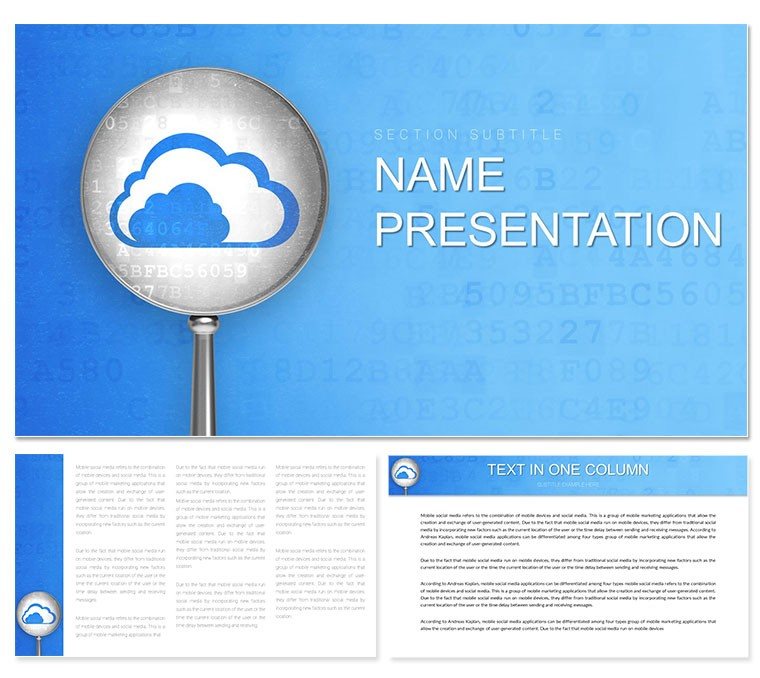
Cloud Security Keynote Template: Fortify Your Digital Defenses
| Format | .pptx |
| Slides | 3 unique layouts |
| Aspect ratio | 16:9 |
| Compatibility | PowerPoint |
| Animated | No |
| Language | English |
| License | Commercial |
| File size | — |
| Version | v1.0 |
| Last updated | January 2023 |
What's inside
In an era where data breaches make headlines weekly, communicating cyber threats effectively can be the difference between vigilance and vulnerability. Enter the Cloud Security Keynote Template - a robust toolkit for IT professionals, consultants, and educators who need to demystify complex security landscapes. Packed with 28 targeted diagrams, three master layouts, and three atmospheric backgrounds, this template transforms technical jargon into accessible visuals that command attention and inspire confidence.
Designed for Keynote users on macOS, compatible from 2016 versions up, it offers seven color schemes ranging from stark security reds to cool data-center blues, ensuring your deck matches the gravity of your topic. Whether you're briefing executives on cloud vulnerabilities or training teams on encryption protocols, these slides provide the structure to layer information logically, from threat overviews to mitigation strategies.
Envision a cybersecurity audit presentation: Kick off with a network topology diagram highlighting entry points, then flow into risk matrices that quantify potential impacts. This template excels in high-stakes environments, like those simulated in workshops drawing from NIST frameworks, where clear visuals prevent information overload and foster proactive discussions.
Essential Features That Anchor Your Security Story
This template's strength lies in its infographic depth, blending simplicity with sophistication. The three masters include one for executive summaries, a detailed analytics view, and a collaborative discussion format, adaptable via drag-and-drop in Keynote.
- 28 Specialized Diagrams: Cover everything from firewall flows to phishing attack timelines, each with placeholders for stats, icons, and annotations.
- Seven Thematic Color Schemes: Choose schemes that evoke trust - muted grays for audits or alerts in orange for urgent threats - while maintaining readability.
- Vector Icons and Flows: Pre-loaded symbols like locks and shields resize flawlessly, with editable paths for custom threat models.
These elements make it a go-to for professionals akin to those at Cisco's security summits, where diagrams must convey layered defenses without diluting the message. Editing is intuitive: Select a shape, adjust fills, and watch the entire slide harmonize.
Practical Use Cases: Securing Narratives Across Scenarios
For computer consulting gigs, this template streamlines client reports on cloud migrations. Use the vulnerability scan slides to map out assessments, then pivot to compliance checklists that align with standards like GDPR - turning dry audits into strategic roadmaps.
Educators find it invaluable for internet safety courses. A step-by-step guide might start with basic access controls via flowchart slides, building to advanced topics like zero-trust architectures. Here's how to weave it into your prep:
- Import and Theme: Load the .key file, apply a color scheme suited to your audience - vibrant for students, subdued for pros.
- Populate Content: Insert real-world examples into diagram nodes, such as recent breach case studies, to ground abstract concepts.
- Enhance Delivery: Add Keynote transitions to simulate threat progression, then rehearse for timing that builds tension and resolution.
In e-commerce settings, teams use it to pitch secure platforms, highlighting encryption layers with stacked bar visuals. Versus generic Keynote charts, this offers purpose-driven layouts that resonate with tech-savvy crowds, saving hours on redesigns.
Tailoring Tips for Maximum Cyber Impact
Customize by integrating live data links - embed charts from tools like Excel for real-time updates during sessions. For visual punch, layer semi-transparent overlays on backgrounds to denote risk zones, a trick that adds depth without clutter.
Consider a tech trainer adapting these for a webinar on remote work security: They swapped icon sets for device-specific ones, making slides relatable and boosting engagement. Test animations sparingly - fade-ins for reveals keep focus sharp.
The template's .kth format shines for theme reuse across series, ensuring brand consistency in ongoing training modules.
Standout Advantages in Cyber Visualization
Unlike broad-spectrum templates, this one zeros in on security nuances, with diagrams prepped for metrics like dwell times or patch cadences. It's your ally in crafting decks that not only inform but empower action.
Secure your spot as the go-to expert - download the Cloud Security Keynote Template for $22 and shield your presentations with pro-level visuals.
Frequently Asked Questions
What Keynote versions does this support?
It works seamlessly with Keynote 2016 and newer, across macOS updates.
Are the security icons customizable?
Yes, all vector icons can be recolored, resized, or replaced to fit your branding.
Ideal for training sessions?
Perfect - diagrams support step-by-step breakdowns for teaching threat mitigation.
How many backgrounds included?
Three options, from clean whites to subtle tech gradients, for varied moods.
Export options available?
Export as PDF, video, or images directly from Keynote for easy sharing.
Good for
- Project roadmaps and sprint plans
- Product launch timelines
- Quarterly or annual review decks
- Company history and milestone summaries
Licence
reviews
Cloud security template features strong lock and shield icons in deep blues and greens that conveyed trust immediately. Firewall diagrams were comprehensive.
IT pro: the threat vector charts helped explain risks to non-tech execs. Good variety in the 28 diagrams.
Practical sysadmin: color schemes allowed easy brand matching. Some icons a bit cartoonish but functional.
Enthusiastic about the compliance checklist slides with green checkmarks. Made my audit presentation smooth.
Slightly critical: data flow visuals could be more complex but overall solid for quick decks.
Student in cybersecurity: the layered defense models were perfect reference for my report.
FAQ
Will it work in Google Slides?
Are fonts embedded?
Can I use this for client work?
What's the refund policy?
Do you update the template after purchase?
Similar templates
See all Keynote templates →
All 1 slides