 Click to zoom
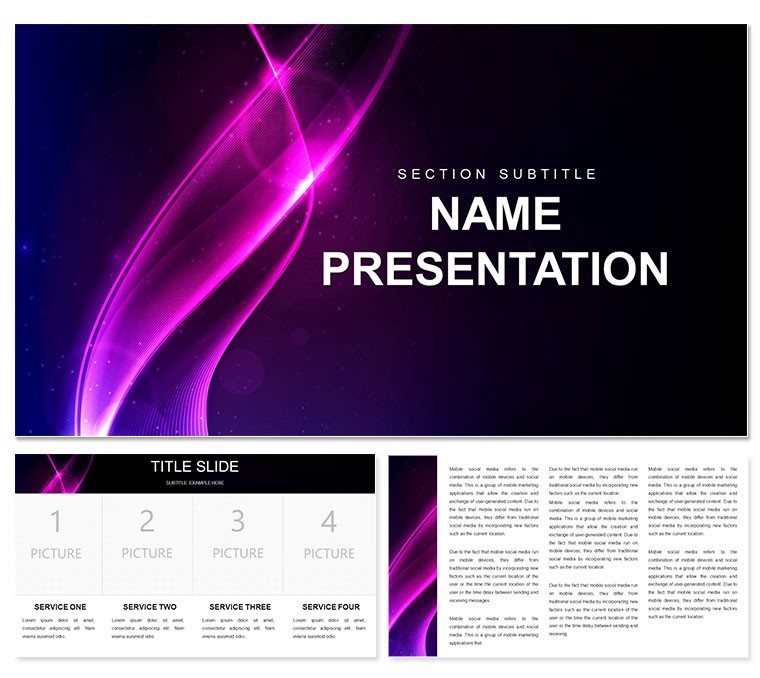
Abstract Announcement PowerPoint Template: Style Your Story with Precision
| Format | .pptx |
| Slides | 3 unique layouts |
| Aspect ratio | 16:9 |
| Compatibility | PowerPoint |
| Animated | No |
| Language | English |
| License | Commercial |
| File size | — |
| Version | v1.0 |
| Last updated | December 2022 |
What's inside
Imagine standing before a room full of stakeholders, unveiling a renovation project that doesn't just inform but captivates. That's the power this abstract announcement PowerPoint template brings to your fingertips. Tailored for professionals in styling, repair, renovation, overhaul, and even graduation ceremonies, it transforms dry updates into visually compelling narratives. With 28 meticulously crafted diagrams, three versatile masters, and three dynamic backgrounds, you'll have a foundation that's as flexible as your ideas. Whether you're pitching a home makeover to clients or celebrating a team's milestone, this template ensures every slide resonates.
What sets it apart? It's not just about aesthetics - it's about clarity in chaos. In fields like interior design or construction, where details can overwhelm, these abstract elements cut through the noise. Swap in your photos, tweak timelines for project phases, or highlight before-and-after visuals without starting from scratch. Compatible with PowerPoint 2016 and later, it works seamlessly on Windows or Mac, letting you focus on delivery rather than design drudgery. And with seven color schemes, from cool grays for corporate overhauls to warm tones for celebratory graduations, matching your brand's vibe is effortless.
Picture this: A design firm uses it to announce a boutique hotel revamp, layering abstract shapes over floor plans to evoke modernity. Or a graduation coordinator maps out event logistics with flowing diagrams that mirror the ceremony's rhythm. These aren't hypotheticals - they're the real-world applications that make your presentations memorable. Ready to announce with impact? Download this template for $22 and turn announcements into announcements that stick.
Unlocking the Core Features of Your Announcement Deck
Diving deeper, let's explore what makes this template a go-to for busy pros. At its heart are those 28 diagrams, each editable to fit your narrative. From circular process flows for renovation stages to linear timelines for repair schedules, they're built to adapt. The three masters mean consistent layouts across slides - headers that auto-update, footers for contact info, and placeholders that snap into place.
Backgrounds play a starring role too. Opt for the subtle gradient one for understated elegance in styling pitches, or the textured abstract for overhaul reports that demand attention. And those color schemes? They're more than palettes; they're mood setters. Blues for trust in repair consultations, greens for growth in graduation planning. Editing is intuitive: Right-click a shape, select format, and watch it morph while preserving vector sharpness - no pixelation worries here.
- Vector-Based Icons: Scalable without loss, ideal for zooming into detail-heavy slides like material swatches.
- Fully Layered Files: Peel back elements in PowerPoint to customize opacity or reorder for emphasis.
- Print-Ready Exports: High-res PDFs ensure your printed handouts match the screen glow.
Integration tip: Pair it with PowerPoint's built-in animations for subtle reveals, like fading in renovation costs to build suspense. It's these thoughtful touches that elevate a standard announcement into a strategic tool.
Real-World Applications: From Renovation Pitches to Graduation Galas
Let's get practical. For renovation specialists, this template shines in client proposals. Start with a title slide using the abstract background to set a creative tone, then flow into a diagram outlining phases: demolition, redesign, execution. Insert your CAD renders into photo placeholders, and use a pie chart from the diagram library to break down budget allocations - visuals that make numbers narrate the value.
In repair scenarios, like automotive or appliance overhauls, leverage the process diagrams. Map a step-by-step fix with arrows connecting fault diagnosis to quality checks, adding icons for tools or parts. A service manager might customize it for team briefings, ensuring everyone aligns on timelines without wading through text walls.
Styling Sessions That Inspire
For fashion or interior stylists, the abstract flair is pure gold. Create mood boards with collage-style slides, dragging in fabric swatches or color palettes. The timeline diagram becomes your session agenda, sequencing consultations to reveals. One stylist shared how it helped her pitch a seasonal collection, using layered shapes to symbolize fabric layers - clients nodded along, hooked from slide one.
Graduation Announcements with Grace
Shifting to celebrations, graduation planners find solace in its structure. Announce keynotes with a hierarchical org chart diagram, branching from commencement to departmental honors. Backgrounds soften the formality, while color schemes in school hues keep it personal. Embed video links for rehearsal clips, turning a static deck into an interactive preview.
Across all, the template saves hours. Instead of fiddling with alignments, you're refining your message. Pro tip: Use the master view to embed your logo globally, then duplicate slides for variations - like A/B testing announcement versions for different audiences.
Tips for Seamless Customization and Delivery
Getting started is straightforward. Download the .potx file, open in PowerPoint, and apply the master to your blank presentation. From there, populate placeholders: Text boxes auto-fit your copy, shapes resize with drags. For advanced tweaks, ungroup diagrams to recolor individually, ensuring cohesion.
- Assess Your Audience: Renovators? Lean on structured flows. Stylists? Embrace the abstract swirls.
- Layer in Data: Import Excel charts directly, overlaying them on diagram bases for hybrid visuals.
- Test Transitions: Preview in slideshow mode; subtle wipes mimic abstract flows without distracting.
Delivery-wise, practice with Presenter View - notes hidden, your cues prominent. For virtual announcements, export to video for asynchronous shares, maintaining that polished abstract edge.
This template isn't just slides; it's a canvas for your expertise. Whether overhauling a space or a ceremony, it empowers you to announce with confidence and flair.
Frequently Asked Questions
What formats are included with this PowerPoint template?
You get .potx for easy editing, .pptx for immediate use, and .jpg previews for quick references.
Can I use this for non-renovation announcements?
Absolutely - its abstract design adapts to any announcement, from product launches to event recaps.
How many color schemes are available?
Seven schemes, each with harmonious tones for diagrams and accents.
Is it compatible with older PowerPoint versions?
Best with 2016+, but check for theme support in earlier ones.
Are the diagrams fully editable?
Yes, vectors allow resizing, recoloring, and reshaping without quality loss.
Does it support animations?
It pairs perfectly with PowerPoint's native animations for smooth reveals.
Good for
- Project roadmaps and sprint plans
- Product launch timelines
- Quarterly or annual review decks
- Company history and milestone summaries
Licence
reviews
Those flowchart arrows were exactly what I needed for my process map.
The decision diamonds could be bigger but I resized them.
Good enough for a last-minute SOP document.
A little basic but it's free so whatever.
The connector lines snapped nicely, which surprised me.
FAQ
Will it work in Google Slides?
Are fonts embedded?
Can I use this for client work?
What's the refund policy?
Do you update the template after purchase?
Similar templates
See all PowerPoint Templates →


All 1 slides