 Click to zoom
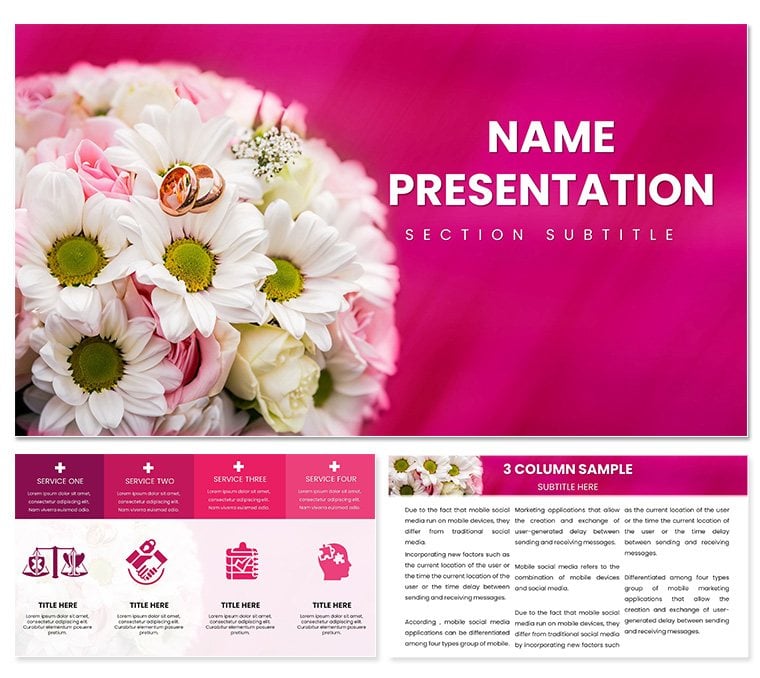
Wedding Congratulations Rings PowerPoint Template: Seal Vows with Visual Elegance
| Format | .pptx |
| Slides | 3 unique layouts |
| Aspect ratio | 16:9 |
| Compatibility | PowerPoint |
| Animated | No |
| Language | English |
| License | Commercial |
| File size | — |
| Version | v1.0 |
| Last updated | May 2023 |
What's inside
Envision your wedding proposal deck unfolding like a love story's climax - each slide a chapter of "I do" moments that leave couples spellbound. This Wedding Congratulations Rings PowerPoint Template is the ring-bearer for event pros, photographers, and romantics crafting heartfelt pitches. It sparkles with 28 editable diagrams in seven romantic color schemes, three enchanting masters, and three backdrop beauties, turning timelines into toasts.
Fully attuned to PowerPoint 2016+, it waltzes with your details, from inserting couple portraits to curving text around band motifs. It's the flourish that elevates "save the date" to "say yes now."
Ringside Features That Bind Hearts
The gem here: 28 diagrams, diamonds in the rough for data that dazzles - from cascade waterfalls for guest flows to orbital rings encircling venue options. Seven schemes blush from ivory pastels to ruby depths, masters weaving unity with matched motifs.
- Backdrop Bouquets: Lace overlays or petal scatters frame without fading your focal vows.
- Icon I Do's: 45+ symbols - veils, cakes, bells - adorn agendas, like looping timelines for ceremony sequences.
- Layout Love: From vow vignettes to reception rundowns, every arrangement harmonizes.
Personalize with a whisper: Hue shifts for seasonal themes, embed RSVPs via forms. It's tuned for tender timings, like rehearsal run-throughs where emotion meets efficiency.
Walk the Aisle: Assembling Your Affair
- Set the Tone: Hue to hues - soft for springs, bold for beach bashes.
- Weave the Details: Nestle numbers in nets; shapes stay suave.
- Build the Bond: Layer layers for phases, from proposals to honeymoons.
- Rehearse the Reveal: Fade-ins for flourishes, share for stakeholder sways.
Echoes how pros like Preston Bailey layer opulence - opulent yet ordered.
From Engagements to Ever After: Wedding Wins
Planners pitching packages adore mind-map menus for add-ons, branching from basics to bespoke. Photogs portfolioing use collage carousels to chronicle shoots, curating couples' tales. Venue scouts storyboard sites with SWOT rings, spotlighting strengths in sunset slots.
Picture a destination doula: They ringed routes with these, routing guests to gems and garnering gigs. Or a floral forager - sector pies for budget blooms, blooming business.
For registry reveals, interactive infographics invite inputs, igniting excitement. It's the vow that vows versatility, from micro-monies to mega-fetes.
Better Than Borrowed Basics
Stock setups stumble like stumbles at the altar - awkward and askew. This? Seamless seams: Proportions preserve poise, twirls tease transitions tenderly. Beyond bland blends, it's the bespoke band that binds brilliance.
FAQs: Vow Vault Answers
Mac-friendly?Perfectly paired for Mac and PC from 2016, no mismatched mates.
Full fest slides?28 diagrams dance as core, masters multiply to 35+ for full fetes.
Secular shifts?Indeed, motif-mute for milestone markers beyond matrimonial.
File finery?.potx for patterns, .pptx for parties, .jpg for previews.
Print-perfect?Vectors vow vividness in invitations or programs.
Group groove tips?Cloud-cast for co-creators, syncing sweetly for surprises.
Good for
- Project roadmaps and sprint plans
- Product launch timelines
- Quarterly or annual review decks
- Company history and milestone summaries
Licence
reviews
The magnifying glass diagram for zooming into details is clever.
The glass lens was semi-transparent, hiding the text behind. Made it clearer.
Used for a detailed analysis slide. The concept was understood.
I wish the template had a better handle for the glass.
Simple metaphor. The download was easy.
FAQ
Will it work in Google Slides?
Are fonts embedded?
Can I use this for client work?
What's the refund policy?
Do you update the template after purchase?
Similar templates
See all PowerPoint Templates →
All 1 slides