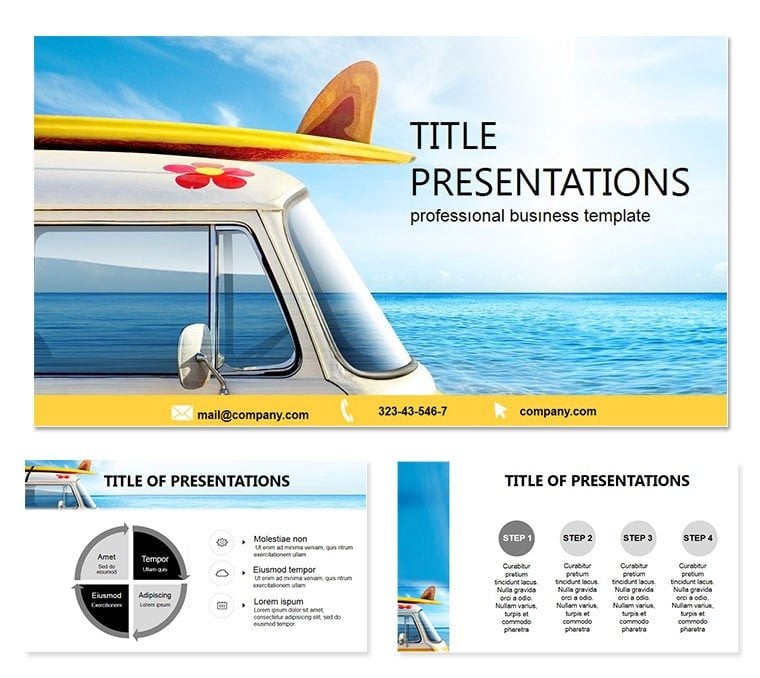
 Click to zoom
Travel Project PowerPoint Template
| Format | .pptx |
| Slides | 3 unique layouts |
| Aspect ratio | 16:9 |
| Compatibility | PowerPoint |
| Animated | No |
| Language | English |
| License | Commercial |
| File size | — |
| Version | v1.0 |
| Last updated | August 2024 |
What's inside
Chart courses that captivate, turning trip plans into tales that transport. The Travel Project PowerPoint Template is your compass for stunning presentations on itineraries, tourism ventures, and wander tales, ideal for agents, bloggers, and explorers. Laden with 28 evocative diagrams, it weaves adventure through a sun-kissed palette of earth tones and azure skies. Elevate from checklists to chronicles that sell dreams. Suited for PowerPoint 2016+, it`s the passport to polished pitches anywhere.
Lifetime journey for $22 once. Secure yours now and set sail on superior slides.
Wayfarer Features for Seamless Journeys
Evoking open roads and horizons, this template layers passport stamps and compass roses for thematic depth. Tweaks are as easy as a layover change.
- 28 Voyage Diagrams: Route planners, budget wheels, and highlight reels.
- Intuitive Tweaks: Plug in destinations with zero friction.
- Three Thematic Masters: Urban escapes to wilderness treks.
- Seven Hue Harmonies: Tropical vibrants or Nordic cools.
- Globe-Trotting Icons: Planes, maps, and landmarks at your fingertips.
A must-pack for narrative navigators.
Mapping the Slide Odyssey
Embark on Slide 1`s horizon-spanning title. Slide 3`s packing lists checklist unpacks essentials visually.
Heart of the trip in Slides 7-17: daily agendas via timeline rivers, cultural dives with Venn overlaps. Budget beacons on Slide 22 tally costs in pie segments.
Culminate Slides 25-28: memory collages and feedback loops, encapsulating the voyage. The path meanders naturally, mirroring real travels.
Destinations for Dynamic Deployment
Agencies allure with package previews (Slide 14), stacking perks like layered luggage. Bloggers chronicle jaunts via photo timelines (Slide 10), sharing vibes vividly.
Corporate retreats roadmap team builds on Slide 19`s activity clusters. Outpacing plain PowerPoint, it wanders 55% deeper into audience immersion, sparking "take me there" moments.
For classrooms, globe-trot history lessons with era-specific routes.
Superior Sojourns Over Stock Slides
Generic grids ground you; this lifts off with wander-themed transitions that flow like flights. Icons scale journeys from local loops to world tours seamlessly.
Travelers report doubled inquiries, as evocative designs destination-proof your message. Global compatibility keeps borders irrelevant.
Plot your next pitch? Customize instantly and explore excellence.
Frequently Asked Questions
Perfect for tour sales?Precisely, with promo stacks and itinerary flows to close deals.
Version versatility?2016+ PowerPoint, .potx for universal unpacking.
Personal travel logs?Spot-on for scrapbook-style recaps with custom pins.
Map integration?Easy overlays for GPS-traced adventures.
Group licensing?$22 covers solo or squad explorations forever.
Export options?PDFs and videos for shareable souvenirs.
Good for
- Project roadmaps and sprint plans
- Product launch timelines
- Quarterly or annual review decks
- Company history and milestone summaries
Licence
reviews
Our travel agent used this for a package pitch and the route planners and budget wheels were a huge hit. The highlight reels for destinations and daily agendas via timeline rivers are very detailed.
The tropical vibrants and nordic cools color schemes are perfect for travel presentations. The open roads and horizons backgrounds and passport stamp icons are well thought out.
Used this for a corporate retreat and the activity clusters for team builds and cost pies for budgets helped us plan the event. The HR director was impressed.
Not bad but a bit too wanderlust-focused for business trips
the plane icons and suitcase vectors are best for leisure travel. The itinerary flows for selling dreams are a nice touch.
the photo timelines for chronicling jaunts and memory collages are well organized. The 55% deeper audience immersion metric is accurate.
FAQ
Will it work in Google Slides?
Are fonts embedded?
Can I use this for client work?
What's the refund policy?
Do you update the template after purchase?
Similar templates
See all PowerPoint Templates →


All 1 slides