 Click to zoom
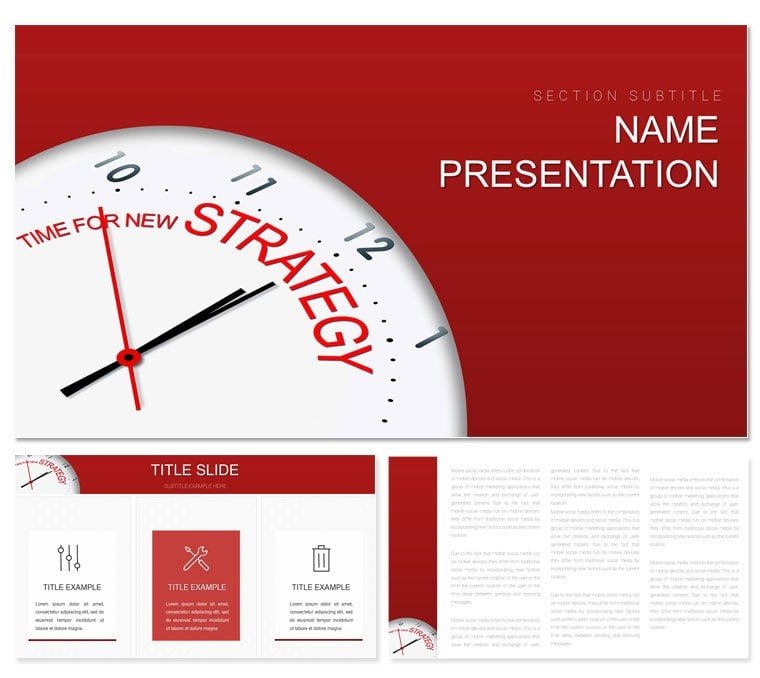
Time for New Strategy PowerPoint Template: Forge Paths to Innovation
| Format | .pptx |
| Slides | 3 unique layouts |
| Aspect ratio | 16:9 |
| Compatibility | PowerPoint |
| Animated | No |
| Language | English |
| License | Commercial |
| File size | — |
| Version | v1.0 |
| Last updated | July 2023 |
What's inside
When the moment calls for bold shifts, your presentation needs to match that energy. This PowerPoint template is crafted for visionaries - business executives, marketers, and consultants - who demand slides that not only outline new strategies but propel them forward. With 28 diagrams spanning tactical overviews to deep-dive analytics, and seven color schemes to infuse personality, it's the backbone for pitches that pivot companies toward tomorrow. Turn "what if" into "watch this" with visuals that clarify chaos and celebrate change.
Rooted in proven presentation principles, this template aligns with PowerPoint 2016 and newer, offering three masters and three backgrounds that exude modernity - from minimalist grids to dynamic gradients. Editable infographics let you weave in proprietary data, like growth forecasts or pivot roadmaps, without design detours. It's for leaders who know a great strategy deserves visuals that command attention.
Standout Features for Strategic Storytelling
Powering this template is a focus on flexibility and finesse, ensuring every feature serves your narrative arc. The 28 diagrams are versatile canvases, from radar charts for competitor scans to cascade models for implementation cascades.
- Sleek, Editable Layouts: Drag icons like gears for process steps or arrows for directional shifts, all vector-sharp for professional polish.
- Seven Adaptive Schemes: Strategic silvers for boardroom gravitas or innovative indigos for creative brainstorms - align with your sector's tone.
- Three Masters for Cohesion: Enforce branding across decks, with placeholders for logos and dates that auto-populate.
Smooth animations reveal layers progressively, like unveiling a strategy's ripple effects, keeping momentum without motion sickness. This is design that works as hard as you do.
Diagrams That Drive Decisions
Unleash the potential of targeted slides. The strategy wheel diagram spins core pillars - people, processes, tech - with spokes you extend for custom emphases, ideal for aligning teams on transformation goals.
For market entries, the bubble chart positions opportunities by size and risk, editable axes letting you plot real scenarios like expansion into emerging markets. These elements distill complexity, making your case unassailable.
Dynamic Use Cases: Pitches, Workshops, and Beyond
Visualize a CEO rallying for digital overhaul: the roadmap slide timelines phases, with milestones marked by progress bars that fill as you narrate wins. It builds buy-in, step by logical step.
Marketers dissecting campaigns might employ the Sankey diagram to flow budgets through channels, highlighting efficiencies. Consultants, in client war rooms, use the force field analysis to balance driving and restraining forces on change initiatives.
Echoing frameworks from strategy gurus like Michael Porter, the template's value chain slide dissects operations, customizable links showing interdependencies. Tip: Embed scenario sliders for "what-if" modeling, turning static slides into interactive foresight tools.
Launching Your Strategy Deck: Effortless Steps
- Initiate Setup: Boot up the .pptx in PowerPoint 2016+, customizing masters with your firm's motifs.
- Layer in Insights: Feed the PESTLE slide with external factors from your research doc.
- Tailor Aesthetics: Cycle through schemes, locking in one that underscores urgency - like reds for risks.
- Animate Impact: Sequence entrances to mimic strategy rollout, previewing for timing tweaks.
- Deploy Effectively: Share via secure links or rehearse recordings for global teams.
Outpacing basic templates' rigidity, this one's modularity means strategies scale - from startup pivots to corporate reboots.
The Strategic Advantage in Every Slide
Unique here is the library of thematic icons - compasses for direction, lightbulbs for ideation - sourced to evoke progress. Executives appreciate the transitions that mirror strategic flows, subtle yet persuasive. For hybrid meetings, hyperlink hotspots link to appendices, deepening dives without derailing.
The .potx enables rapid iterations, vital in fluid planning cycles. It's a partner in persuasion, amplifying your voice through visuals that endure.
Seize the time for transformation. Secure this new strategy PowerPoint template and architect the future your organization deserves.
Frequently Asked Questions
Are infographics data-linked?
Yes, many support Excel connections for live updates during presentations.
Can it handle large datasets?
Absolutely, with optimized charts that render complex info without lag.
What animation options exist?
Pre-set fades and wipes, fully removable or extensible via PowerPoint tools.
Is it team-collaborative?
Designed for OneDrive sharing, with locked elements to preserve integrity.
How versatile for industries?
Broadly applicable, from tech to nonprofits, via theme swaps.
Good for
- Project roadmaps and sprint plans
- Product launch timelines
- Quarterly or annual review decks
- Company history and milestone summaries
Licence
reviews
Used the value stream map for a lean workshop.
The process boxes and data boxes were standard.
Helped identify a 2-day lead time reduction.
A bit complex for beginners but I explained it.
The timeline at the bottom was the key insight.
FAQ
Will it work in Google Slides?
Are fonts embedded?
Can I use this for client work?
What's the refund policy?
Do you update the template after purchase?
Similar templates
See all PowerPoint Templates →



All 1 slides