 Click to zoom
Stethoscope Keynote Template for Doctors - Editable KEY
| Format | .pptx |
| Slides | 3 unique layouts |
| Aspect ratio | 16:9 |
| Compatibility | PowerPoint |
| Animated | No |
| Language | English |
| License | Commercial |
| File size | — |
| Version | v1.0 |
| Last updated | March 2026 |
What's inside
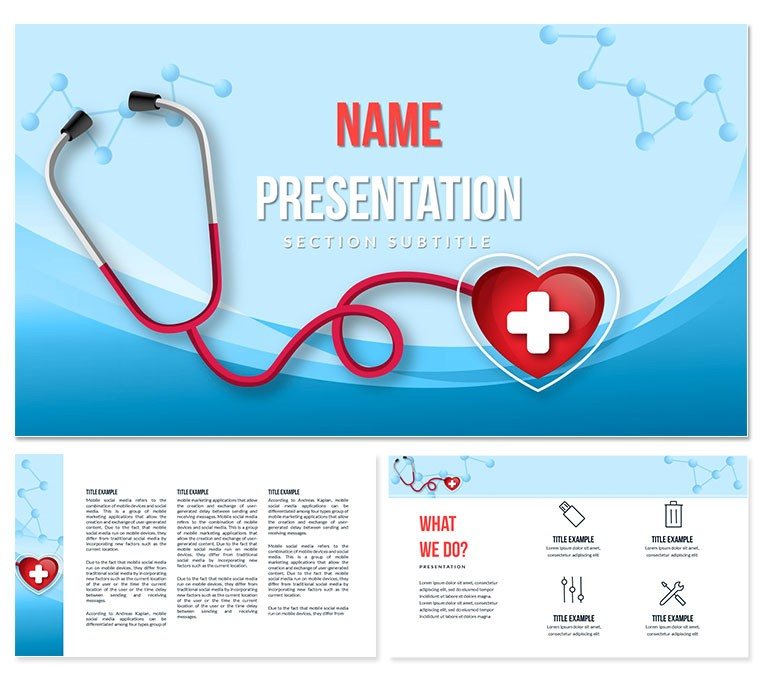
What is a stethoscope-themed Keynote diagram template? A stethoscope Keynote template is a pre-structured Apple Keynote file (.key) built around a medical visual identity - using a stethoscope as the central design anchor - and packaged with diagram layouts, color schemes, and slide masters that support clinical and healthcare presentations without requiring a designer.
Package Contents
28 diagram slides across 7 color schemes arrive in the full purchase. The diagrams span the structural types most relevant to cardiology briefings, clinical seminars, and patient case presentations: flow layouts for diagnostic sequences, comparison panels for treatment options, and section-intro slides that establish visual hierarchy before a data-heavy sequence begins. Seven color schemes - each covering all 28 layouts - let a presenter match institutional colors or differentiate sections of a longer deck by hue.
Three slide masters and three background variants form the structural layer beneath the diagrams. The masters define how title text, body text, and graphic zones align on each slide type. The backgrounds provide tonal variation: a clean light tone for print-friendly export, a mid-tone suited to standard projection, and a deeper variant for high-contrast environments like auditoriums. The stethoscope motif appears as a recurring design element in the header zones and intro layouts - not as a literal illustration repeated on every slide, but as a shaped graphic that signals the medical context at a glance.
The distinction worth noting against other healthcare presentation sets is the focus on cardiac and clinical auscultation themes specifically. Sets built around generic hospital iconography use crosses, pills, and organ outlines broadly. This set leads with the stethoscope - the instrument most directly associated with direct patient examination - making it a better fit for cardiology grand rounds, clinical skills training sessions, and diagnostic education than a generalist medical template would be.
Editing Capabilities at a Glance
FeatureDetailsDiagrams included28 diagram slides in the paid packageColor schemes7, each covering the full diagram setMasters and backgrounds3 masters, 3 backgroundsFile formats.key (Keynote editing), .kth (theme installation)Keynote compatibilityKeynote 12 or later on macOSText placeholdersUpdate without ungrouping diagram elementsColor theme adjustmentsApply institution colors via the Keynote master slide paletteFree vs. paidFree: 3 masters + 3 backgrounds ($8). Paid: 28 diagrams + 7 schemes ($15)Three Situations Where This Pays Off
A cardiologist at a teaching hospital preparing a grand rounds session on auscultation technique has 90 minutes between clinic hours and the lecture hall. Building a slide set that maintains the visual tone of a cardiology department while covering five distinct diagnostic scenarios from scratch is not a 90-minute task. Using the pre-built diagnostic flow layouts and comparison panels, the preparation shrinks to slide content - the structural and visual decisions are already resolved.
A medical school faculty member running a clinical skills module across three consecutive semesters adapted the same base template for each cohort by swapping one color scheme per semester and updating the case data. The visual consistency across semesters reduced the time students spent orienting to a new slide format at the start of each session - a small friction point that compounds across a 12-week course.
Healthcare consultants preparing executive briefings for hospital network leadership have used the comparison and hierarchy diagram types to present staffing models and resource allocation - fields where the stethoscope motif is still contextually appropriate while the diagram structures map directly to a business presentation use case.
Download the .key and .kth files and open a ready-to-edit presentation today.
Adapting the Template to Your Brand
How do I apply my clinic's brand colors to a stethoscope Keynote template? Open the .key file in Keynote 12, navigate to View - Edit Master Slides, then replace the color fills with your institution's hex values. The change applies to all slides using that master automatically.
- Step 1 - Open the .key file in Keynote 12 or later (1 minute)
- Step 2 - Go to View - Edit Master Slides and select the primary content master (2 minutes)
- Step 3 - In the Format panel, update color fills to your institution's primary and secondary hex codes (3 minutes)
- Step 4 - Replace text in each diagram placeholder - department name, case title, data labels - without ungrouping the grouped diagram shapes (4 minutes)
- Step 5 - Export as .key for further editing or as PDF for distribution to attendees (1 minute)
Editing difficulty: Beginner. Grouped diagram elements allow label editing without accidentally repositioning shapes. No design background is required.
What You'd Need to Replicate This Yourself
Reconstructing 28 diagram slides with a coherent stethoscope-themed visual identity from a blank Keynote file requires shape construction, icon sourcing, master slide configuration, and a color system that holds across seven distinct palettes. A designer familiar with Keynote estimates 8-10 hours for a set of this scope. A clinician working without design training would face longer - and the result would likely show inconsistencies in icon sizing, spacing, and color application that become visible on a projection screen.
There is a design reason the stethoscope graphic in this set appears in header zones rather than centered on content slides: placing a large illustrative element in the content zone competes with the data or text the slide exists to convey. The header placement anchors the medical identity without reducing the readable area of the diagram below it. Replicating that balance manually requires deliberate layout decisions most presenters do not have time to make under deadline.
- DIY timeline: 8-10 hours for a designer; longer for a clinician
- Icon sourcing alone: 45-60 minutes to find, download, resize, and license medical vector icons
- Master slide configuration: 1-2 hours to establish consistent typography and layout zones
Download the stethoscope Keynote template and start with a finished structure.
Which Keynote version is required to open this file?Keynote 12 or later is required for full compatibility. Keynote 12 shipped with macOS Monterey in late 2021, and it remains the minimum version for this file's master slide and theme features. Users on macOS Ventura, Sonoma, and Sequoia are within the compatible range. If you use an older macOS that cannot run Keynote 12, the preview JPG files are not included in this package - verify your Keynote version in the App Store before purchasing. Keynote on iPad is not recommended for full editing, as master slide controls are more limited on iOS than on macOS.
What does the $8 tier include versus the $15 full package?The $8 package contains the 3 slide masters and 3 background variants - the visual foundation without pre-built diagram slides. It suits a designer or advanced Keynote user who wants the themed master structure to build custom slides from. The $15 full package adds all 28 diagram slides across all 7 color schemes, which means every comparison panel, flow diagram, and hierarchy layout is pre-built and ready to populate with your content. For clinicians or educators who need a working deck quickly, the $15 package removes the slide-construction step entirely. The free tier is not available for this product - both options require purchase.
Can I use this template for paid client work or consulting presentations?Yes, the license covers internal institutional use and paid client presentations. A medical consultant preparing a deck for a hospital network client, a healthcare agency delivering training materials, or a medical educator selling a course that includes these slides as visual aids - all fall within permitted use. The restriction applies to redistribution: you may not sell, sublicense, or redistribute the .key or .kth files themselves as template products. If your use involves packaging the design inside a broader digital product for resale, contact ImagineLayout to clarify the applicable terms before purchase.
How do I change the stethoscope color scheme to my department's brand palette?Open the .key file in Keynote 12, then navigate to View - Edit Master Slides. Each master controls the color fills for all slides that use it. In the Format panel on the right, select any colored shape or background element and replace the fill color with your institution's hex code. For diagram slides, click directly on the diagram segment you want to recolor, then use Format - Fill - Color Fill and enter your value. The seven included color schemes are pre-built starting points - you are not locked into any of them once you access the master slide controls. Changes at master level propagate automatically, so a full rebrand takes 5-8 minutes rather than 28 individual edits.
Does the template support animations or builds?Animation support is not specified on the product page. To check whether any slide has a build applied, select a slide in Keynote and open the Animate panel on the right side. If a build appears, it can be deleted by selecting the animated element and clicking the minus button in the Animate panel. To remove all animations from the entire file at once, select all slides via the slide navigator, then use Format - Remove All Animations. The static layout and diagram structure remain fully intact after removing animations - this is a safe operation that does not affect the visual design or grouping of elements.
What is the refund policy for digital downloads?ImagineLayout reviews refund requests for digital products on a case-by-case basis, typically when the file is technically defective or does not match the product description. Because the files are delivered immediately as a digital download, refunds are not automatic for change-of-mind purchases. If the .key file does not open in Keynote 12 or later, or if the diagram layouts differ materially from the preview images shown on the product page, contact ImagineLayout support with your order number and a description of the issue. Full refund terms are available at imaginelayout.com/refund-policy.
Healthcare teams building multi-topic medical decks often pair a cardiac-specific set like this with broader resources from the Medicine - Pharma Keynote template collection, or add icon-focused slides from the Professional Stethoscopes Keynote template for section divider pages.
Good for
- Project roadmaps and sprint plans
- Product launch timelines
- Quarterly or annual review decks
- Company history and milestone summaries
Licence
reviews
I used this for school work and the charts helped me a lot
I used it for office reporting and the layout made data clear
The graph slides were fine for quick analysis
Used it for presentation and it was easy
It is okay but slides feel similar
FAQ
Will it work in Google Slides?
Are fonts embedded?
Can I use this for client work?
What's the refund policy?
Do you update the template after purchase?
Similar templates
See all Keynote templates →


All 1 slides