 Click to zoom
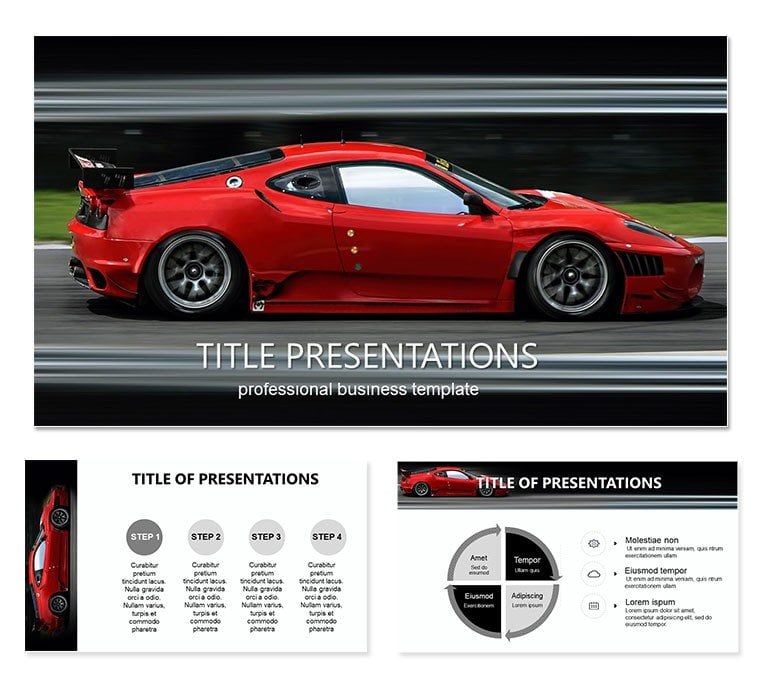
Speed Concept Car Keynote Template
| Format | .pptx |
| Slides | 3 unique layouts |
| Aspect ratio | 16:9 |
| Compatibility | PowerPoint |
| Animated | No |
| Language | English |
| License | Commercial |
| File size | — |
| Version | v1.0 |
| Last updated | October 2021 |
What's inside
Imagine pulling up to a boardroom where your slides don`t just inform - they accelerate ideas forward like a high-performance engine. That`s the power of the Speed Concept Car Keynote Template, crafted for automotive professionals, safety advocates, and tech enthusiasts who need to showcase innovations without the drag of starting from scratch. With 28 meticulously designed diagrams, three master layouts, and three background options, this template turns complex concepts like adaptive cruise control and driver monitoring systems into crystal-clear visuals that keep your audience locked in.
Whether you`re pitching to European automakers on the next wave of safety features or educating teams on road hazard prevention, these slides blend sleek automotive aesthetics with practical functionality. The seven color schemes let you match your brand`s vibe - think metallic silvers for tech-forward talks or bold reds for urgent safety alerts. And because every element is fully editable in Keynote, you can tweak icons, adjust data flows, or swap in your latest stats with ease. It`s not just a template; it`s your shortcut to presentations that drive results, saving you hours of design time while ensuring your message hits the mark every time.
Unlocking the Core Features of Your Automotive Slides
Dive into what makes this template rev up your workflow. At its heart are those 28 diagrams, each tailored to automotive storytelling. From flowcharts mapping out vehicle sensor integrations to infographics breaking down collision avoidance stats, they`re built to handle real-world data without breaking a sweat.
- Master Layouts for Consistency: Three masters ensure your deck flows seamlessly, whether you`re building a 10-slide overview or a deep-dive report.
- Background Variety: Choose from subtle gradients evoking open roads or dynamic patterns mimicking speed lines, all optimized for Keynote`s rendering.
- Color Flexibility: Seven schemes mean no more mismatched palettes - pair cool blues for calm safety discussions or vibrant greens for eco-friendly tech highlights.
Editing is straightforward: Open in Keynote, select a diagram, and drag to resize or recolor. For instance, update a pie chart on market share for safety features by simply pasting your figures - the animations snap into place automatically. This level of intuitiveness means even non-designers can produce pro-level slides that stand up to scrutiny.
Diagrams That Drive Your Narrative
Each of the 28 diagrams serves a purpose, turning abstract ideas into tangible takeaways. Take the process map for adaptive cruise control: It visualizes how sensors detect obstacles, adjust speeds, and alert drivers in a single, easy-to-follow sequence. Or the comparison slide pitting traditional braking against modern systems - side-by-side visuals make the upgrade`s value pop without overwhelming text.
These aren`t generic shapes; they`re inspired by real automotive blueprints, with clean lines and precise proportions that echo engineering drawings. Use the timeline diagram to chart the evolution of road safety standards from the 1970s seatbelt mandates to today`s AI-driven assists, layering in milestones with custom markers.
Real-World Applications: From Pitch Decks to Training Sessions
In the fast lane of automotive presentations, this template shines brightest when applied to high-stakes scenarios. Picture a safety engineer at a major automaker using the hazard analysis diagram to illustrate blind-spot detection failures - data flows in arrows that mimic radar sweeps, making the risks visceral and the solutions compelling.
For educators, it`s a game-changer in driver training modules. Build a slide deck around the infographic on distracted driving stats, customizing it with local road data to resonate with new license holders. Coaches in corporate fleets can leverage the org chart variant to outline team roles in safety compliance, ensuring everyone sees their part in the bigger picture.
Step-by-Step: Crafting a Road Safety Pitch
- Select Your Base: Start with a master layout that matches your company`s color scheme - say, a metallic gray for that premium feel.
- Populate Key Diagrams: Drop in the flowchart for emergency braking systems, then edit text boxes to include your proprietary tech specs.
- Add Interactivity: Keynote`s build effects let you reveal layers progressively - first the problem, then the tech fix, building tension and release.
- Finalize with Backgrounds: Layer a subtle road texture behind your conclusion slide to tie it all together visually.
- Rehearse and Refine: Test transitions on a projector; tweak opacities if needed for that polished handover.
This approach not only structures your content but also engages viewers, turning passive listeners into active proponents of your ideas. Compared to cobbling together basic Keynote shapes, this template cuts prep time dramatically, letting you focus on delivery rather than design tweaks.
Customization Tips to Tailor Your Deck
Make it yours without the hassle. Beyond colors, experiment with icon swaps - replace generic car symbols with branded vectors from your asset library. For data-heavy slides, integrate live charts that update from linked spreadsheets, keeping your info fresh across revisions.
A pro tip: Use the vector-based elements for scalability; zoom in on a dashboard mockup without pixelation, perfect for large-screen demos. And for accessibility, ensure high-contrast modes in your color choices - vital for diverse audiences in safety-focused talks.
Integrate it into your workflow by saving custom masters as presets, so future decks inherit the automotive polish. It`s like having a design co-pilot, always ready to accelerate your next project.
Elevate Your Automotive Storytelling Today
Ready to shift your presentations into high gear? Download the Speed Concept Car Keynote Template for $22 and transform how you convey speed, safety, and innovation. Your audience - and your ideas - deserve the drive.
Frequently Asked Questions
What software is required to use this template?
This template is designed exclusively for Apple Keynote, compatible with versions 2016 and later.
Are the diagrams fully editable?
Yes, every diagram, icon, and text element is vector-based and fully customizable in Keynote.
How many color schemes are included?
There are seven distinct color schemes, allowing for quick brand alignment.
Can I use this for non-automotive presentations?
Absolutely, the diagrams adapt well to any tech or safety-themed content.
What file formats are provided upon download?
You`ll receive .key files for Keynote, .kth for themes, and .jpg previews.
Is there support for animations?
Keynote`s native animations are pre-set on diagrams for smooth transitions.
Good for
- Project roadmaps and sprint plans
- Product launch timelines
- Quarterly or annual review decks
- Company history and milestone summaries
Licence
reviews
Put together a startup pitch with this and the graph pages helped a lot.
The arrows and section dividers made the flow easier to follow.
I Think a few slides had too much empty space though.
Easy to customize during my lunch break before the meeting.
The darker background slides actually looked good on projector.
FAQ
Will it work in Google Slides?
Are fonts embedded?
Can I use this for client work?
What's the refund policy?
Do you update the template after purchase?
Similar templates
See all Keynote templates →


All 1 slides