 Click to zoom
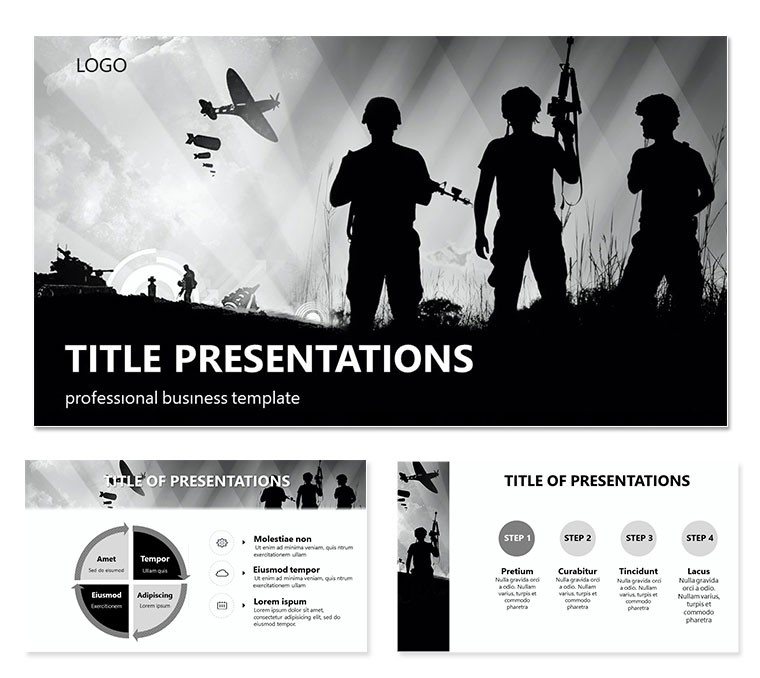
Soldiers Heroes PowerPoint Template
| Format | .pptx |
| Slides | 3 unique layouts |
| Aspect ratio | 16:9 |
| Compatibility | PowerPoint |
| Animated | No |
| Language | English |
| License | Commercial |
| File size | — |
| Version | v1.0 |
| Last updated | July 2016 |
What's inside
Imagine stepping into a boardroom where your slides don`t just inform - they inspire action, evoking the unyielding spirit of those who stand on the front lines. The Soldiers Heroes PowerPoint template is crafted for professionals in defense, security, and production industries who need to convey complex strategies with the precision of a well-executed mission. With 28 meticulously designed diagrams, this template transforms raw data into visual stories of resilience and triumph, helping you rally teams or stakeholders around critical objectives.
Whether you`re outlining operational timelines for a manufacturing rollout or mapping risk assessments in high-stakes environments, this template`s military-inspired aesthetics - think bold lines, strategic layouts, and thematic motifs - ensure your message lands with impact. Built on three versatile masters and three distinct backgrounds, it offers flexibility to match your briefing`s tone, from tactical overviews to inspirational retrospectives. And at just $22, it`s an investment that pays dividends in time saved and audiences captivated.
Core Elements That Drive Your Narrative Forward
At the heart of this template lies a suite of 28 diagram pages, each engineered to handle specific storytelling needs. Start with the foundational process flows that mirror battle plans, allowing you to sequence events from reconnaissance to resolution. These aren`t generic shapes; they`re tailored with subtle heroic icons - silhouettes of advancing figures or emblematic shields - that subtly reinforce themes of valor without overwhelming your content.
Customization is seamless: Swap color schemes across seven professional palettes, from earthy camo tones for field ops to crisp navy blues for formal reports. Each diagram supports drag-and-drop edits in PowerPoint 2016 and later, so you can layer in your data points, adjust scales, or integrate photos of real-world assets. Picture using the pyramid structure on slide 7 to hierarchize command chains - base layers for enlisted roles building up to apex decision-makers - making abstract org charts feel immediate and relatable.
- Timeline Mastery: Slides 12-15 feature arrow-driven timelines that curve like advancing fronts, perfect for projecting project milestones in production cycles.
- Data Visualization: Bar and pie variants on pages 20-22 break down resource allocations, with hover-friendly labels for interactive reviews.
- Comparison Grids: Dual-column setups on slide 25 let you pit scenarios side-by-side, like ally vs. adversary tactics, fostering clear decision-making.
These elements aren`t just pretty; they`re practical. A logistics coordinator might use the cycle diagram on slide 18 to loop through supply chain vulnerabilities, turning potential pitfalls into proactive safeguards. The result? Presentations that don`t drone on but propel discussions toward unified strategies.
Real-World Applications: From Briefing Rooms to Boardrooms
In the fast-paced world of industry production, where delays can cascade like dominoes, this template shines by distilling chaos into clarity. Consider a defense contractor pitching a new prototype: Leverage the radial diagram on slide 9 to radiate key specs from a central hero icon, drawing eyes to innovations like enhanced durability or rapid deployment. It`s a subtle nod to the human element, reminding viewers that behind every spec is a story of ingenuity.
For security firms, the template`s risk matrix on slide 24 becomes a cornerstone. Populate it with threat levels and mitigation steps, using the seven color schemes to color-code urgency - reds for imminent dangers, greens for fortified positions. This visual shorthand not only saves precious slide real estate but also accelerates buy-in during time-crunched reviews.
Step-by-Step: Building a Heroic Pitch
- Assess Your Mission: Identify core objectives - e.g., securing funding for a training program - and select a master slide that aligns with your venue`s lighting.
- Layer in Details: Drop your data into the editable vectors; resize elements without distortion to fit quarterly metrics or annual forecasts.
- Theme and Polish: Apply a color scheme that echoes your brand - perhaps metallic grays for industrial grit - then add transitions for smooth flow between heroic vignettes.
- Rehearse and Refine: Test on multiple devices to ensure widescreen compatibility, tweaking animations to punctuate pivotal reveals.
This workflow integrates effortlessly with tools like Excel for live data pulls, keeping your deck dynamic even as numbers update. Unlike starting from scratch in vanilla PowerPoint, where alignment woes eat hours, here you`re off the ground in minutes, focusing on strategy over styling.
Beyond tactics, the template lends itself to motivational sessions. A team lead in a production plant could adapt slide 28`s motivational pyramid to climb from current challenges to aspirational peaks, incorporating quotes from historical figures like Patton for that extra spark - without veering into cliché territory.
Why This Template Stands Out in the Field
What sets Soldiers Heroes apart from off-the-shelf options? It`s the intentional fusion of form and function, rooted in real presentation dynamics. The diagrams scale responsively, maintaining crisp edges on high-res projectors, and the backgrounds - subtle gradients evoking dawn patrols or night ops - provide context without competing for attention.
Users appreciate the thematic cohesion: No mismatched fonts or clashing hues to undermine credibility. In one instance, a project manager adapted the flowchart on slide 4 for a cross-departmental rollout, crediting the template`s modularity for halving prep time while doubling engagement scores in post-meeting feedback. It`s these nuances that turn a standard slide deck into a strategic asset.
Ready to marshal your visuals with military precision? Download the Soldiers Heroes PowerPoint template today and watch your presentations advance from good to legendary.
Frequently Asked Questions
What versions of PowerPoint does this template support?
It`s fully compatible with PowerPoint 2016 and newer versions, including Microsoft 365, ensuring smooth performance across Windows and Mac.
Are the diagrams fully editable?
Yes, every diagram, icon, and text element is vector-based and editable, allowing you to customize colors, sizes, and content without quality loss.
How many slides are included?
The template provides 28 dedicated diagram slides, plus three masters for building additional content as needed.
Can I use this for non-military presentations?
Absolutely - its strategic layouts work well for any production or leadership scenario, like manufacturing timelines or team motivation decks.
Does it include animations?
Basic entrance animations are pre-applied to diagrams for emphasis, but you can add or remove them via PowerPoint`s animation pane.
Good for
- Project roadmaps and sprint plans
- Product launch timelines
- Quarterly or annual review decks
- Company history and milestone summaries
Licence
reviews
The comparison matrix on slide 12 was great for picking a new vendor.
Used the progress bars to show completion status.
The template is very no-frills but that's exactly what I needed.
I just replaced the placeholder text with my own in about 10 minutes.
FAQ
Will it work in Google Slides?
Are fonts embedded?
Can I use this for client work?
What's the refund policy?
Do you update the template after purchase?
Similar templates
See all PowerPoint Templates →

All 1 slides