 Click to zoom
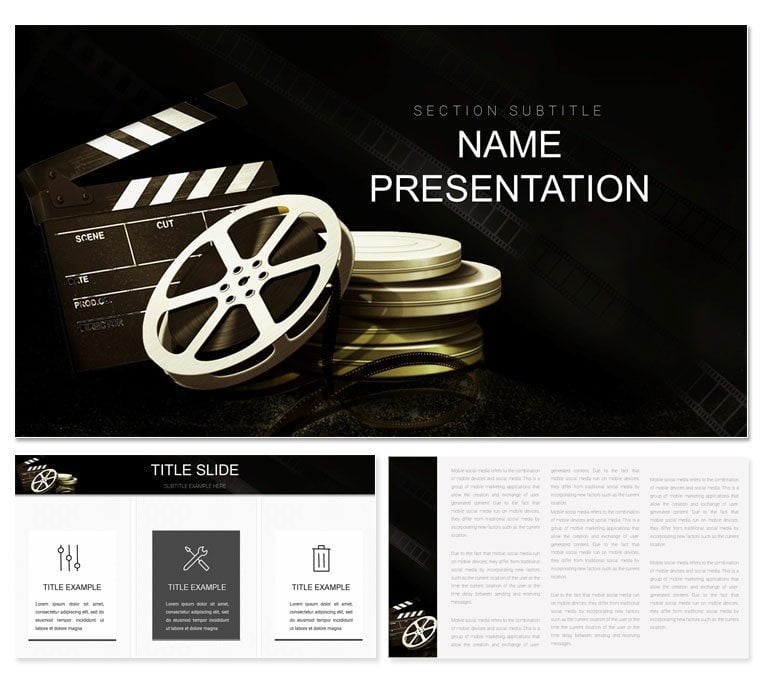
Software Movie Maker PowerPoint Template
| Format | .pptx |
| Slides | 3 unique layouts |
| Aspect ratio | 16:9 |
| Compatibility | PowerPoint |
| Animated | No |
| Language | English |
| License | Commercial |
| File size | — |
| Version | v1.0 |
| Last updated | October 2022 |
What's inside
Lights, camera, impact - that's the mantra for anyone in the entertainment realm turning ideas into on-screen magic. This Software Movie Maker PowerPoint template is your storyboard for success, designed for directors, producers, and digital artists who crave visuals as captivating as their scripts. Packed with 28 evocative diagrams, three cinematic masters, and three scene-setting backgrounds, it frames your narratives with Hollywood polish.
Whether pitching a indie flick's budget breakdown or demoing editing workflows, these slides reel in audiences with fluid designs. From clapperboard timelines to reel infographics, it's crafted to spotlight software's role in storytelling. At $22, it's the affordable cut that trims production woes. Roll the credits on mediocre decks and cue your breakthrough presentation.
Spotlighting the Template's Cinematic Features
Built like a director's cut, the three masters control pacing - set scene titles, cast credits, or fade-ins universally. Backgrounds evoke genres: noir shadows for thrillers or vibrant pops for rom-coms.
The 28 diagrams steal the show: storyboard grids for shot sequences, bar reels measuring runtime impacts. Seven color schemes grade your mood - sepia for flashbacks, neons for futurism. All vectors, so zooms stay sharp like 4K footage.
- Themed Props: Icons of cameras, scripts, and spotlights for authentic accents.
- Flexible Frames: Resizable placeholders for video embeds or image strips.
- Plot Arcs: Curved graphs tracing audience engagement curves.
Plays nice with PowerPoint 2016+, including iPad exports for on-set reviews.
Scripting This Template for Entertainment Wins
Picture prepping a festival submission. Open the template, pick the master for widescreen ratios. Slide 7's montage layout: sequence thumbnail placeholders with transition arrows. Slot in concept art, narrate voiceover paths - the design's aspect ratios keep compositions balanced.
For software demos, slide 20's workflow wheel spins effects pipelines, from capture to color correction. A filmmaker used this to land funding by visualizing post-production efficiencies, turning skeptics into backers.
Director's Cut: Customizing Your Deck
- Scene Setup: Import .pptx, hit Slide Master to cue logos and end slates.
- Shot Edits: Format shapes for vignette effects or layer masks on images.
- Narrative Notes: Type scripts into callouts; auto-flow handles long monologues.
- Grade Shift: Variants menu for instant color timing adjustments.
- Wrap and Distribute: Animate sequences, save as MP4 for trailer teasers.
This reel ensures your edits cut through the noise.
Outshining Stock Footage Slides
Basic PowerPoint feels like silent films - stiff and dated. Here, dissolve transitions mimic crossfades, and the pyramid on slide 14 builds production hierarchies like rising tension. Embed hyperlinks to IMDB for cast deep-dives, making decks interactive reels.
Reel Applications in Film and Theater
Theater directors mapping act structures love the radial plots for character arcs. Marketing teams for blockbusters use funnel slides to track box office projections.
Integrate with Premiere timelines: screenshot key frames into placeholders, syncing visuals to edits. For virtual pitches, the template's responsive design shines on Zoom shares.
Insider move: Pair with font libraries for title card authenticity, evoking classic posters.
Seamless Sync with Creative Pipelines
This template dovetails with DaVinci Resolve exports or Final Cut libraries. Use it as a pre-vis tool, iterating storyboards collaboratively via shared links.
Studios standardize on the .potx for pitch bibles, ensuring every proposal feels like a sequel in quality.
Action! Snag this for $22 and storyboard your path to standing ovations.
Frequently Asked Questions
Editable for video embeds?
Yes, placeholders support direct inserts with aspect preservation.
PowerPoint compatibility?
From 2016 across desktop, web, and mobile.
Usage for film festivals?
Freely, with full rights for promotional materials.
Animation styles?
Film-strip wipes and zoom pans included.
Image resolution tips?
High-res friendly; vectors handle 4K inserts.
Good for
- Project roadmaps and sprint plans
- Product launch timelines
- Quarterly or annual review decks
- Company history and milestone summaries
Licence
reviews
A little complex but we made it work.
The milestone diamonds popped in color.
Grabbed this for a product launch timeline.
The swimlanes for different teams were well organized.
Helped coordinate marketing, sales, and dev.
FAQ
Will it work in Google Slides?
Are fonts embedded?
Can I use this for client work?
What's the refund policy?
Do you update the template after purchase?
Similar templates
See all PowerPoint Templates →

All 1 slides