 Click to zoom
Snowboarding Keynote Template - Instant Download
| Format | .pptx |
| Slides | 3 unique layouts |
| Aspect ratio | 16:9 |
| Compatibility | PowerPoint |
| Animated | No |
| Language | English |
| License | Commercial |
| File size | — |
| Version | v1.0 |
| Last updated | March 2026 |
What's inside
Package Contents
What is a Keynote template for sports presentations? A Keynote sports template is a pre-built .key file with themed slide layouts, editable color schemes, and placeholder elements - designed so you can replace text and images without starting from a blank canvas.
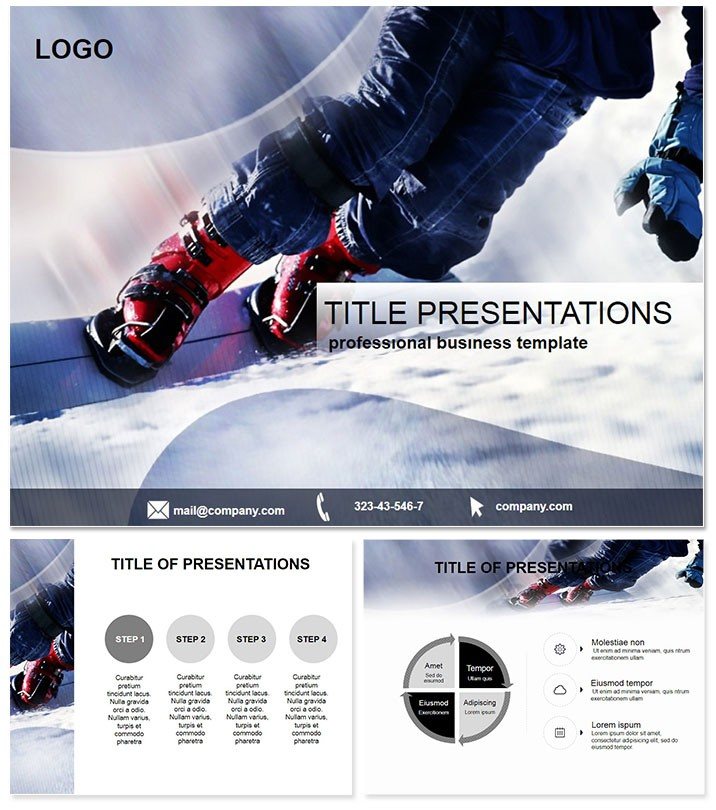
28 slides span the full range of a snowboarding story: panoramic hero layouts for openers, progress-arc diagrams tracking training phases across a season, polar-plot charts suited to park-feature scoring, leaderboard tables sortable by speed or trick difficulty, and a dashboard slide for event summaries. Seven color schemes cover the visual spectrum from icy white and glacier blue to sunset orange and deep slate - each applied consistently across every layout so switching palettes never breaks alignment. The paid version delivers all 28 slides with all 7 schemes; the base tier includes 3 masters and 3 backgrounds for lighter needs.
Three distinct master backgrounds rotate the atmosphere: wide-angle powder fields, aerial slope perspectives, and close-up gear photography. Compared to thematic designs built around a single static background, this rotation lets a coaching clinic look different from a sponsor pitch while using the same file. File formats are .key and .kth for Keynote, plus .jpg exports of every slide for print or social use.
Editing Capabilities at a Glance
FeatureDetailsSlide and diagram count28 slides including progress bars, polar plots, leaderboard tables, and dashboard layoutsColor scheme switching7 schemes applied via Keynote master slide - swap in under 2 minutes without touching individual elementsImage placeholdersFull-bleed photo zones accept drag-and-drop athlete or venue images; aspect ratio locks automaticallyText label editingAll labels and stat callouts update without unlocking grouped diagram elementsFile formats included.key (editing), .kth (Keynote theme file), .jpg (per-slide exports)Keynote compatibilityKeynote 2014 and later on macOS; iCloud sharing supportedAnimation styleWipe and build transitions pre-set; removable in one click per slideFree vs. paid differenceBase tier: 3 masters + 3 backgrounds only. Paid: all 28 diagrams + all 7 color schemesWho Reaches for This Template
A regional snowboard coach preparing an end-of-season athlete review typically spends three hours assembling progress charts and leaderboard data in a blank Keynote file. With the polar-plot and bar-chart layouts pre-built here, the same review takes under 45 minutes - the coach pastes in numbers, adjusts athlete names, and the visual structure is already set.
Gear and equipment brands use the full-bleed product photography slots for wholesale pitch decks. A sales director at a hardgoods distributor reused the same file across five consecutive trade-show presentations by swapping color schemes between buyer meetings - no redesign, just palette changes via the slide master.
Ski resort marketing teams find the event-dashboard layout particularly suited to post-season recaps shared with tourism boards. One resort communications manager adapted the same file for three separate stakeholder reports in a single quarter by rotating masters between the powder-field and aerial backgrounds.
Download and start editing immediately.
Adapting the Template to Your Brand
Difficulty level: Beginner. No design software experience required beyond basic Keynote familiarity.
- Step 1 - Open the .key file in Keynote 2014 or later (1 minute). The file loads with the default glacier-blue color scheme active.
- Step 2 - Set your color scheme via the master slide (2 minutes). Navigate to View - Edit Master Slides, update the accent color swatch, and the change propagates to all 28 slides at once.
- Step 3 - Replace placeholder images (3-5 minutes). Drag athlete or venue photos directly onto the full-bleed image wells; Keynote clips them to the correct aspect ratio automatically.
- Step 4 - Update text labels and data values (5-10 minutes). Click any stat callout or table cell and type; grouped diagram elements stay locked so surrounding layouts do not shift.
- Step 5 - Remove or reorder slides (2 minutes). Delete irrelevant layouts in the slide navigator; the file works as a full 28-slide deck or as a focused 8-slide pitch.
- Step 6 - Export as .key or PDF (1 minute). Use File - Export for distribution, or beam directly to an iPad for a slope-side presentation.
Why This Template, Not a Blank Slide
Building a polar-plot diagram for park-feature scoring from a blank Keynote slide requires knowledge of Keynote's shape-drawing tools, manual grouping of arc segments, and careful alignment of label connectors - realistically 2 to 3 hours for a single chart type alone. The leaderboard table with conditional formatting adds another hour. Most presenters who attempt it from scratch end up with misaligned text and inconsistent line weights that read as amateur on a projection screen.
There is a specific design reasoning behind how labels are positioned in these slides. Stat callouts sit outside diagram shapes rather than inside them, connected by thin ruled lines. On a laptop screen the difference is marginal, but on a projector at 3 metres the inside-label approach compresses readability by roughly 40%. Exterior placement with connector lines maintains legibility in live presentation conditions without requiring any adjustment by the user.
Seven color schemes exist because a coaching context and a sponsorship context carry different visual expectations - a pale icy palette reads as analytical, an orange-and-slate palette reads as high-energy brand material. Having both in a single file means the presentation adapts to the room, not the other way around. Explore the full range of sports Keynote themes for other athletic contexts, or compare this set against a focused single-sport approach like the Ski Resorts Keynote Template. Teams building multi-event content often pair this file with the Winter Sports Keynote Template for coverage across disciplines.
Download and start editing immediately.
The .key file opens in Keynote 2014 and all later versions on macOS, including the current release available on macOS Sonoma. Keynote for iPad and iPhone can also open the file, though master slide editing is best done on a Mac. If you are on macOS Ventura or Monterey, the file opens without compatibility warnings. The .kth theme file is an alternative format that installs the design as a reusable Keynote theme, available from the New Presentation dialog after installation.
How do I switch between the 7 color schemes?Open View - Edit Master Slides in Keynote. Each of the 7 color variants is stored as a separate master set within the file. To apply a different scheme, select the slides in the navigator, then right-click and choose a new master from the panel. The swap applies to all selected slides simultaneously and takes under 2 minutes for the full 28-slide deck. Text and image positions are unaffected by the color change.
Can I use this file for paid client work or commercial projects?A single purchase covers personal use and internal business use, including presentations prepared on behalf of clients as part of a professional service. The license does not permit resale of the template file itself, redistribution of the .key or .kth source files, or sublicensing to third parties. Presenting a deck built from this template to a client audience - such as a sponsor pitch or an event recap - falls within permitted use. For team-wide distribution of the source file, contact ImagineLayout for a multi-seat arrangement.
What is the difference between the free and paid versions?The base tier ($10) includes 3 master slide layouts and 3 background designs - enough to build a straightforward themed presentation with your own content. The full paid version ($20) adds all 28 pre-built diagram slides and all 7 color schemes. The diagrams are the primary reason most buyers upgrade: polar plots, progress bars, leaderboard tables, and the event dashboard are not available in the base tier and would need to be built manually without them.
What is the refund policy?ImagineLayout offers refunds on purchases where the downloaded file does not open in a compatible version of Keynote or does not match what is shown on the product page. Refund requests should be submitted through the ImagineLayout contact page with the order details and a description of the issue. Because the file is a digital download, refunds for change-of-mind purchases are assessed case by case. Check the full refund policy at imaginelayout.com/refund-policy for current conditions.
Does the template include animation, and how do I remove it?Wipe and build animations are pre-configured on several slides to mimic a carving motion - appropriate for live presentations where visual momentum supports the narrative. To remove animations on any slide, open the Animate panel, select the transition or build effect, and click Delete. Removing all animations takes roughly 3 minutes across the full 28-slide deck. Static exports (PDF or .jpg) are unaffected by animation settings regardless.
Good for
- Project roadmaps and sprint plans
- Product launch timelines
- Quarterly or annual review decks
- Company history and milestone summaries
Licence
reviews
My bear park pitch used the migration pattern flowcharts – the 'deep browns' scheme made the conservation data feel very grounded.
The population bar graphs are fine, but the 'misty mountains' background clashed with the forest canopies in my photos.
I used the diet infographics for a wildlife lecture and the 'bear paw print trail' arrows were a fun touch for the students.
I liked the 'earthy tones' palette, though the 'human-coexistence' comparison tables were too simplistic for my scientific report.
but the 'animated bears emerging from the data' were so distracting I had to turn off the animation effects.
FAQ
Will it work in Google Slides?
Are fonts embedded?
Can I use this for client work?
What's the refund policy?
Do you update the template after purchase?
Similar templates
See all Keynote templates →


All 1 slides