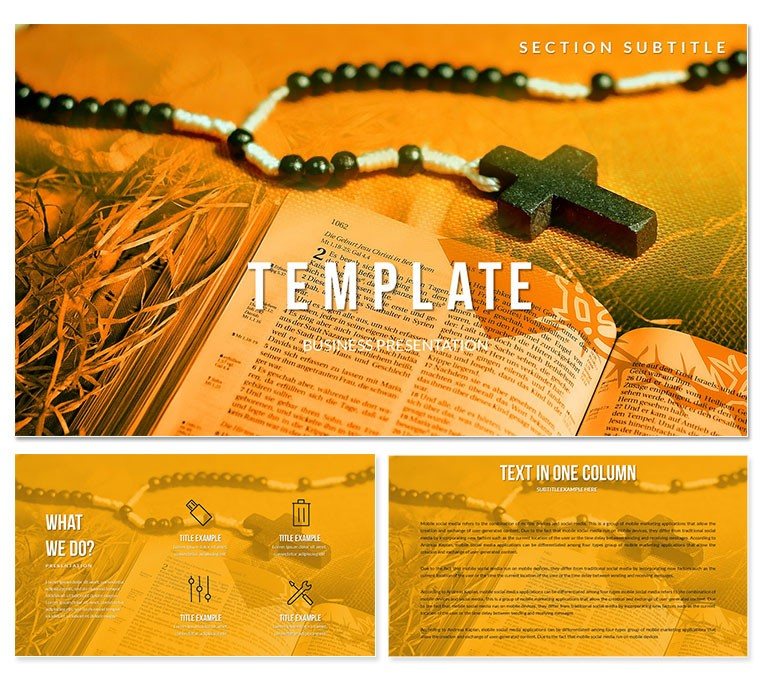
 Click to zoom
Rosary Prayer Diagram Templates - Ready to Present | ImagineLayout
| Format | .pptx |
| Slides | 3 unique layouts |
| Aspect ratio | 16:9 |
| Compatibility | PowerPoint |
| Animated | No |
| Language | English |
| License | Commercial |
| File size | — |
| Version | v1.0 |
| Last updated | April 2026 |
What's inside
Files and Formats Included
28 diagrams arrive inside JPG previews, POTX master and full PPTX file.
Bead-chain connectors link each prayer stage so the flow reads left to right without extra arrows.
Compared to single-chart layouts this set keeps every slide inside the same visual family yet lets each diagram stand alone when copied into other decks.
Editing Capabilities at a Glance
FeatureDetailsEditable shapesbead segments resize and recolor independentlyText placeholderslabels update without unlocking grouped elementsColor theme adjustmentscompatible with PowerPoint and Keynote slide master paletteDiagram connectorsbead lines adjustable in direction and weightIcon layersrosary icons replaceable without affecting layoutExport optionsPPTX or KEY for editing, PDF for distributionCustomization in X Steps
Open the file and spend the first two minutes orienting to the master slide structure - this is where all color changes happen globally.
The most common mistake is editing individual slide colors directly; going through the master saves 15 minutes of repeated work.
Once content is in place the export step depends on the destination - PDF for handouts or PPTX for live projection.
State editing difficulty: Beginner.
Real Scenarios
Before: 4 hours building prayer flow from scratch with inconsistent bead alignment.
After: 35 minutes and all diagrams consistent across 6 client decks.
reused the same file across three client reports by swapping color schemes
Download and start editing immediately
Building From Scratch vs. Starting Here
Manual creation of rosary step diagrams forces repeated alignment checks that eat 2 hours per slide.
Nodes in a concept web are most useful when the connecting lines carry semantic weight - not just related to but leads to or completes.
Label the bead connectors not just the nodes so the audience follows the prayer sequence at a glance.
Download and start editing immediately
What is a PowerPoint diagram template? A PowerPoint diagram template is a pre-designed set of editable shapes, flowcharts, and layouts in PPTX format that allow quick assembly of business or thematic presentations.
How to insert custom images into placeholders: Select the placeholder shape, go to Insert - Pictures, choose your file and the image scales automatically to fit the bead or cross frame.
FAQ
Does this template work in PowerPoint 2016 or newer?Yes it opens natively in PowerPoint 2016, 2019, 365 and Mac versions. All shapes remain fully vector and editable. Older versions may lose some gradient effects but core diagrams stay intact.
How do I change the color scheme via slide master?Go to View - Slide Master, click the top master thumbnail, then Design - Colors and pick one of the 7 presets. Every diagram updates instantly across all 28 slides. Individual overrides remain possible on any single shape.
What does the license allow for client work?The license permits use in paid client presentations and internal church decks. You may not resell the original file or redistribute the source PPTX. One license covers one user or one organization.
What is the difference between free and paid version?The paid version includes the complete 28 diagrams and all 7 color schemes plus the POTX master. Free previews show only sample JPG slides with watermarks and limited diagrams.
What is the refund policy?You can request a full refund within 7 days if the file does not open or the diagrams fail to meet the listed specifications. Contact support with your order number and the issue will be resolved or refunded.
How can I apply the template to an existing presentation?Copy any diagram slide from this file then paste into your deck. The master color theme transfers automatically. Update text placeholders and the layout adapts in seconds.
Can multiple team members use the same license?No. Each license is for a single user or organization. Additional seats require separate purchases to stay compliant.
See more religious spiritual templates
For complementary sermon diagrams see Sermon and Testimony templates.
Or explore Journey of Faith edition.
Good for
- Project roadmaps and sprint plans
- Product launch timelines
- Quarterly or annual review decks
- Company history and milestone summaries
Licence
reviews
The boxing glove and punching bag vectors are tough. Used this for a sales team motivation slide.
Good for a sports medicine presentation. The injury prevention diagrams are accurate.
I liked the "Weight Class" comparison chart for tiered pricing strategies.
The ring layout diagram is cool but I had to ungroup a lot of ropes to adjust the colors.
Good for a fitness bootcamp pitch. The strongman icons make the team look powerful.
FAQ
Will it work in Google Slides?
Are fonts embedded?
Can I use this for client work?
What's the refund policy?
Do you update the template after purchase?
Similar templates
See all PowerPoint Templates →
All 1 slides