 Click to zoom
Rock Music PowerPoint Templates
| Format | .pptx |
| Slides | 3 unique layouts |
| Aspect ratio | 16:9 |
| Compatibility | PowerPoint |
| Animated | No |
| Language | English |
| License | Commercial |
| File size | — |
| Version | v1.0 |
| Last updated | October 2022 |
What's inside
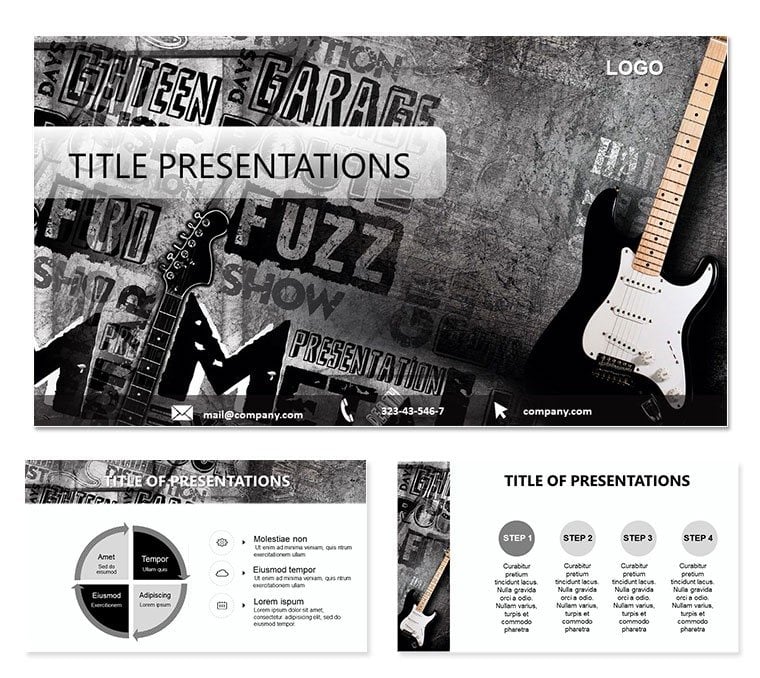
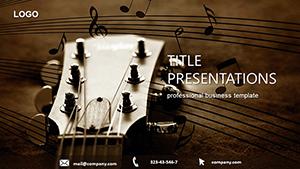
Feel the pulse of a guitar riff echoing through your slides, pulling your audience into the raw energy of rock. This Rock Music PowerPoint template is your backstage pass to creating presentations that don`t just play notes - they strike chords. Tailored for art and entertainment enthusiasts, from concert promoters mapping tour routes to educators dissecting genre evolutions, it packs 28 diagrams alive with the spirit of rock-n-roll, alternative anthems, punk rebellion, and heavy metal thunder.
What sets this apart is its nod to rock`s diverse soul: timelines that trace from Elvis`s swivel to stadium-shaking solos, mind maps branching into subgenres like a family tree of distortion. With three masters and backgrounds evoking dimly lit venues or sun-baked festivals, you can tune the vibe to fit your story - be it a label pitch or a classroom jam session. Seven color schemes let you dial in the mood, from gritty blacks for punk sets to fiery oranges for classic rock retrospectives.
Features That Hit All the High Notes
Dive deeper, and you`ll find tools that harmonize form and function. The 28 diagrams cover everything from SWOT analyses styled as equalizer bars to flowcharts mimicking song structures - verse, chorus, bridge, all editable in PowerPoint 2016+. Sources in .jpg and .potx mean you`re set for previews or full remixes.
- Three Masters for Consistent Sound: Anchor your branding with custom headers featuring vinyl spins or amp stacks, keeping every slide in sync.
- Three Thematic Backgrounds: From stage fog gradients to poster-wall textures, they immerse without distracting.
- Seven Palette Options: Shift from cool blues for indie vibes to warm reds for metal mosh pits, adapting to your narrative`s tempo.
These elements aren`t filler; they`re amplifiers. Envision a promoter using a pyramid slide to layer festival lineups, apexing with headliners while base levels detail support acts - visually queuing the build-up to main stage frenzy.
Striking a Chord: Practical Use Cases
Rock`s classifications aren`t rigid - they`re riffs waiting to be played. This template lets you riff on them effortlessly. For music historians charting the genre`s mutations, radial diagrams fan out influences: blues roots feeding into punk edges, each spoke clickable to sub-slides with artist spotlights.
Here`s a beat-by-beat guide to rocking a presentation on alternative rock`s rise:
- Tune Your Setlist: Identify core tracks - key bands, albums - and match to diagram types, like cycles for feedback loops in scene growth.
- Plug In and Edit: Insert photos or clips into placeholders, tweaking curves to echo waveform peaks.
- Rehearse the Breakdown: Animate builds to drop beats sequentially, testing for flow in rehearsal mode.
- Encore with Engagement: End with a Q&A slide prompting audience polls on favorite riffs, turning passive listeners into participants.
Event planners have turned to genre-themed visuals for years, akin to how Coachella`s decks blend timelines with crowd heatmaps. Here, you get that polish with rock-specific flair, like drum-kit icons for rhythm sections in process overviews.
Tips to Remix and Refine
Customization is where the magic happens - treat these slides like a mix tape. Start with vector icons: scale guitar necks or mic stands infinitely for crisp handouts. Hyperlink lyric snippets to external audio embeds, bridging slides to Spotify for live demos.
A savvy move: Layer transparency on background elements to let text pop, especially in low-light venues. Versus basic PPT, this cuts prep from hours to minutes, freeing you for content that connects. For virtual gigs, optimize animations to entrance fades, ensuring smooth streams.
The Encore: Why It Resonates
It`s more than slides - it`s a setlist for success. Cross-platform ready, it integrates with Zoom polls or Google Slides exports. Teachers crafting syllabi find the modular builds ideal for semester arcs, while labels pitch deals with infographics that scream market dominance.
Picture a festival coordinator stacking vendor breakdowns in a stacked bar chart, colored to match stage lighting schemes. The outcome? Proposals that don`t just sell - they sell out. This template captures rock`s untamed essence, making your presentations unforgettable anthems.
Crank up your next talk with beats that linger. Grab this Rock Music PowerPoint template and let the music move your message.
Frequently Asked Questions
What PowerPoint versions does it support?
Optimized for 2016 and above, with easy adaptation for older installs via save-as.
Can I add my own music embeds?
Yes, placeholders support hyperlinks to audio files or streaming links.
Is it suitable for non-music events?
Sure - repurpose the energetic layouts for any dynamic industry overview.
How editable are the icons?
Fully vector, so resize, recolor, or swap without quality loss.
Does it work on Mac?
Perfectly, with seamless .potx imports into PowerPoint for Mac.
Are there preset transitions?
Yes, subtle wipes and spins that echo stage changes.
Good for
- Project roadmaps and sprint plans
- Product launch timelines
- Quarterly or annual review decks
- Company history and milestone summaries
Licence
reviews
The bar chart variations on slide 10 were more interesting than the standard PPT ones.
Used the interconnected circles on slide 17 to show overlapping responsibilities.
The layout on slide 2 is a little weird but the rest of the slides are standard.
Good enough for a training manual I was putting together.
I just grabbed this to make my quarterly numbers look a little less boring.
FAQ
Will it work in Google Slides?
Are fonts embedded?
Can I use this for client work?
What's the refund policy?
Do you update the template after purchase?
Similar templates
See all PowerPoint Templates →
All 1 slides