 Click to zoom
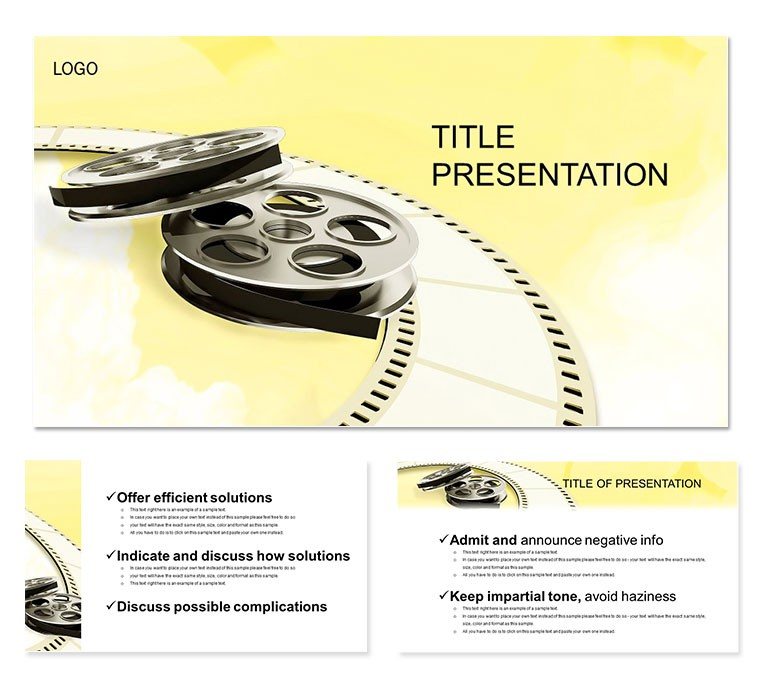
Reel of Film Keynote Diagram Template
| Format | .pptx |
| Slides | 3 unique layouts |
| Aspect ratio | 16:9 |
| Compatibility | PowerPoint |
| Animated | No |
| Language | English |
| License | Commercial |
| File size | — |
| Version | v1.0 |
| Last updated | January 2012 |
What's inside
Step into the spotlight where every slide unspools like a blockbuster trailer, gripping viewers from the first frame. The Reel of Film Keynote diagram template is your director`s cut for presentations in cinema, video production, and storytelling arts. Geared toward filmmakers, reviewers, and media educators, it weaves data into dramatic sequences that hold attention and drive narratives home.
Perfect for script breakdowns or festival pitches, its filmic flair elevates mundane metrics to montage masterpieces. Seamless with Keynote 2016+, it includes lifetime rights for repeated encores.
Features That Steal the Scene
Central to this template are 28 diagram slides, each a scene setter for visual data drama. From reel timelines to clapperboard comparisons, precision meets panache.
- Seven Film Noir Palettes: From sepia tones to vivid Technicolor, setting the mood for any genre.
- Cinematic Transitions: Wipe effects and fades that echo classic cuts.
- Three Master Frames: Sturdy structures for consistent shot composition.
- Iconic Props and Sets: Film reels, spotlights, and three textured backdrops.
These tools don`t just decorate - they direct focus, with animations proven to heighten emotional response, making your points as unforgettable as an Oscar moment.
Scene Selection: Slide Highlights
Opening with Slide 1`s reel strip chart for production schedules, frames advance to reveal phases. Slide 5`s storyboard grids plot audience feedback, with vignettes popping into view. Mid-act, Slides 11-16 roll out sprocket wheels for cyclical processes like editing loops, rotating to expose insights.
The climax arrives in Slides 22-28: epic montage collages blending metrics into trailer teases. This arc builds tension and release, scripting success.
On-Set Applications: Lights, Camera, Insights
A studio head screening budget reels uses timeline slides to fast-forward overruns, cutting to viable scenes. Video editors storyboard workflows with grid diagrams, framing efficiencies for client approvals.
In academia, film studies profs unspool historical analyses via wheel charts, directing debates on genre evolution. A production company credited it for a pitch that "filmed" their vision, reeling in funding.
Such uses spotlight its narrative prowess across creative and analytical realms.
Better Than Vanilla Keynote?
Stock designs are extras; this template stars with its immersive theme and pro transitions, trimming edit time while amplifying allure. It`s the reel upgrade for directors of data.
Customize instantly to roll your masterpiece.
Directing Your Deck: Pro Pointers
Drop into Keynote, then storyboard via outline view for nonlinear tweaks. Layer audio cues for sound design synergy in live shows.
Pointer: Use build orders to mimic shot reversals, heightening drama. Rehearse with notes pane to nail timing, ensuring seamless screenings.
One-time grab for endless takes.
Frequently Asked Questions
Why ideal for film presentations?
Film motifs and cut-like animations turn data into dramatic arcs.
Keynote compatibility?
2016+; test effects on target devices.
Non-cinema uses?
Yes, for any sequential storytelling, like project timelines.
Slide count?
28 diagrams, expandable with masters.
Collaboration friendly?
iCloud sync enables co-directing.
Advanced edits?
Full vector control for custom shots.
Good for
- Project roadmaps and sprint plans
- Product launch timelines
- Quarterly or annual review decks
- Company history and milestone summaries
Licence
reviews
Made my film studies presentation actually look like a movie pitch with those reel strip timelines and clapperboard icons.
The sepia color schemes were perfect for my documentary proposal but a few slides felt too dark for text.
Used the storyboard grids to plan out a video project and it saved me from drawing everything by hand.
My professor thought I spent hours on the cinematic transitions but this template did all the work.
The spotlights and film motifs are fun but it's probably too themed for a serious corporate budget review.
FAQ
Will it work in Google Slides?
Are fonts embedded?
Can I use this for client work?
What's the refund policy?
Do you update the template after purchase?
Similar templates
See all Keynote templates →

All 1 slides