 Click to zoom
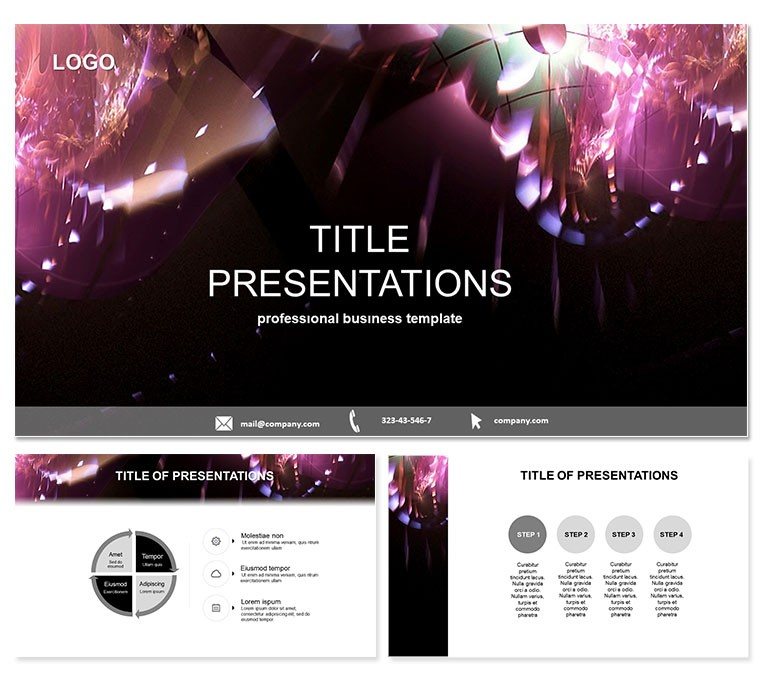
Purple Light PowerPoint Template: Elevate Performance Visuals
| Format | .pptx |
| Slides | 3 unique layouts |
| Aspect ratio | 16:9 |
| Compatibility | PowerPoint |
| Animated | No |
| Language | English |
| License | Commercial |
| File size | — |
| Version | v1.0 |
| Last updated | October 2021 |
What's inside
Imagine stepping into a boardroom where your slides don`t just inform - they captivate. The Purple Light PowerPoint Template turns mundane performance data into a symphony of elegance, blending subtle purple accents against a serene blue backdrop. Designed for professionals who demand precision and poise, this template isn`t just a tool; it`s your secret weapon for making complex metrics memorable. Whether you`re dissecting quarterly results or outlining strategic goals, its intuitive layouts ensure your message lands with clarity and style.
At its core, this template empowers you to showcase achievements without the hassle of starting from scratch. With fully editable elements, you can tweak colors, icons, and text in minutes, freeing you to focus on what matters: driving decisions. Compatible with PowerPoint 2016 and later versions, it supports seamless integration into your workflow, whether you`re on Windows or Mac. And with a one-time purchase granting lifetime license, it`s an investment that pays dividends in every presentation you deliver.
Unlocking the Core Features of Purple Light
Dive deeper into what makes this template a standout choice. Built around three master slides, it offers flexibility for consistent branding across your deck. Switch between three distinct backgrounds - each evoking a sense of calm professionalism - to match your session`s tone. The real magic lies in the 28 meticulously crafted diagrams, each available in seven vibrant color schemes. From bar charts tracking sales growth to pie charts breaking down team contributions, these visuals are ready to adapt to your data.
- Master Slides: Three options for effortless theme consistency, including title, content, and section dividers.
- Backgrounds: Three variations in soft blues with purple highlights, ensuring readability even in low-light settings.
- Diagrams: 28 pre-built slides covering timelines, process flows, hierarchies, and quantitative comparisons.
- Color Schemes: Seven palettes, from cool corporate blues to warm performance-driven purples, all vector-based for sharp scaling.
Customization is a breeze - no advanced skills required. Simply drag and drop your data into SmartArt-enhanced placeholders, and watch the template animate your story. This level of polish rivals custom design agencies but at a fraction of the cost and time.
A Closer Look at the Slide Collection
Each of the 28 diagram slides is engineered for specific storytelling needs. Start with the introductory timeline slide, which uses flowing light rays to map project milestones, making long-term progress feel immediate and exciting. Follow with hierarchical org charts that layer team roles with purple glow effects, ideal for clarifying reporting structures during restructures.
For data-heavy sections, the quantitative slides shine: think stacked bar graphs that layer revenue streams in gradient blues, or scatter plots pinpointing efficiency gains. Process flows get a dynamic twist with arrowed pathways that mimic light diffusion, perfect for illustrating workflow optimizations. And don`t overlook the comparison matrices - side-by-side tables with subtle shading that highlight variances without overwhelming the viewer.
These aren`t generic placeholders; they`re thoughtful designs informed by real presentation pitfalls. For instance, the radial diagrams avoid clutter by using concentric circles to nest sub-metrics, ensuring even dense info remains digestible. Tailor them for your niche, like adapting a funnel slide for lead conversion in marketing pitches.
Real-World Applications: Where Purple Light Excels
Picture a sales director prepping for an investor update. Instead of default PowerPoint grids, they deploy this template`s light-infused charts to visualize market penetration - blues representing stability, purples signaling innovative leaps. The result? Stakeholders lean in, questions turn to applause.
In academia, educators use it for research overviews, where the serene backgrounds let complex hypotheses breathe. A professor might swap color schemes to differentiate variables in a study on economic trends, making abstract concepts tangible for undergrads. It`s equally at home in non-profits, where grant proposals benefit from the template`s clean aesthetics to underscore impact metrics without flashy distractions.
One user, a mid-level manager, shared how it streamlined their monthly KPI reviews: "Swapping in our data took under 10 minutes, and the team finally engaged instead of zoning out." These scenarios highlight the template`s versatility - bridging corporate strategy sessions to community outreach decks.
Why Ditch Defaults for Purple Light?
Standard PowerPoint templates are functional but forgettable - like a plain suit at a gala. They lack the nuanced visuals that hold attention or the adaptability for brand alignment. This template counters that with bespoke diagrams that load faster than layered animations and scale better on projectors. Plus, its vector graphics prevent pixelation during exports to PDF or video, a boon for hybrid meetings.
Compared to free alternatives, Purple Light invests in quality: no misaligned elements or dated fonts. It`s like upgrading from economy to business class - smoother, more refined, and ultimately more effective at closing the deal, whether that`s a promotion or a partnership.
Ready to infuse your next presentation with effortless elegance? Download the Purple Light PowerPoint Template today and watch your performance narratives come alive.
Frequently Asked Questions
What versions of PowerPoint does this template support?
The Purple Light PowerPoint Template is fully compatible with PowerPoint 2016, 2019, 2021, and Microsoft 365, ensuring smooth performance across platforms.
Can I customize the colors to match my brand?
Absolutely - each of the 28 diagrams comes with seven editable color schemes, and you can further tweak via PowerPoint`s color theme tools for perfect brand synergy.
Is this template suitable for Mac users?
Yes, it`s optimized for both Windows and Mac, with .potx files that open seamlessly in PowerPoint for Mac.
How many slides are included, and what types?
You get 28 diagram-focused slides, including timelines, charts, and process maps, all built on three master layouts for quick assembly.
What`s the licensing policy?
One-time purchase includes lifetime access and unlimited use for personal or commercial projects - no recurring fees.
Does it include animations or transitions?
Subtle entrance animations are pre-applied to diagrams for engagement, but they`re optional and easily removed or adjusted.
Good for
- Project roadmaps and sprint plans
- Product launch timelines
- Quarterly or annual review decks
- Company history and milestone summaries
Licence
reviews
The checklist slides were great for a project manager.
Used the status indicators and Gantt bars.
The design is very functional.
Wish there were more rows in the table.
Good for a project status update.
FAQ
Will it work in Google Slides?
Are fonts embedded?
Can I use this for client work?
What's the refund policy?
Do you update the template after purchase?
Similar templates
See all PowerPoint Templates →



All 1 slides