 Click to zoom
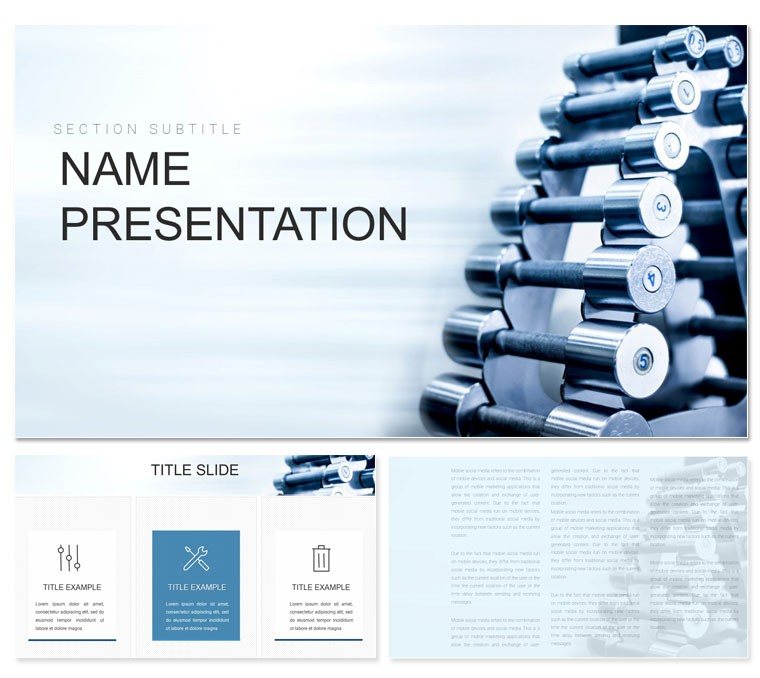
Powerblock Dumbbells PowerPoint Presentation Template: Lift Your Training Narratives
| Format | .pptx |
| Slides | 3 unique layouts |
| Aspect ratio | 16:9 |
| Compatibility | PowerPoint |
| Animated | No |
| Language | English |
| License | Commercial |
| File size | — |
| Version | v1.0 |
| Last updated | November 2024 |
What's inside
Strength training isn't just about reps - it's about inspiring progress that lasts. This PowerPoint template channels that drive, helping fitness trainers, coaches, and wellness educators craft slides that pump up motivation and map out gains. Focused on adjustable dumbbell routines like Powerblock systems, it includes 28 diagrams across seven energetic color schemes, turning workout plans into visual blueprints anyone can follow. From client progress trackers to group class overviews, these designs make fitness feel approachable and achievable.
Assembled with athlete input for real-world relevance, the template thrives in PowerPoint 2016 and later, with three masters and three backgrounds that nod to gym vibes - think metallic accents or motivational gradients. Swap in your session logs or client photos to personalize, ditching the drag of generic fitness slides. It's for those in the trenches who want presentations that energize as much as a good set.
Core Features to Power Up Your Decks
This template packs punch through practical, potent elements, prioritizing motion and measurement in every diagram. The 28 visuals range from rep counters to form breakdowns, all primed for your tweaks.
- Dynamic, Editable Icons: Dumbbell silhouettes and progress bars that morph with your data, staying crisp in print or project.
- Seven Vital Schemes: High-energy yellows for cardio bursts or steady blues for endurance builds - match the workout's intensity.
- Three Masters for Flow: Consistent spacing and motifs ensure your deck feels like a unified routine, not scattered sets.
Layouts accommodate video embeds for demo clips, blending static smarts with live action. Customization here means tailoring to body types or goals, making inclusivity effortless.
Spotlighting Diagrams for Peak Performance
Key slides hit the mark precisely. The progression ladder diagram climbs from beginner curls to advanced complexes, with rungs you label for weight increments - visualize plateaus broken.
For routine rundowns, the cycle diagram loops through circuits, editable segments timing rests and reps. Trainers use it to demo full-body flows, animating arrows to guide the eye through sequences.
Fitness-Focused Applications: Sessions, Challenges, and Clinics
Picture onboarding a new client: the before-after comparator slide juxtaposes metrics, with bars filling to show strength arcs over weeks. It celebrates small wins, fostering loyalty.
In bootcamps, the heatmap diagram shades muscle groups targeted per day, customizable intensities revealing balance or gaps. Educators in PE classes leverage the pyramid for skill hierarchies, basing broad jumps on foundational squats.
Inspired by routines from strength coaches like those in CrossFit circles, the template's burndown chart tracks challenge adherence, with lines dipping as goals near completion. Pro move: Link slides to app trackers for hybrid coaching, pulling live stats into visuals.
Gearing Up Your Presentation: Quick Steps
- Start Strong: Open .pptx in PowerPoint 2016+, setting masters to your gym's branding.
- Load Your Lifts: Input sets into the table slide, auto-formatting for readability.
- Color Code Intensity: Select a scheme, accenting high-rep days with pops of red.
- Sequence the Sweat: Add wipe transitions to mimic motion, testing for seamless playback.
- Roll Out Results: Export for client portals or in-person handouts, formats intact.
Beating stock fitness templates' blandness, this one's themed precision means routines render with pro-level detail, no extra lifts required.
The Edge That Defines Winning Workouts
What elevates it? Curated icons like adjustable plates for modularity, paired with backgrounds that evoke iron and effort. Coaches highlight how animations simulate lifts, engaging kinesthetically even screen-bound.
For virtual sessions, hotspots jump to form tips, enhancing remote efficacy. The .potx suits program templating, scaling for one-on-one to squad training.
Time to raise the bar on your materials. Download this Powerblock dumbbells PowerPoint template and sculpt sessions that sculpt success.
Frequently Asked Questions
Can I embed workout videos?
Yes, placeholders support direct inserts, with aspect controls for flawless fit.
Are diagrams printable?
Vector-based for high-res prints, ideal for wall charts or handouts.
What about metric vs. imperial?
Fully adaptable - edit units in tables for global audiences.
Does it support progress photos?
Grid slides are photo-optimized, with crops and captions built-in.
Is it beginner-friendly to edit?
Intuitive tools make changes straightforward, even for non-designers.
Good for
- Project roadmaps and sprint plans
- Product launch timelines
- Quarterly or annual review decks
- Company history and milestone summaries
Licence
reviews
The arrows showing the gap were well designed.
Those gap analysis charts are good for strategy planning.
The current vs future state comparison was clear.
My leadership team approved the action plan.
Simple but effective, no complaints.
FAQ
Will it work in Google Slides?
Are fonts embedded?
Can I use this for client work?
What's the refund policy?
Do you update the template after purchase?
Similar templates
See all PowerPoint Templates →

All 1 slides