 Click to zoom
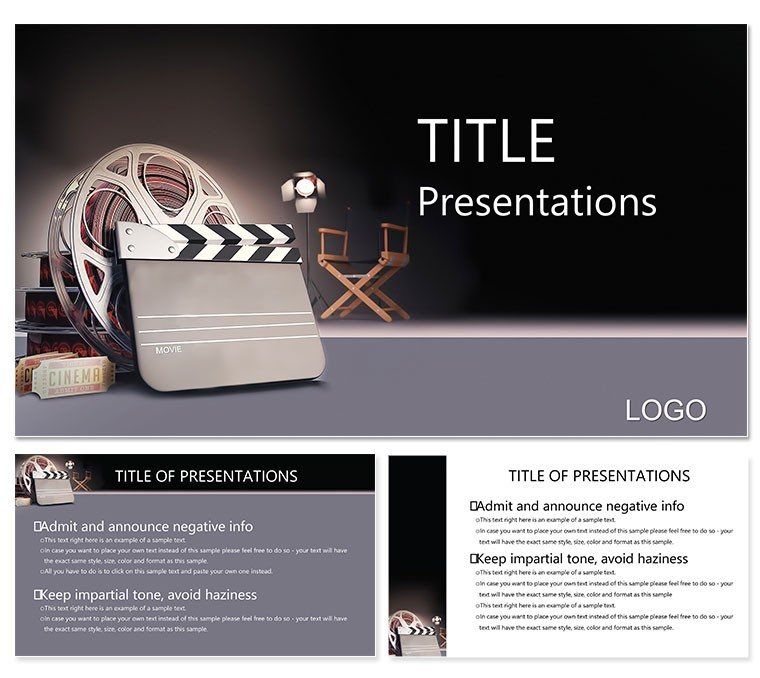
Motion Picture Producer PowerPoint Template: Frame Your Vision
| Format | .pptx |
| Slides | 3 unique layouts |
| Aspect ratio | 16:9 |
| Compatibility | PowerPoint |
| Animated | No |
| Language | English |
| License | Commercial |
| File size | — |
| Version | v1.0 |
| Last updated | October 2022 |
What's inside
Envision pitching a blockbuster to studio execs, your slides cutting between storyboards and budgets like a well-edited trailer. The Motion Picture Producer PowerPoint template is built for filmmakers, producers, and creatives in video production who need to convey complex processes with cinematic flair. It delivers 28 diagram slides that dissect everything from pre-production planning to post-release strategies, making your deck as dynamic as the films you craft.
This template solves the scramble of mismatched visuals in production bibles, providing a unified look with three master layouts for consistent framing and three backgrounds evoking reel strips or clapperboards. Seven color schemes - from noir blacks to vibrant primaries - suit genres from drama to animation. Files come in .jpg for mocks and .potx for PowerPoint 2016+ edits, streamlining your pipeline from concept to approval.
Directors have used akin structures for festival submissions, where timeline slides map shoots against festivals, securing funding. For telecom pros in content creation, it`s a tool to align tech specs with creative goals. Eager to storyboard your success? Adapt this template and cue the applause.
Key Elements That Direct Attention
Central to its appeal is the template`s precision engineering, turning raw ideas into polished reels of slides.
Masters and Backgrounds for Seamless Cuts
Three masters manage aspect ratios and titles, ensuring widescreen compatibility for pitch decks. Backgrounds include subtle film grain or spotlight effects, setting the scene without stealing focus. Great for crew shares via .potx.
28 Diagrams: Scenes of Storytelling
- Project Timelines: Gantt-style charts for shooting schedules, with milestones for reshoots.
- Budget Breakdowns: Pie visuals allocating funds to cast, crew, VFX.
- Story Flows: Act structures in branching trees, ideal for script reviews.
- Team Roles: Org charts linking directors to grips, clarifying hierarchies.
Animations simulate scene transitions, like wipes across charts for narrative flow.
Color Schemes to Set the Tone
Seven options match moods: desaturated for thrillers, saturated for rom-coms, with accessible contrasts for projections.
On-Set Applications: From Script to Screen
It shines in collaborative chaos, like a producer outlining dailies for a location scout.
Step-by-Step: Assembling a Pitch Deck
- Scene One - Setup: Select master for 16:9, add clapper background.
- Insert Keyframes: Load script beats into flow diagrams from treatment docs.
- Animate Builds: Sequence budget reveals to build tension like a plot twist.
- Edit for Pace: Trim with color tests under theater lights.
- Roll Credits: Present, pausing slides for live reads.
This method accelerates from rough cut to final pitch, versus juggling disparate tools.
Genre-Specific Uses
Indie filmmakers timeline crowdfunding milestones; ad agencies chart campaign shoots. Telecom trainers map signal flows to production parallels in edu sessions.
Tip: Hyperlink diagram nodes to mood boards, pulling viewers into your world.
Cutting Edge Over Stock Footage
Surpasses basic PPT with vector scalability for large formats, no pixelation. Integrate with Premiere timelines via exports, or Google Sheets for budget syncs.
Link to ImagineLayout`s design templates for hybrid media decks.
Post-Production Tweaks for Pros
PowerPoint 365 integration for co-edits. Pro: Layer audio cues in notes for rehearsal.
Goal: Decks that roll like films - engaging, paced, unforgettable.
Action: Download and Direct
Cut to your breakthrough - get the Motion Picture template for $22 and produce pitches that win.
Frequently Asked Questions
Supported PowerPoint editions?
2016+, full support in desktop and online.
Color customization ease?
Seven presets, plus theme overrides for genre fits.
Editable diagram depth?
Shapes and connectors allow full reshapes and data swaps.
Film icons present?
Yes, clappers, reels in scalable formats.
Slide total?
28 diagrams, masters for more.
Keynote viable?
Converts well, some animations adapt.
Good for
- Project roadmaps and sprint plans
- Product launch timelines
- Quarterly or annual review decks
- Company history and milestone summaries
Licence
reviews
The stacked bar chart with percentage labels inside.
I wish there were more slide layouts included.
Had to present a budget breakdown and the waterfall chart helped.
My colleague asked to borrow the template.
The placeholder text is everywhere but that's expected.
FAQ
Will it work in Google Slides?
Are fonts embedded?
Can I use this for client work?
What's the refund policy?
Do you update the template after purchase?
Similar templates
See all PowerPoint Templates →

All 1 slides