 Click to zoom
Military Tanks PowerPoint Template
| Format | .pptx |
| Slides | 3 unique layouts |
| Aspect ratio | 16:9 |
| Compatibility | PowerPoint |
| Animated | No |
| Language | English |
| License | Commercial |
| File size | — |
| Version | v1.0 |
| Last updated | October 2023 |
What's inside
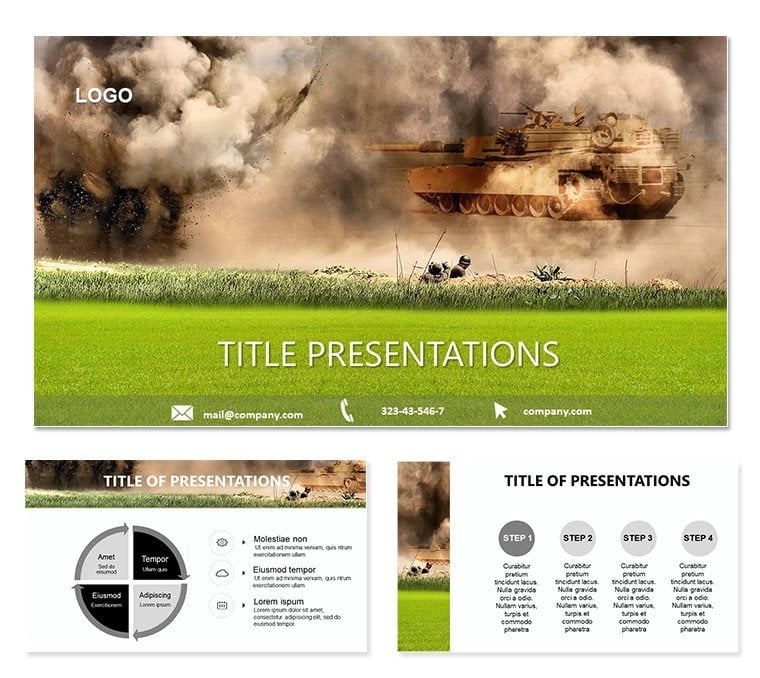
Picture rolling out a presentation that commands respect from the first slide, much like a tank division advancing with unyielding force. The Military Tanks PowerPoint template delivers exactly that, armoring your content with rugged visuals and structured layouts tailored for defense briefings, historical analyses, or strategic overviews. Boasting 28 editable diagrams across seven color palettes, it equips you to tackle complex topics - from tactical maneuvers to operational timelines - with confidence. Compatible with PowerPoint 2016 onward and optimized for widescreen (16:9 and 16:10), this tool integrates tank silhouettes and camo patterns to ground your narratives in authenticity.
Inspired by iconic armored vehicles that symbolize resilience, the template`s three master slides and three backgrounds set a tone of strategic depth. Defense analysts can deploy it to visualize battle simulations, while educators bring history to life through layered infographics. No more wrestling with mismatched clipart; these vector elements scale flawlessly, letting you emphasize key data like troop movements or resource allocations with pinpoint accuracy.
Strategic Features to Fortify Your Message
Explore the arsenal of tools within: Slide 1 establishes dominance with a full-width tank render against a desert expanse, ideal for intros - overlay your objectives for instant alignment. Progress to slide 4`s horizontal timelines, styled as tank tracks, where milestones advance like convoys under fire. The seven color schemes range from arid neutrals for field reports to metallic blues for corporate strategy sessions, ensuring every deck feels purposeful.
- Vector Precision: Tank icons and terrain motifs resize without distortion, perfect for zooming into supply logistics.
- Background Versatility: Choose urban grit or open plains to contextualize your theme, enhancing immersion.
- Diagram Depth: Twenty-eight options cover everything from SWOT matrices armored in tread patterns to Venn diagrams encircled by turret views.
A strategy planner once adapted slide 18`s org chart - recast as a command hierarchy with tank divisions - for a merger pitch, clarifying roles amid chaos. Such adaptations highlight how this template bridges military metaphor with modern business needs.
Battle-Tested Use Cases for Diverse Fronts
From classroom lectures on WWII campaigns to boardroom simulations of market conquests, this template adapts to the terrain. In defense sectors, employ the funnel diagrams on slides 10-12 to depict recruitment pipelines, with tank funnels narrowing to elite units. History buffs might use radial charts (slide 25) to radiate event timelines from pivotal battles, annotating with archival-style labels.
- Assess Your Battlefield: Identify core messages, then select diagrams that mirror their flow - lines for advances, blocks for fortifications.
- Armor with Data: Import from spreadsheets; adjust armor plating colors to signal risk levels.
- Rehearse the Advance: Use slide sorter to sequence for narrative momentum, testing transitions for smooth rolls.
Versus standard PowerPoint builds, it accelerates setup by pre-loading thematic assets, freeing you for deeper analysis. A quick workflow hack: Group tank elements for batch edits, streamlining updates across multi-section decks.
Key Slide Spotlights
Slide 7`s bar series stacks like armored plating, stacking metrics for comparative strength - edit heights to show production ramps. Deeper in, slide 23`s process wheel spins like treads, cycling stages from ideation to deployment, with customizable spokes for sub-tasks. These designs not only inform but inspire, evoking the grit of real-world operations.
For integration, hyperlink diagrams to appendices, creating a navigable command center. Pros recommend faint grid overlays on backgrounds for subtle alignment guides during builds.
Lead with Unassailable Design
This template isn`t just slides - it`s your strategic edge, built for those who plan meticulously and execute boldly. Secure yours for $22 and roll out decks that leave lasting impressions.
Frequently Asked Questions
Can I customize the tank visuals in this PowerPoint template?
Yes, all tank icons and backgrounds are vector-based and fully customizable to align with your specific theme.
What PowerPoint versions does it support?
It`s fully compatible with PowerPoint 2016 and later, including Microsoft 365.
Are there animations included?
Basic entrance animations are built-in for diagrams; add more via PowerPoint`s tools for tailored effects.
Is it suitable for educational presentations?
Definitely - its historical motifs make it ideal for teaching strategy or military history.
How do the color schemes work?
Apply any of the seven schemes globally or per slide to match your presentation`s tone.
What`s the slide size?
Widescreen formats (16:9 and 16:10) for optimal viewing on modern screens.
Good for
- Project roadmaps and sprint plans
- Product launch timelines
- Quarterly or annual review decks
- Company history and milestone summaries
Licence
reviews
Good for a basic deck
The font is a bit boring but it's readable.
The process flow with step numbers and arrows is very intuitive.
Some slides have overlapping elements when I edit
Had to present a change management plan and the timeline worked.
FAQ
Will it work in Google Slides?
Are fonts embedded?
Can I use this for client work?
What's the refund policy?
Do you update the template after purchase?
Similar templates
See all PowerPoint Templates →

All 1 slides