 Click to zoom
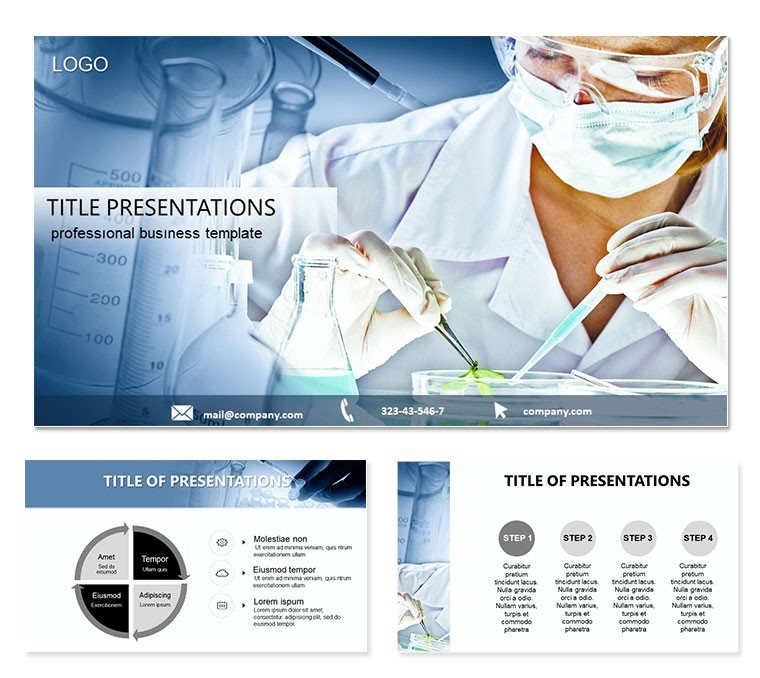
Medical Sciences Conference PowerPoint Template
| Format | .pptx |
| Slides | 3 unique layouts |
| Aspect ratio | 16:9 |
| Compatibility | PowerPoint |
| Animated | No |
| Language | English |
| License | Commercial |
| File size | — |
| Version | v1.0 |
| Last updated | October 2021 |
What's inside
Imagine stepping onto the stage at a bustling medical sciences conference, where every slide needs to not just inform but inspire fellow researchers, clinicians, and students to dive deeper into cutting-edge health topics. This PowerPoint template is your secret weapon for turning complex medical concepts into visually compelling narratives that stick. Tailored for professionals and academics in the medical field, it offers 28 meticulously crafted diagrams across 7 versatile color schemes, ensuring your presentation on topics like emerging therapies or public health strategies resonates long after the applause fades.
Whether you`re a graduate student unveiling your thesis on genomic advancements or a seasoned professor leading a panel on ethical AI in diagnostics, this template streamlines your workflow. With three master slides and three background options, you can quickly adapt the look to match your institution`s branding or the conference`s theme. Available in widescreen formats (16:9 and 16:10), it`s optimized for modern projectors and screens, letting your content shine without technical hiccups.
Unlocking the Core Features of This Template
At its heart, this template is built for clarity and customization. Each of the 28 diagram pages serves a specific purpose, from simple flowcharts tracing disease progression to intricate timelines mapping clinical trial phases. Start with the basics: the master slides provide a consistent header and footer setup, so your title, affiliation, and contact details appear effortlessly on every slide. Switch between the three backgrounds - subtle gradients in medical blues, clean whites for data-heavy sections, or textured neutrals for discussion slides - to keep viewers engaged without overwhelming them.
Customization is a breeze in PowerPoint 2016 and later versions. Drag and drop your data into the editable shapes; the smart guides ensure alignment stays pixel-perfect. The seven color schemes range from professional grays for formal sessions to vibrant accents for highlighting breakthrough stats, like the rise in telemedicine adoption during global health crises. And since sources come in .jpg for quick previews and .potx for full editing, you`re set for both planning and polish.
- Diagram Variety: Flowcharts for treatment protocols, pie charts for demographic breakdowns, and Venn diagrams for overlapping research fields.
- Color Flexibility: Seven schemes to suit day or evening sessions, ensuring readability under varying lights.
- Format Compatibility: Widescreen ready, with vector-based elements that scale without losing quality.
Step-by-Step: Building Your Conference Deck
Getting started couldn`t be simpler. Open the .potx file in PowerPoint, apply one of the master slides via the View tab, and select your preferred background from the slide master view. Next, navigate to the diagram pages - say, Diagram Page 5 for a process map - and replace placeholder text with your key findings, such as "Phase III trials show 85% efficacy in targeted therapies." Use the built-in animation tools to reveal elements sequentially, mimicking the logical flow of scientific inquiry.
- Outline your talk: Map sections to diagram types, like using bar graphs for comparative studies on Page 12.
- Infuse data: Insert real-world examples, perhaps a line chart on Page 18 depicting vaccine rollout curves from recent global efforts.
- Refine visuals: Adjust colors to emphasize contrasts, ensuring accessibility for color-blind attendees.
- Rehearse: Test transitions in slideshow mode to confirm smooth delivery.
This approach not only saves hours of design time but also positions you as a polished communicator, much like how leading medical journals use infographics to distill dense research.
Real-World Applications in Medical Presentations
Picture a young resident presenting at the annual American College of Physicians meeting. Using this template`s radial diagrams on Page 22, they illustrate the interconnectedness of social determinants in patient outcomes, drawing nods from the audience. Or consider a pharma executive at a virtual symposium: The timeline slides on Pages 25-27 help roadmap drug development pipelines, making abstract timelines tangible and persuasive.
For educators, the template shines in lecture halls. Assign students to adapt the scatter plots on Page 10 for epidemiology data, fostering hands-on learning. In roundtable discussions, the minimalist layouts keep focus on dialogue, with subtle icons reinforcing points without clutter. It`s versatile enough for hybrid events too - export to PDF for handouts or share via screen-sharing tools seamlessly.
Tailored Use Cases for Diverse Medical Scenarios
Research Symposiums: Leverage the Gantt charts to outline multi-year studies, syncing milestones with funding cycles.
Clinical Workshops: Employ the layered diagrams for dissecting surgical techniques, layer by layer, to build understanding progressively.
Policy Briefings: Use the comparison tables to juxtapose healthcare models, sparking informed debates.
These applications highlight how the template bridges theory and practice, empowering users to convey nuance in high-stakes environments.
Why This Template Stands Out for Medical Pros
Unlike generic slide packs, this one is steeped in medical context - diagrams mimic the precision of lab reports, with clean lines and ample white space for annotations. It`s compatible across devices, from laptops to tablets, and integrates with add-ins like think-cell for advanced charting if needed. Professionals appreciate the time it frees up: Focus on rehearsing your delivery rather than tweaking alignments.
Integrate it into your workflow by pairing with tools like EndNote for citations - embed hyperlinks in footnotes for interactive Q&A. For teams, the shared .potx format ensures brand consistency across collaborative decks. And with its emphasis on visual hierarchy, it naturally guides eyes to your core message, whether that`s a novel biomarker discovery or sustainability in healthcare delivery.
Pro Tips for Maximizing Impact
- Layer animations sparingly: Reveal data points one by one to build suspense in efficacy discussions.
- Pair with high-res images: Insert microscopy shots into frame placeholders for authentic visuals.
- Test on audience proxies: Run a dry rehearsal with colleagues to gauge clarity on complex diagrams.
These tweaks elevate standard talks into memorable sessions, fostering connections that could lead to collaborations or publications.
Ready to Transform Your Next Conference Talk?
Download this Medical Sciences Conference PowerPoint Template today for just $22 and step confidently into your spotlight. With its ready-to-adapt diagrams and thoughtful design, you`ll not only meet expectations but exceed them, leaving your audience inspired and informed.
Frequently Asked Questions
What software versions does this template support?
It works seamlessly with PowerPoint 2016 and newer, including Microsoft 365 subscriptions.
Can I adjust the color schemes for my branding?
Yes, the seven schemes are fully editable; simply update the theme colors in the design tab.
Are the diagrams vector-based for resizing?
Absolutely, all elements are scalable without quality loss, perfect for various screen sizes.
How many backgrounds are included?
There are three distinct backgrounds to choose from, each optimized for different content types.
Is it suitable for virtual presentations?
Definitely - widescreen formats ensure crisp viewing on Zoom or Teams.
What`s the file size for easy sharing?
The .potx file is lightweight, around 5MB, for quick email or cloud uploads.
Good for
- Project roadmaps and sprint plans
- Product launch timelines
- Quarterly or annual review decks
- Company history and milestone summaries
Licence
reviews
Presented on genomic advancements at a conference and the flowcharts made the process clear.
Used the radial diagrams to show social determinants of patient outcomes - got a lot of nods.
The timeline slides helped roadmap drug development pipelines for a pharma exec.
Just a grad student but this made my thesis data look ready for a journal.
The medical blues and clean whites kept the slides from looking too busy.
FAQ
Will it work in Google Slides?
Are fonts embedded?
Can I use this for client work?
What's the refund policy?
Do you update the template after purchase?
Similar templates
See all PowerPoint Templates →



All 1 slides