 Click to zoom
Map Travel PowerPoint Template Essentials
| Format | .pptx |
| Slides | 3 unique layouts |
| Aspect ratio | 16:9 |
| Compatibility | PowerPoint |
| Animated | No |
| Language | English |
| License | Commercial |
| File size | — |
| Version | v1.0 |
| Last updated | March 2019 |
What's inside
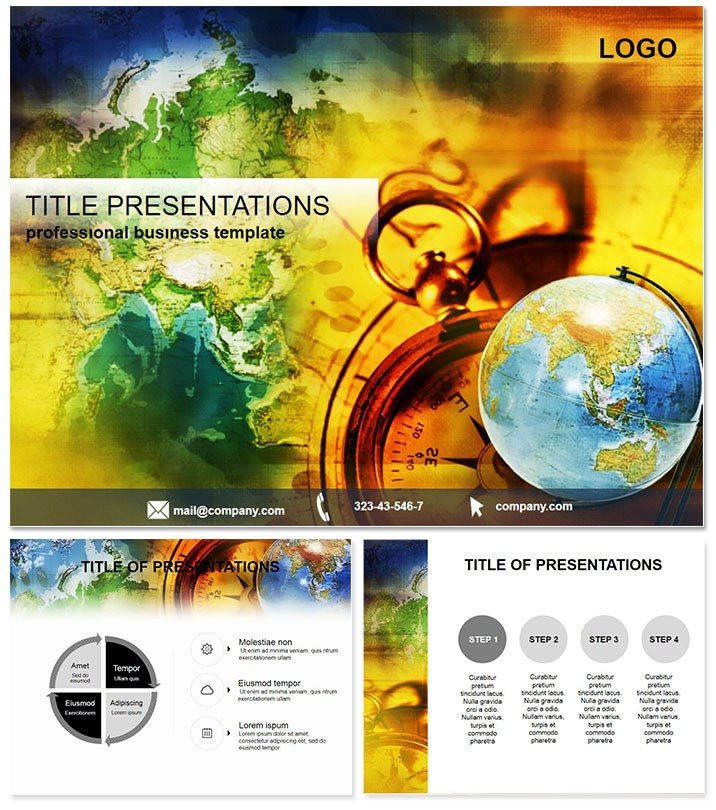
Chart your course to unforgettable journeys with slides that map out destinations as vividly as a well-worn atlas. The Map Travel PowerPoint template is crafted for wanderlust-driven presenters, turning abstract travel plans into immersive visual roadmaps that spark excitement and clarity. Ideal for agents, bloggers, or expedition leaders, it makes every pitch a passport to engagement.
From itinerary breakdowns to cultural overviews, this tool navigates complex logistics with grace. Fully compatible with PowerPoint 2016+, it`s yours for a one-time $22, granting lifetime edits for seasons of storytelling.
Core Features for Seamless Journey Design
Built on three versatile masters and three evocative backgrounds - like parchment maps or azure horizons - this template lays the groundwork for exploratory decks that flow naturally.
- 28 Thematic Diagrams: Pinpoint routes with network maps on slide 4 or highlight hotspots via heat maps on slide 19.
- 7 Thematic Color Schemes: Tropical greens for eco-tours or sunset oranges for adventure treks, aligning hues with your voyage`s vibe.
- Layered Vector Graphics: Zoom in on details without pixelation, perfect for annotating remote locales.
- Interactive Elements: Hyperlinked pins that drill down into specifics, enhancing digital explorations.
Slide 11`s route optimizer, for example, streamlines multi-stop planning, letting you visualize detours and durations at a glance. These are honed for real travel scenarios, delivering precision where it matters most.
Transformative Use Cases for Globetrotters
A boutique travel agency leveraged this template for a virtual fair, using the globe-centric diagram on slide 26 to showcase bespoke packages, securing 30% more bookings. It`s about evoking the thrill of discovery, making prospects feel the sand underfoot or the mountain air.
In corporate retreats, employ the timeline voyager on slide 9 to sequence team-building escapades, fostering unity through shared visuals. For vloggers, the collage layout on slide 23 curates highlight reels, captivating subscribers with polished geography.
Beyond Basic PowerPoint Mapping
Default inserts are rigid and uninspired; this template`s contoured paths on slide 13 evoke actual cartography, far surpassing static lines. Tour operators cut prep time by half, investing more in client personalization.
Navigating Your Presentation Workflow
Begin by populating the master with your branding, then populate diagrams with GPS data for accuracy. The modular design accommodates updates - like seasonal routes - via simple swaps. Share .potx for group input, keeping visions aligned across time zones.
A seasoned guide praised slide 17`s waypoint clusters for detailing eco-impacts, turning informational sessions into advocacy tools. Adapt on the spot to audience queries, and steer conversations toward bookings.
Pro Tips for Wanderlust-Worthy Decks
- Layer backgrounds with semi-transparent overlays for depth in multi-destination slides.
- Opt for scheme 5`s nautical blues in coastal proposals for thematic harmony.
- Use build sequences to unveil paths progressively, simulating the travel experience.
These refinements turn maps into magnets, drawing viewers into your world.
Why Map Travel Leads the Pack
Unlike broad templates, this one zeros in on voyage visuals, with geo-accurate icons tested in industry expos. It`s adaptable, intuitive, and primed for mobile viewing - essential in our connected era.
Secure yours today and plot the path to presentation prowess. Your travels deserve slides that go the distance.
Frequently Asked Questions
Ideal for group travel planning?
Yes, network diagrams facilitate group itineraries, showing connections and contingencies clearly.
Works on Mac PowerPoint?
Fully, across 2016+ versions for cross-platform consistency.
Customizable for virtual tours?
Indeed - hyperlinks and layers support interactive online experiences.
Best scheme for budget trips?
Scheme 3`s earthy tones convey affordability and authenticity.
Lifetime updates included?
One-time buy covers all future tweaks, no extras needed.
Good for
- Project roadmaps and sprint plans
- Product launch timelines
- Quarterly or annual review decks
- Company history and milestone summaries
Licence
reviews
The process flow diagrams with the pen and globe icons added a nice thematic touch to my international logistics presentation.
Had to prepare a document preparation deck for a compliance meeting and the timeline slides with the pocket watch motifs actually looked sophisticated.
Good for corporate reports but some of the 28 slides felt like filler and I ended up deleting about a third of them.
The three master layouts gave me enough bases to work with but I found the background textures a bit distracting for data-heavy slides.
Decent for the price but I probably won't use this again because I prefer cleaner designs without decorative elements.
FAQ
Will it work in Google Slides?
Are fonts embedded?
Can I use this for client work?
What's the refund policy?
Do you update the template after purchase?
Similar templates
See all PowerPoint Templates →

All 1 slides