 Click to zoom
Making Ideas Keynote Diagrams: Matrix Your Creativity into Reality
| Format | .pptx |
| Slides | 21 unique layouts |
| Aspect ratio | 16:9 |
| Compatibility | PowerPoint |
| Animated | No |
| Language | English |
| License | Commercial |
| File size | — |
| Version | v1.0 |
| Last updated | February 2025 |
What's inside
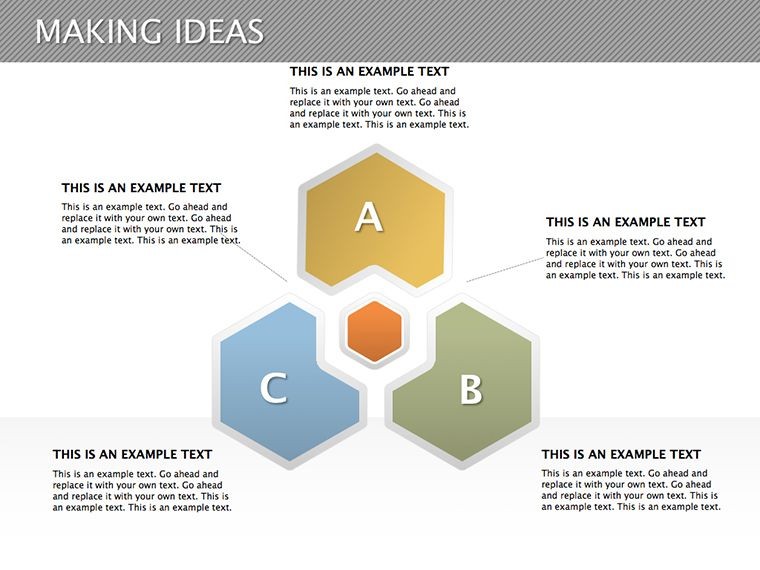
Unleash the power of structured thinking with our Making Ideas Keynote Diagrams template, boasting 21 editable matrix slides ready for your presentations. Ideal for innovators, marketers, and educators, this tool transforms brainstorming into organized visuals, fostering clearer idea development. Based on matrix frameworks from management gurus like Boston Consulting Group, these diagrams help you categorize, prioritize, and evolve concepts seamlessly. Whether in a startup pitch or academic lecture, you'll inspire teams to connect dots creatively. Exclusive to Keynote with .key compatibility, it's plug-and-play - copy, paste, and color-change to match your vision, turning abstract thoughts into concrete strategies.
Core Features Fueling Idea Generation
Matrix designs provide grids for multidimensional analysis, all vector-scalable for precision. Quick edits let you adapt cells for specific data, ensuring flexibility.
- Priority Matrices: Rank ideas by impact and feasibility.
- Comparison Grids: Evaluate options side-by-side.
- Idea Flow Charts: Track evolution from concept to execution.
- Customizable Cells: Add text, icons, or colors dynamically.
These embody design principles from "The Back of the Napkin" by Dan Roam, making complex ideas visually simple.
Diving Deep into the Matrix Slides
Slide 1 introduces a basic 2x2 matrix for quick categorizations, like Eisenhower's urgent-important grid. Slides 2-6 expand to multi-axis: one for product portfolios, another for risk assessments, drawing from McKinsey models. Ideation-focused slides (7-13) include brainstorming webs and affinity diagrams, suitable for design sprints as practiced at Google Ventures.
Advanced matrices in 14-18 incorporate scoring systems and SWOT integrations for strategic depth. Closing slides (19-21) offer synthesis matrices, perfect for decision-making summaries. Transitions are suggested for cell reveals, building suspense in narratives.
Diverse Use Cases for Idea Mastery
Matrices thrive in collaborative settings, from marketing campaigns to research planning. Use them to align teams on product roadmaps or teach critical thinking in classrooms.
- Brainstorming Sessions: Organize wild ideas into viable ones.
- Strategic Planning: Plot growth paths effectively.
- Educational Tools: Illustrate concepts interactively.
Real-world win: A creative agency streamlined their pitch process with these, cutting prep time by half while impressing clients. Incorporate by pasting your notes, then refine with Keynote's alignment guides.
Tips from the Pros for Matrix Magic
Leverage shading for emphasis, as per color theory in design. Balance content to prevent grid overload, echoing Gestalt principles. For group edits, use iCloud collaboration in Keynote.
Internal links to matrix variations enhance site flow. This template is your blueprint for innovative presentations.
Build Better Ideas Today
Our expertise in diagram tools guarantees this template's effectiveness and ease.
Ignite your creativity - download Making Ideas Keynote Diagrams now. Matrix and manifest your next big idea.
Frequently Asked Questions
How flexible are the matrices?21 slides with adjustable rows, columns, and content for any scenario.Works on older Keynote?Yes, compatible with Keynote '09 and newer versions.Can I add images to cells?Sure, insert photos or icons directly into matrix grids.Animation capabilities?Prepped for cell-by-cell builds to reveal ideas progressively.Export formats available?Export as PDF, images, or movies from Keynote.Good for
- Project roadmaps and sprint plans
- Product launch timelines
- Quarterly or annual review decks
- Company history and milestone summaries
Licence
reviews
The workflow diagrams helped explain our project stages.
I liked the cleaner layouts with less extra graphics.
Some slides felt repetitive after a while.
Easy to customize for office presentations.
Worked fine for my business class assignment too.
FAQ
Will it work in Google Slides?
Are fonts embedded?
Can I use this for client work?
What's the refund policy?
Do you update the template after purchase?
Similar templates
See all Keynote Diagrams →

All 21 slides