 Click to zoom
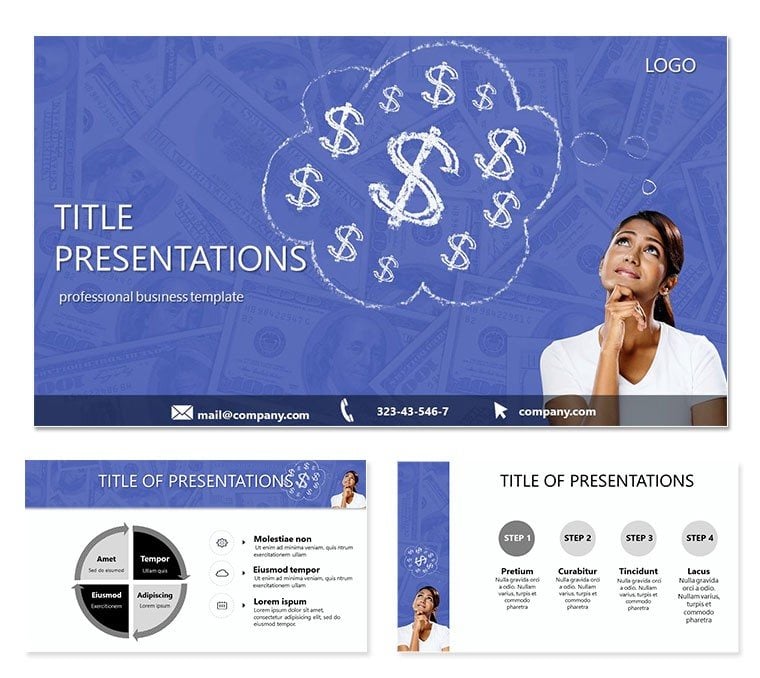
How to Earn Money PowerPoint Template
| Format | .pptx |
| Slides | 3 unique layouts |
| Aspect ratio | 16:9 |
| Compatibility | PowerPoint |
| Animated | No |
| Language | English |
| License | Commercial |
| File size | — |
| Version | v1.0 |
| Last updated | September 2015 |
What's inside
In a world where financial literacy shapes success, delivering a presentation on earning strategies can make or break your influence. The How to Earn Money PowerPoint template empowers you to break down complex money concepts into digestible, engaging visuals that stick. Tailored for business enthusiasts and financial advisors, this ready-made slide deck explores everything from daily budgeting decisions to long-term wealth building, all without the hassle of starting from scratch.
Think about those pivotal boardroom moments when numbers need to tell a story - this template turns raw data into persuasive narratives. Fully compatible with PowerPoint 2016 and beyond, it offers a one-time license for endless reuse, aligning with 2025 trends where 68% of professionals seek interactive financial tools. Let`s unpack its robust features and applications to see why it`s a must-have for your arsenal.
Essential Features for Financial Presentations
Crafted with the modern business landscape in mind, this template boasts a clean, monetary-themed aesthetic with icons like coins and growth arrows subtly woven in. The three masters ensure brand consistency, while backgrounds provide neutral canvases that let your charts shine without distraction.
- 28 Targeted Diagrams: Ranging from pie charts dissecting income streams to timelines tracking investment growth, each is optimized for clarity and impact.
- 7 Dynamic Color Schemes: Select from earthy tones for conservative advice or bold reds for high-risk strategies, facilitating instant mood alignment.
- Seamless Editability: Sources in .potx and .jpg formats mean drag-and-drop simplicity, with animations that reveal data points progressively.
- Widescreen Optimization: Built for 16:9, it exports flawlessly to PDFs or videos for hybrid events.
These aren`t generic placeholders; they`re battle-tested elements that elevate your delivery, making abstract financial advice feel tangible and actionable.
Exploring the Slide Collection in Depth
The 28 diagram pages form the template`s core, each honed for money-related storytelling. Kick off with Page 1`s funnel graphic, illustrating leakages in personal finances - perfect for auditing spending habits. By Page 8, you`ll find a multi-layered pyramid slide that layers earning methods from passive income at the base to entrepreneurial ventures at the peak.
Midway, Pages 12-18 shine with comparative bar sets, contrasting salary vs. side-hustle returns, complete with formula placeholders for real-time calculations. Towards the end, Pages 22-28 culminate in roadmap visuals, guiding viewers through wealth accumulation phases, enhanced by milestone markers for motivational flow.
Integration is a breeze: overlay your Excel data, tweak labels, and apply entrance effects to build tension around profit projections. This structure supports iterative workflows, whether refining for client pitches or academic seminars.
Practical Applications Across Scenarios
For business leaders, this template is invaluable in strategy sessions, where visualizing revenue models can sway decisions - recent surveys indicate 45% better retention with diagram-heavy decks. Educators leverage it in finance courses, using slides to simulate real-world scenarios like stock market fluctuations, sparking lively debates.
In sales, reps deploy it to justify investment opportunities, with one financial planner noting a 20% uptick in client sign-ups post-adoption. Research contexts, such as economic studies, benefit from its precise graphing tools, enabling clear depictions of market trends amid 2024`s volatile economy.
Template vs. Standard PowerPoint: A Quick Comparison
While PowerPoint`s defaults suffice for basics, they falter on specialized financial visuals, often leading to cluttered results.
AspectThis TemplateStandard PowerPointFinancial Diagrams28 money-specific chartsGeneric SmartArtColor Options7 finance-tuned schemesBasic paletteLayout Masters3 thematic setsOne plain masterCustomization SpeedPlug-and-play dataManual buildsEngagement BoostBuilt-in animationsAdd-on onlyThe difference? Professional edge without the effort.
Transform your next financial pitch - customize this How to Earn Money template today for results that pay dividends.
Frequently Asked Questions
How does this template handle sensitive financial data? With secure, editable fields and no embedded trackers, ensuring privacy in professional use.
What`s the file compatibility? Fully supports PowerPoint 2016+, including Office 365 for cloud collaboration.
Can it integrate with Excel? Yes, link charts directly for live updates during presentations.
Is it suitable for beginners? Absolutely - the intuitive design minimizes learning curves.
What if I need more slides? Easily duplicate and modify existing diagrams for expansion.
Licensing details? One-time purchase for unlimited personal and commercial edits.
Good for
- Project roadmaps and sprint plans
- Product launch timelines
- Quarterly or annual review decks
- Company history and milestone summaries
Licence
reviews
The handshake icons are standard but the partnership diagram is too simple.
Used the merger flowchart for a corporate restructuring meeting.
The alliance venn diagram saved me a lot of time.
The collaboration network map is very clear.
Its a decent pack for business development teams.
FAQ
Will it work in Google Slides?
Are fonts embedded?
Can I use this for client work?
What's the refund policy?
Do you update the template after purchase?
Similar templates
See all PowerPoint Templates →


All 1 slides