 Click to zoom
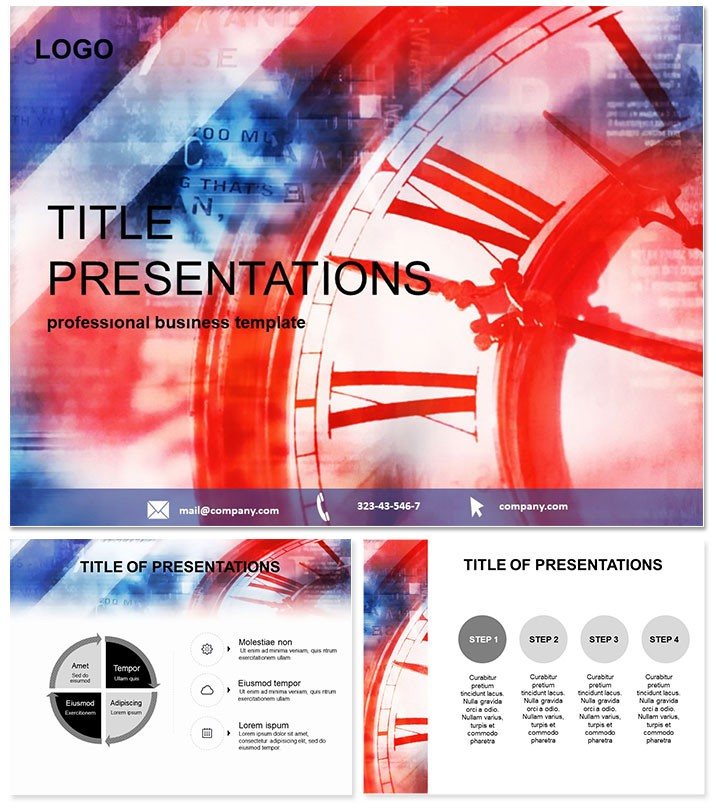
GMT Time Zone PowerPoint Template
| Format | .pptx |
| Slides | 3 unique layouts |
| Aspect ratio | 16:9 |
| Compatibility | PowerPoint |
| Animated | No |
| Language | English |
| License | Commercial |
| File size | — |
| Version | v1.0 |
| Last updated | October 2021 |
What's inside
Crossing time zones in a global pitch? Our GMT Time Zone PowerPoint Template bridges the gap, delivering 28 diagrams that demystify Greenwich Mean Time for international teams and learners alike. Crafted for business travelers, historians, and educators, it turns temporal tangles into triumphs of clarity. Why invest time here? Because in our 24/7 world, mastering time visuals isn`t optional - it`s essential for synchronized success. From jet-lag-proof schedules to epoch-spanning timelines, this tool ensures your message lands on time, every time. Download now to align your narrative across continents.
Navigate Time with Precision
Rooted in three master designs and backgrounds, the template`s 28 diagrams explore everything from UTC offsets to historical meridian shifts, available in seven color schemes for daylight or nocturnal themes. Fully editable in PowerPoint 2016 and beyond, it pairs with world clocks for interactive demos. Whether charting conference calls or ancient solar calendars, these slides foster understanding without overwhelming details.
Core Features for Timely Impact
- 28 Time-Focused Diagrams: Clocks, meridians, and zone maps - scalable for any resolution.
- Seven Thematic Colors: Earth tones for history or bright contrasts for modern logistics.
- Intuitive Customization: Adjust angles, labels, and overlaps with drag controls.
- Versatile Masters: Three options to frame sections like `Past` and `Present`.
- $22 Lifetime Deal: Own it forever, no updates required.
Enhance with built-in morph transitions to `travel` across zones, making static slides feel alive.
Versatile Uses Across Fields
Consider a multinational corp syncing Q4 deadlines: The offset calculator slide reveals peak collaboration windows, minimizing misfires. In classrooms, teachers animate the Prime Meridian`s evolution, sparking curiosity in geography buffs. Travel agencies could map tour itineraries, highlighting golden hours for excursions. Case in point: An NGO used it for disaster response coordination, saving hours in cross-hemisphere planning.
Default PowerPoint clocks? They`re rudimentary and rigid. This template`s layered vectors allow fluid rotations and annotations, exporting cleanly to web or print for broader reach.
Insider Strategies for Engagement
- Embed live UTC feeds via hyperlinks for real-time relevance.
- Color-code zones by stakeholder roles for quick scans.
- Sequence reveals to build from local to global views.
Pros note its value in remote work, where time visuals prevent `ghosting` in async teams.
Synchronize Your Success Story
Time waits for no one, but with this template, you`ll always be ahead. It empowers precise, persuasive presentations that respect every clock. From boardrooms to lecture halls, make every second count. Customize instantly and step into a world perfectly timed.
Frequently Asked Questions
Does it cover daylight saving adjustments?
Yes, dedicated slides for DST impacts and conversions.
Compatible with Google Slides?
Export to PPTX works, but native PowerPoint yields best results.
Can I add custom time zones?
Easily - edit labels and arcs to include niche locations like UTC+14.
What`s the resolution for large screens?
Vector-based, so infinite scalability without pixelation.
Is historical data included?
Base diagrams are ready; add facts via editable text fields.
How does the license work for teams?
$22 covers multi-user access in educational or corporate settings.
Good for
- Project roadmaps and sprint plans
- Product launch timelines
- Quarterly or annual review decks
- Company history and milestone summaries
Licence
reviews
The budget icons and cost diagrams were perfect for my finance presentation.
Used the expense flowcharts for a funding request.
The 7 color schemes included some nice accounting tones but the layout is pretty standard.
The allocation comparison charts and variance diagrams were useful.
It's okay for budget reviews but not for detailed financial analysis.
FAQ
Will it work in Google Slides?
Are fonts embedded?
Can I use this for client work?
What's the refund policy?
Do you update the template after purchase?
Similar templates
See all PowerPoint Templates →


All 1 slides