 Click to zoom
Food Industry Keynote Template: Plate Your Ideas with Flavor
| Format | .pptx |
| Slides | 3 unique layouts |
| Aspect ratio | 16:9 |
| Compatibility | PowerPoint |
| Animated | No |
| Language | English |
| License | Commercial |
| File size | — |
| Version | v1.0 |
| Last updated | October 2024 |
What's inside
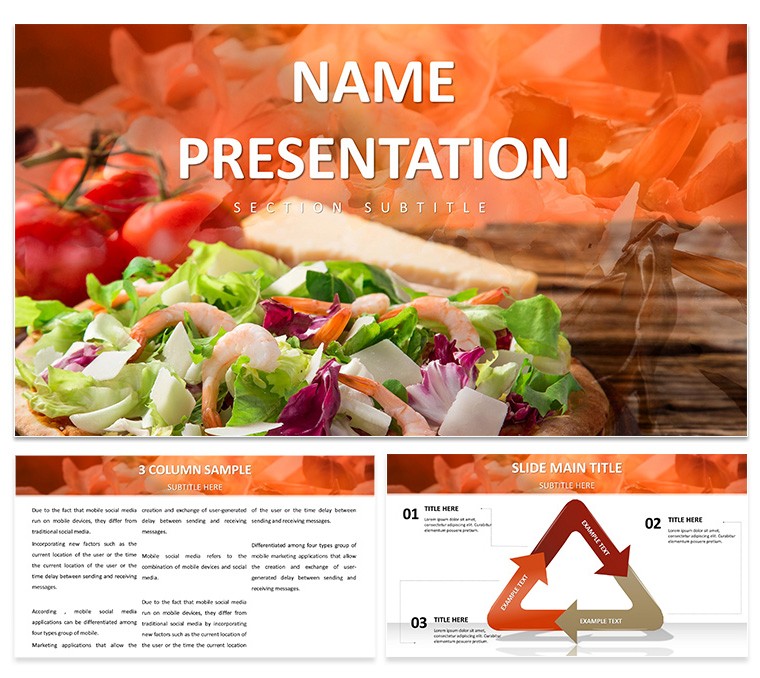
In the fast-paced world of food and beverage, a bland presentation can spoil even the freshest concepts. Enter the Food Industry Keynote Template, a vibrant toolkit that infuses your slides with the zest of culinary creativity and business savvy. Geared toward restaurant owners, food marketers, and supply chain coordinators, it delivers 28 industry-tuned diagrams in 7 appetizing color schemes, anchored by 3 master slides and 3 evocative backgrounds. Perfect for unveiling seasonal menus, dissecting supply logistics, or forecasting flavor trends, this template turns data into dishes that delight discerning audiences.
Optimized for Keynote across Apple devices, its elements - from pie charts mimicking tart slices to flow diagrams tracing farm-to-table journeys - are primed for personalization. Swap in your photos of signature dishes, adjust hues to match brand palettes, or animate ingredient breakdowns for mouthwatering reveals. This goes beyond stock slides, embodying the sensory appeal of gastronomy in visual form, much like how top chefs layer flavors for harmony. It equips you to serve up strategies that not only inform but inspire action in competitive kitchens or boardrooms.
Key Ingredients: Features That Spice Up Your Deck
What makes this template a staple? Its curated features blend practicality with panache, starting with masters that cater to narrative arcs: one for recipe spotlights, another for analytics, and a third for team huddles. These ensure every slide simmers with cohesion.
- 28 Tailored Diagrams: Envision a radial menu planner radiating options or a chain-link graphic for vendor networks - each resonates with food sector nuances, like yield calculators for portion control.
- 7 Palate-Pleasing Color Schemes: From earthy terracottas evoking rustic farms to zesty citrus bursts for innovative launches, they unify your theme while highlighting hotspots like profit margins.
- Three Thematic Backgrounds: Marble textures for upscale dining vibes or linen patterns for casual cafe feels, all subtle to let content take center stage.
Vector icons of utensils, herbs, and metrics keep things scalable and sharp, ready for any screen size.
Recipe for Success: Building Your Presentation Step by Step
Whip up your deck in Keynote by importing the template - effortless and instant. Choose a master aligned with your pitch, say the strategy one, and flavor the title slide with your logo and event teaser. For a trend report, grab the bar graph styled as stacked platters: load sales data, and builds stack layers progressively.
- Sketch Your Menu of Topics: Prioritize sections - trends, operations, innovations - pairing with apt diagrams for flavorful flow.
- Infuse Personal Touches: Embed high-res food shots or link to supplier docs for enriched context.
- Season with Effects: Apply Keynote's dissolve for seamless shifts between courses, testing on projectors for vibrancy.
- Serve and Savor: Output to video for social shares or print for menu mocks.
This method marinates your prep, focusing on storytelling over setup.
Tasting Notes: Applications in the Food Ecosystem
A distributor might use the pipeline diagram to trace produce from field to fork, spotlighting efficiency gains for investor eyes. Chefs in workshops could animate the flavor profile wheel, rotating notes to demo pairings for aspiring cooks. Marketers launching a line employ the pyramid for market segmentation, apexing on target demographics.
These scenarios showcase adaptability - from bistro blueprints to global trade talks - surpassing generic tools by incorporating sector-specific motifs like fermentation timelines. It's the secret sauce for engagements that leave audiences hungry for more.
Chef's Tips: Elevating Your Food-Focused Slides
Balance visuals like a well-composed plate: cap bullets at three per slide, using ample white space for breathing room. Rotate schemes for multi-part decks - vibrant for intros, subdued for finances. Incorporate scent-evoking descriptors in notes to prime hybrid attendees.
For workshops, enable presenter view with timers per slide, pacing like a timed service. Ultimately, it's about nourishing minds as much as menus.
Ready to feast on better presentations? Secure the Food Industry Keynote Template for $22 and cook up confidence.
Frequently Asked Questions
What file format is the template in?
It's a native .key file, fully compatible with Apple's Keynote application.
Can I customize colors to match my brand?
Yes, the 7 schemes are fully adjustable, plus you can create custom ones via Keynote's color picker.
Is it ideal for vegan or specialty food pitches?
Definitely - diagrams adapt easily to niche themes, like plant-based supply chains.
How editable are the food icons?
All icons are vector-based, allowing resize, recolor, and regrouping without quality loss.
Does it work on iPad Keynote?
Yes, optimized for touch editing on iPadOS, with full feature access.
Good for
- Project roadmaps and sprint plans
- Product launch timelines
- Quarterly or annual review decks
- Company history and milestone summaries
Licence
reviews
Food industry template has appetizing plate and ingredient icons in warm reds and yellows. Flavorful designs made my product launch deck delicious.
The 28 diagrams include market share pies and process flows that fit food topics perfectly. Easy color matching.
Slightly too fun for serious investors but great visuals. Used extensively.
Practical and thematic - the plate your ideas concept delivered. Saved hours.
As a marketer, the vibrant yet professional layouts boosted engagement. Specific food charts were spot on.
Mixed: love the icons, some backgrounds too busy but editable.
FAQ
Will it work in Google Slides?
Are fonts embedded?
Can I use this for client work?
What's the refund policy?
Do you update the template after purchase?
Similar templates
See all Keynote templates →

All 1 slides