 Click to zoom
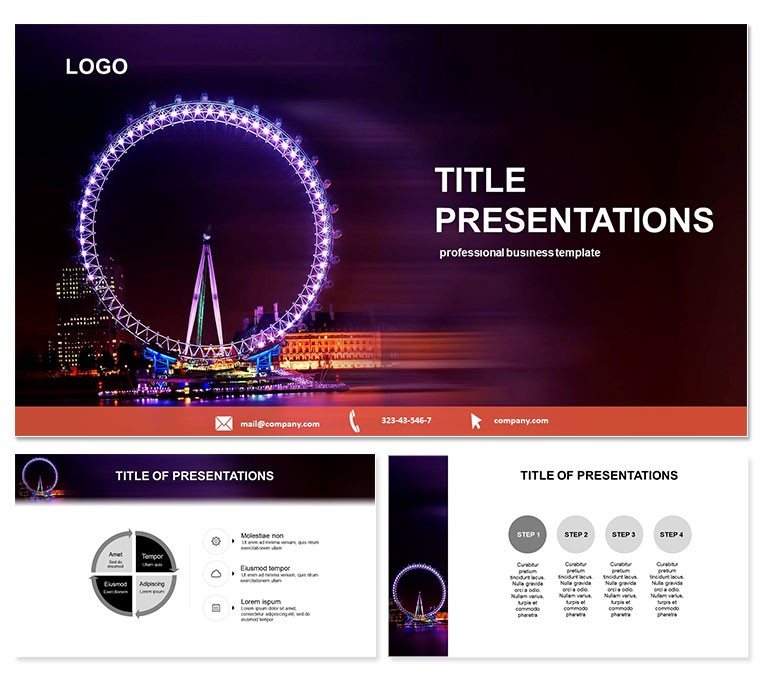
Ferris Wheel PowerPoint Template for Tourism
| Format | .pptx |
| Slides | 3 unique layouts |
| Aspect ratio | 16:9 |
| Compatibility | PowerPoint |
| Animated | No |
| Language | English |
| License | Commercial |
| File size | — |
| Version | v1.0 |
| Last updated | October 2021 |
What's inside
Picture yourself atop a glowing Ferris wheel, overlooking a vibrant city skyline at dusk, as your presentation unfolds like a nighttime adventure. The Ferris Wheel PowerPoint Template brings this captivating scene to life, making it the ideal choice for anyone crafting decks on tourism, parks, or recreational experiences. This template isn`t just visually striking; it`s a strategic tool that helps you transport your audience into the excitement of discovery, turning static slides into immersive stories.
Crafted with a focus on thematic relevance, it includes three master slides for flexible structuring, three evocative backgrounds inspired by urban evenings, and 28 meticulously designed diagrams. With seven color schemes ranging from twilight blues to festive golds, customization is effortless. Built for PowerPoint 2016 and beyond, it ensures smooth performance on Windows and Mac, with editable vectors that maintain quality at any resolution.
Standout Features for Engaging Narratives
What sets this template apart is its ability to blend entertainment with information. The Ferris wheel motif serves as a metaphor for cyclical journeys - perfect for outlining seasonal events or multi-phase projects. Typography is bold yet balanced, with ample white space to let your key messages breathe. Image placeholders are optimized for panoramic shots, allowing seamless integration of your own travel photos.
- Three Masters: Options for overview slides, detail dives, and interactive Q&A sections to keep momentum.
- Three Backgrounds: Night cityscape, wheel silhouette, and subtle light trails for varied atmospheres.
- 28 Diagrams: Specialized visuals like cycle charts and path maps that echo the wheel`s rotation.
- Seven Color Schemes: From cool nocturnes to warm accents, all adjustable in seconds.
Unlike basic PowerPoint defaults, which can feel flat, this template`s dynamic elements - like animated wheel rotations on select slides - add a layer of interactivity that boosts retention.
Exploring the Slide Collection in Depth
The 28 diagram slides are themed around motion and elevation, each enhancing the Ferris wheel narrative:
- Opening Vista: Panoramic city view with wheel overlay, introducing your tourism topic with grandeur.
- Attraction Highlights: Radial spokes listing park features, mimicking wheel cabins.
- Visitor Journey Map: Circular flowchart tracking from arrival to peak experiences.
- Seasonal Breakdown: Segmented wheel for quarterly data on attendance trends.
- Budget Allocation: Spoke diagram distributing funds across recreation initiatives.
- Feedback Loop: Rotating cycle for survey results, emphasizing continuous improvement.
- Future Visions: Elevated perspective slide for expansion plans, looking out from the top.
- Closing Ride: Fading wheel with call-to-action, inviting next steps.
These aren`t generic placeholders; they`re purpose-built. For example, the journey map slide uses curved paths that auto-align with your text inputs, ensuring a polished look without manual tweaks.
Practical Use Cases in Action
Travel agencies have leveraged this template to pitch destination packages, using the radial diagram to showcase excursion options. One firm reported a 15% uptick in bookings after their deck`s immersive visuals drew clients into the experience.
In municipal planning meetings, recreation directors employed the seasonal breakdown slide to advocate for park upgrades. The wheel`s cyclical design intuitively conveyed year-round usage patterns, swaying stakeholders toward approval.
Versus stock PowerPoint charts, which lack thematic tie-ins, this template fosters deeper connections, making your content more memorable and persuasive.
Elevating Your Presentations Effortlessly
With its lightweight files and intuitive editing, you`ll spend less time fussing and more time refining your message. A one-time $22 investment unlocks lifetime use, complete with free updates - value that pays off in every presentation.
Spin your ideas into motion - download the Ferris Wheel PowerPoint Template now and light up your next pitch.
Frequently Asked Questions
Does this template work on both Windows and Mac PowerPoint?
Yes, fully optimized for PowerPoint 2016+ on all platforms.
Are animations included in the diagrams?
Select slides feature subtle wheel rotations; all are editable or removable.
How customizable are the backgrounds?
Layered for easy swaps - replace the cityscape with your own imagery in minutes.
What if I need more than 28 slides?
Masters allow unlimited duplication and adaptation.
Is there support for high-resolution exports?
Absolutely, vectors ensure sharp prints and 4K displays.
Good for
- Project roadmaps and sprint plans
- Product launch timelines
- Quarterly or annual review decks
- Company history and milestone summaries
Licence
reviews
Pulled an all-nighter for a research symposium, this template's layout was easy on the eyes.
I only needed the Venn diagrams, so the rest of the slides were wasted on me.
It's alright, the color contrasts on some slides make text hard to read though.
Used the process flow slides for a manufacturing audit, saved me a bunch of time.
The icons are cute, but I wish there were more placeholder options for text.
FAQ
Will it work in Google Slides?
Are fonts embedded?
Can I use this for client work?
What's the refund policy?
Do you update the template after purchase?
Similar templates
See all PowerPoint Templates →

All 1 slides