 Click to zoom
Engaging Online Math Lessons Keynote Template
| Format | .pptx |
| Slides | 3 unique layouts |
| Aspect ratio | 16:9 |
| Compatibility | PowerPoint |
| Animated | No |
| Language | English |
| License | Commercial |
| File size | — |
| Version | v1.0 |
| Last updated | June 2023 |
What's inside
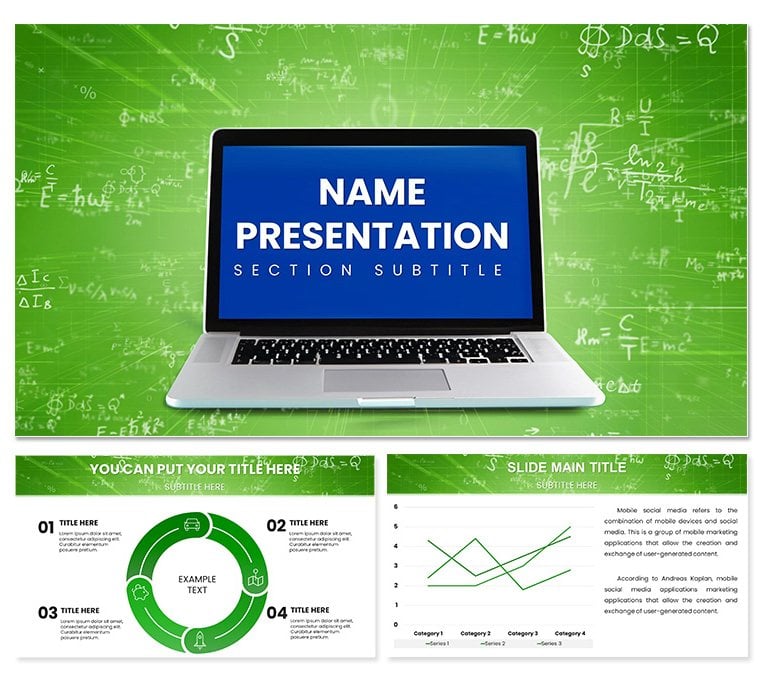
Imagine turning dry algebra problems into visual adventures that light up your students' screens during virtual sessions. That's the magic of the Online Math Lessons Keynote Template, crafted specifically for educators who want to make complex concepts click without the hassle of starting from scratch. Whether you're a high school teacher breaking down quadratic equations or a college tutor diving into calculus derivatives, this template hands you 28 ready-to-use diagrams paired with seven vibrant color schemes to match your teaching vibe. It's more than slides - it's a toolkit for sparking curiosity and simplifying the abstract, all while fitting seamlessly into your online platform.
Picture this: You're prepping for a Zoom lesson on geometry proofs, and instead of fumbling with basic shapes in Keynote, you drag and drop a pre-built infographic that illustrates theorems with clean lines and intuitive labels. Or, for a statistics module, swap in a pie chart from the collection to show probability distributions, tweaking colors to align with your school's branding in seconds. This isn't just about pretty visuals; it's about freeing up your energy to focus on the "aha" moments that make teaching rewarding. Designed for Keynote users on Mac, it opens right up in versions from 2016 onward, ensuring smooth compatibility whether you're on the latest update or an older setup.
Unlock the Core Features That Make Math Pop
At the heart of this template are those 28 diagrams, each engineered to tackle specific math challenges. From basic bar graphs for tallying survey data in probability lessons to intricate flowcharts mapping out problem-solving steps in logic puzzles, every element is vector-based for crisp scaling on any display. The seven color schemes range from calming blues for focused theory sessions to energetic greens for interactive group activities, letting you adapt on the fly.
- Versatile Charts for Data-Driven Lessons: Use line graphs to track exponential growth in functions or scatter plots to explore correlations - perfect for turning raw numbers into narratives that students can grasp instantly.
- Infographics for Conceptual Depth: Break down fractions with layered pie segments or visualize vectors with arrowed diagrams, making abstract ideas tangible without overwhelming your audience.
- Timelines and Processes: Sequence historical math milestones or step through theorem proofs, with editable milestones that let you insert custom dates or examples tailored to your curriculum.
Customization is a breeze: Select a diagram, hit edit, and adjust fonts, icons, or animations with Keynote's native tools. No need for extra software - just your creativity. And with three master slides and backgrounds included, your entire deck maintains a cohesive look, from title pages to wrap-up summaries.
Tailored Diagrams for Every Math Topic
Dive deeper into the diagram lineup, and you'll find gems like pyramid structures for hierarchical data in set theory or radial charts for angular measurements in trigonometry. Each one comes pre-loaded with placeholder text that's easy to swap for your lesson specifics, ensuring you spend less time formatting and more time engaging. For instance, a Venn diagram slide lets you overlap concepts like even and odd numbers, with overlapping zones ready for annotations that highlight intersections.
Real-World Use Cases: From Classroom to Virtual Tutoring
Let's get practical - how does this template shine in action? Consider a middle school teacher facing a hybrid class: She pulls up a process flow diagram to walk through long division steps, animating each phase to reveal solutions progressively. Students follow along, pausing to replicate on their own devices, turning passive viewing into active learning. Or take a private tutor prepping for SAT math review; by layering in customizable icons for question types, the session feels personalized, boosting confidence as scores climb through clear visualizations.
In corporate training, a workshop facilitator uses the template's bar charts to compare budgeting scenarios in financial modeling sessions, drawing parallels to real-life applications like loan calculations. The result? Attendees not only understand but retain the material longer, thanks to visuals that stick.
- Prep Your Deck: Open the .key file in Keynote and browse the diagram library to select fits for your lesson plan.
- Customize Visually: Tweak colors via the scheme selector and insert your data - watch as smart guides snap elements into place.
- Add Interactivity: Layer in hyperlinks to online calculators or embed quick polls for live feedback during your presentation.
- Present and Iterate: Run through transitions smoothly, then save versions for future tweaks based on student questions.
This workflow cuts prep time dramatically, letting you iterate based on what resonates. It's especially handy for online formats, where screen real estate matters - compact designs ensure nothing gets lost in the shuffle.
Customization Tips to Elevate Your Teaching Style
To make this template truly yours, start with the masters: Duplicate one for a themed series, say earth tones for environmental math tie-ins, and apply it across slides. Pro tip: Use Keynote's build effects sparingly on diagrams to reveal data points one by one, mimicking a guided discovery approach that mirrors Socratic questioning in math education.
For advanced users, integrate external data by copying tables from Excel and pasting as editable objects, then link them to charts for live updates. If you're blending with video, position diagrams as overlays for screencast explanations, creating hybrid content that feels dynamic and professional.
One educator shared how swapping neutral backgrounds for subtle grid patterns enhanced spatial reasoning lessons, making the deck feel like an extension of graph paper. Small touches like these amplify impact without overcomplicating your setup.
Why This Template Stands Out for Math Educators
Compared to generic Keynote themes, this one zeros in on math-specific visuals, sparing you the hunt for compatible add-ons. It's built for clarity - high-contrast elements ensure readability on projectors or shared screens - and scalability, so your deck looks sharp whether presenting to 5 or 500. Plus, at just $22, it's an investment that pays off in saved hours and elevated engagement.
Ready to make your next lesson unforgettable? Download the Online Math Lessons Keynote Template today and watch equations come alive.
Frequently Asked Questions
Is the Online Math Lessons Keynote Template compatible with older versions of Keynote?
Yes, it works seamlessly with Keynote 2016 and later, ensuring broad accessibility for educators.
How many diagrams are included, and can I customize them?
There are 28 diagrams, each fully editable for text, colors, and layouts to fit your needs.
Does it support animations for interactive lessons?
Absolutely - Keynote's native animation tools integrate perfectly with the diagrams for dynamic reveals.
Can I use this for non-online math classes?
Of course; it's versatile for in-person, hybrid, or recorded sessions alike.
Are there instructions for getting started?
The template includes intuitive masters and a simple structure, with quick-start tips in the file notes.
Good for
- Project roadmaps and sprint plans
- Product launch timelines
- Quarterly or annual review decks
- Company history and milestone summaries
Licence
reviews
Time saved on design allowed more personalization for each client.
Prepared client onboarding materials with this Keynote template. New clients appreciated the clear presentation.
Layouts handle both overview and detailed information effectively. Consistent branding application.
Solid choice with the small issue that some bullet point alignments shifted after editing.
FAQ
Will it work in Google Slides?
Are fonts embedded?
Can I use this for client work?
What's the refund policy?
Do you update the template after purchase?
Similar templates
See all Keynote templates →
All 1 slides