 Click to zoom
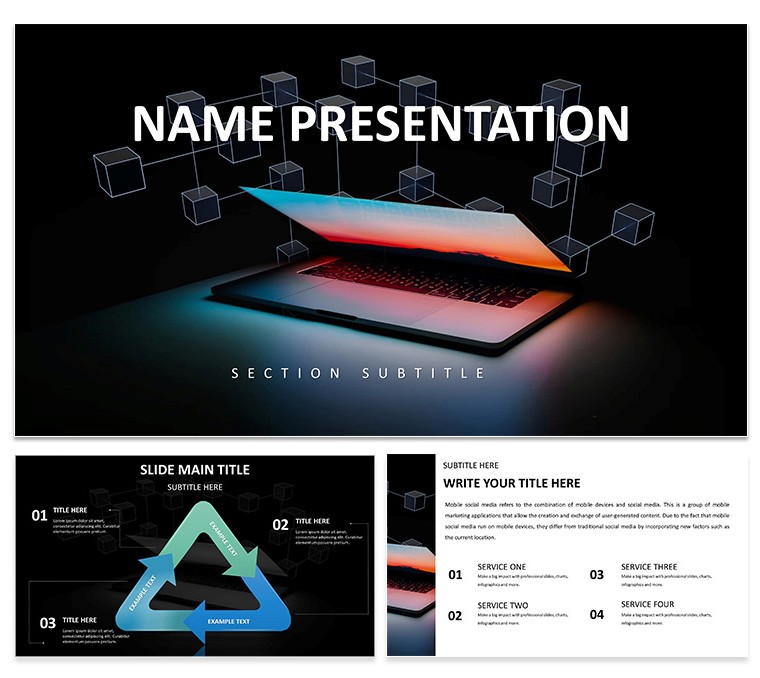
Digital Solutions Keynote Template
| Format | .pptx |
| Slides | 3 unique layouts |
| Aspect ratio | 16:9 |
| Compatibility | PowerPoint |
| Animated | No |
| Language | English |
| License | Commercial |
| File size | — |
| Version | v1.0 |
| Last updated | November 2024 |
What's inside
Imagine stepping into a boardroom where your ideas don't just speak - they command attention. That's the power of the Digital Solutions Keynote Template, crafted specifically for tech-savvy professionals, startups, and business leaders who need to convey complex digital strategies with effortless clarity. This isn't your average slide deck; it's a toolkit designed to turn raw data into compelling narratives that drive decisions and spark innovation.
With 28 meticulously designed diagrams across seven vibrant color schemes, this template equips you with everything from sleek flowcharts for software workflows to dynamic timelines for product launches. Whether you're pitching a new app to investors or outlining cybersecurity protocols to your team, these slides adapt seamlessly to your story. Built on three master layouts and three background options, it ensures consistency while giving you the freedom to tweak fonts, colors, and icons to match your brand's digital edge.
What sets this apart? It's the intuitive structure that lets you focus on your message, not the mechanics. Swap in your logos, resize charts without losing polish, and watch as your presentation flows like a well-coded algorithm. Professionals in IT consulting have leaned on similar setups to close deals faster, highlighting how a polished visual can bridge the gap between technical jargon and executive buy-in. Ready to code your next win? This template is your shortcut.
Unlocking the Core Features
Dive deeper into what makes this template a game-changer for digital presentations. Start with the vector-based icons - over 50 tech-themed elements like circuit patterns and cloud symbols - that you can recolor or resize endlessly. These aren't static clipart; they're scalable assets that maintain sharpness on any screen, from laptop pitches to large conference projectors.
The diagrams themselves cover a spectrum of needs: pie charts for market share breakdowns, bar graphs for user growth metrics, and process maps for agile development cycles. Each one is pre-animated with subtle transitions that reveal data points one by one, keeping your audience hooked without overwhelming them. And since it's fully layered in Keynote, editing is as simple as selecting and dragging - no need for external graphic software.
Compatibility is key here; it works flawlessly with Keynote 2016 and later versions on macOS, ensuring smooth playback even during high-stakes demos. Plus, the included backgrounds - minimalist gradients in blues and grays - evoke trust and innovation, perfect for fintech or SaaS overviews.
Real-World Applications for Digital Pros
Picture a startup founder in Silicon Valley preparing for a venture capital round. Using this template, they layer in revenue projections via a customizable line graph slide, then pivot to a SWOT analysis infographic that visually dissects competitive landscapes. The result? A 20-minute pitch that feels like a strategic conversation, not a data dump.
Or consider an IT manager rolling out a cloud migration plan. The template's roadmap slide becomes the hero, with milestones plotted along a horizontal timeline, complete with drag-and-drop milestones. Add team photos to the org chart slide, and suddenly, the human element shines through the tech talk.
- For Sales Teams: Craft client proposals with comparison tables that highlight your solutions against competitors - editable cells make updating quarterly a breeze.
- For Product Managers: Use the funnel diagram to illustrate user journey stages, from awareness to conversion, pulling in real analytics for authenticity.
- For Executives: Summarize quarterly KPIs on a dashboard slide, where gauges and meters bring metrics to life without clutter.
These applications aren't theoretical; they're drawn from how teams in dynamic sectors like e-commerce and software development harness visuals to accelerate buy-in.
Step-by-Step: Building Your First Deck
Getting started is straightforward - here's how to make it yours in under an hour:
- Open in Keynote: Launch the file and choose your preferred master layout from the inspector panel.
- Customize Colors: Head to the color scheme selector; pick from the seven options or create a custom palette to align with your company's hex codes.
- Input Data: Click into any diagram - say, the stacked bar chart - and replace placeholders with your figures. Keynote's smart guides keep everything aligned.
- Add Personal Touches: Drag in images from your library to the media placeholders, or type directly into text boxes with auto-formatting for headings and bullets.
- Preview and Polish: Run a slide show to test animations, then export as PDF or video for sharing.
This workflow cuts down on design guesswork, letting you iterate quickly. One tip: Always start with the agenda slide to set expectations - it's included and ready to outline your sections.
Why This Template Outshines Basics
Compared to whipping up slides from scratch in Keynote's default themes, this one saves hours by providing ready-to-go structures that are inherently responsive. No more wrestling with misaligned shapes or bland defaults; everything snaps into place with professional finesse. It's like upgrading from a basic text editor to a full IDE - suddenly, your output looks enterprise-ready.
The themed icons add that extra layer of relevance, turning generic bullets into visual anchors. For instance, a lock icon next to security features instantly conveys protection, making your points more memorable.
Elevate Your Digital Storytelling Today
Don't let subpar slides dim your digital vision. Grab the Digital Solutions Keynote Template for $22 and start crafting presentations that not only inform but inspire action. Your audience - and your outcomes - will thank you.
Frequently Asked Questions
What versions of Keynote does this template support?
It’s fully compatible with Keynote 2016 and newer versions on macOS, ensuring smooth performance across updates.
How many diagrams are included, and what types?
You get 28 diagrams, ranging from flowcharts and timelines to charts and infographics tailored for digital topics.
Can I customize the colors and fonts?
Absolutely - everything is editable, with seven built-in color schemes and flexible text styles to match your branding.
Is this template suitable for non-tech presentations?
While optimized for digital solutions, its versatile layouts work well for any business context needing clear visuals.
Does it include animations?
Yes, subtle build-in animations are pre-set on diagrams to reveal elements progressively, enhancing flow without distraction.
Good for
- Project roadmaps and sprint plans
- Product launch timelines
- Quarterly or annual review decks
- Company history and milestone summaries
Licence
reviews
Finished my sales presentation faster than usual using this.
The charts looked clear on both laptop and projector.
A few layouts needed resizing after adding extra content.
I liked the minimal look instead of bright flashy colors.
Pretty practical template for office use.
FAQ
Will it work in Google Slides?
Are fonts embedded?
Can I use this for client work?
What's the refund policy?
Do you update the template after purchase?
Similar templates
See all Keynote templates →



All 1 slides