 Click to zoom
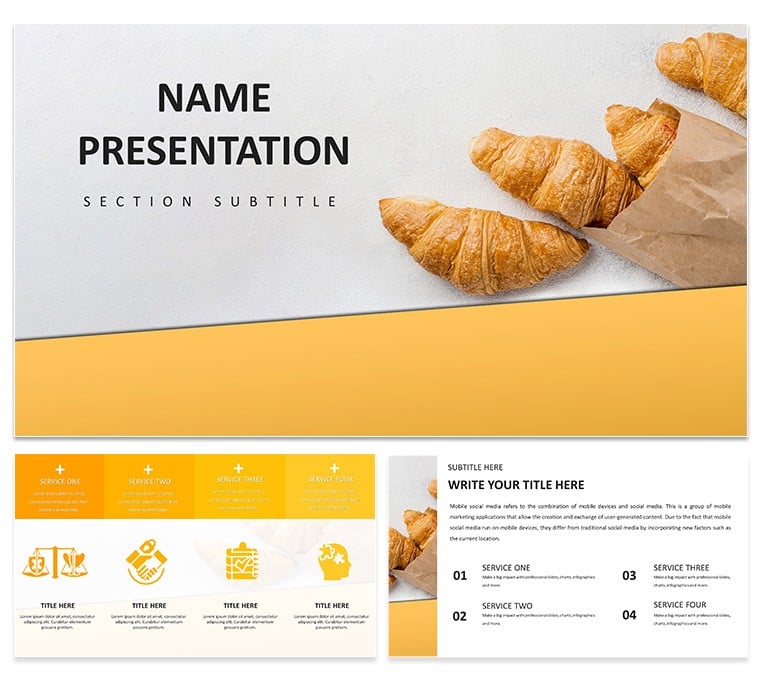
Croissant PowerPoint Template for Bakery Pros
| Format | .pptx |
| Slides | 3 unique layouts |
| Aspect ratio | 16:9 |
| Compatibility | PowerPoint |
| Animated | No |
| Language | English |
| License | Commercial |
| File size | — |
| Version | v1.0 |
| Last updated | May 2024 |
What's inside
Imagine walking into a bustling bakery where the air is thick with the scent of fresh butter and golden layers flaking apart just right. Now, picture translating that sensory delight into a presentation that doesn't just inform but entices. That's the magic of the Croissant PowerPoint template, crafted specifically for bakery owners, pastry artisans, and marketing teams who want to turn everyday pitches into irresistible narratives. With its elegant, warm-toned layouts inspired by the flaky perfection of croissants, this template helps you highlight menu items, share baking stories, or pitch expansion ideas with a touch of French sophistication.
At its core, this template offers a seamless way to blend visuals and text, ensuring your audience feels the crunch before they even taste it. Whether you're preparing for a supplier meeting or a customer tasting event, the designs draw eyes to key details like ingredient sourcing or seasonal specials. And because it's built for PowerPoint 2016 and later versions, you can dive right in without compatibility headaches - simply drag, drop, and customize to fit your brand's voice.
Unlocking the Template's Core Features
Diving deeper, the Croissant template stands out with its thoughtful structure. It includes three master slides that set the tone for consistency across your deck, paired with three background options to match different moods - from rustic oven-fresh vibes to sleek cafe elegance. The real stars, though, are the 28 diagrams, each available in seven color schemes that evoke buttery golds, soft creams, and hints of caramelized edges.
Think of the timeline diagram for tracing a croissants journey from dough to display case, or the process flow chart that breaks down lamination techniques without overwhelming your viewers. These aren't just static shapes; they're editable vectors that respond intuitively to your tweaks, letting you swap in high-res photos of your signature almond-filled varieties or adjust text for allergen notes. Plus, the built-in icon set - featuring rolling pins, piping bags, and layered pastry motifs - adds that extra layer of thematic charm without cluttering the slide.
- Fully Customizable Elements: Resize diagrams effortlessly while maintaining crisp lines, ideal for adapting to widescreen or standard formats.
- Integrated Placeholders: Drop your own bakery photos into frames designed to mimic a pastry case window, creating an immediate visual hook.
- Color Harmony: The seven schemes ensure your deck aligns with seasonal promotions, like a richer palette for fall pumpkin croissants.
One practical tip: Start by populating the master slides with your logo and fonts, then layer in content slide by slide. This workflow keeps things organized, especially when collaborating with your design lead on last-minute changes.
Real-World Applications in Bakery Settings
For a mid-sized urban bakery eyeing franchise growth, this template shines in investor decks. Take the comparison chart: Use it to juxtapose your handmade croissants against mass-produced competitors, emphasizing quality through side-by-side visuals of texture and taste profiles. A real example comes from a Paris-inspired chain that adapted a similar layout to showcase their pain au chocolat lineup, resulting in clearer funding discussions as stakeholders could "see" the premium appeal.
Shift to daily operations, and you'll find it invaluable for staff training sessions. The step-by-step infographic slides guide new hires through proofing and baking stages, with animated transitions that mimic the rising dough - making complex processes feel approachable. Or consider customer-facing uses: During pop-up events, project a menu overview slide to highlight limited-edition flavors, drawing crowds with its appetizing close-ups.
- Menu Overviews: Build a grid layout to feature varieties like plain, chocolate, and spinach-feta, complete with calorie breakdowns and pairing suggestions.
- Sales Pitches: Craft a pyramid diagram for tiered pricing strategies, showing how premium fillings boost margins.
- Event Recaps: Summarize tasting feedback with pie charts that visually slice up customer preferences.
Compared to starting from a blank PowerPoint canvas, this template cuts down on design time by providing pre-aligned elements, letting you focus on storytelling. It's like having a sous chef for your slides - reliable and ready to elevate the ordinary.
Tailoring the Template to Your Bakery's Story
Customization is where this template truly bakes. Begin with the text-heavy slides for narrative depth: Weave in anecdotes about sourcing organic flours or partnering with local farms, using the elegant script fonts to evoke handwritten recipe cards. For data-driven sections, leverage the bar graphs to track monthly sales trends, coloring bars to match your croissant hues for subconscious appeal.
In a workshop setting, I've seen bakers use the mind map slide to brainstorm flavor innovations, branching out from a central "classic butter" node to exotic ideas like matcha or lavender infusions. This fosters creativity while keeping the presentation grounded in visuals that spark hunger. And for accessibility, ensure alt text on images describes the flaky layers vividly, making your deck inclusive for all viewers.
To integrate seamlessly, pair it with PowerPoint's built-in animations - subtle fades on diagram reveals mimic the gentle unfolding of pastry layers. Test on different devices to confirm responsiveness, ensuring your pitch lands as smoothly as a well-laminated dough.
Why This Template Transforms Your Presentations
Beyond aesthetics, the Croissant template empowers you to connect emotionally with your audience. In an industry where taste is king, visuals become your voice - conveying craftsmanship that words alone can't capture. Whether sealing a partnership or delighting patrons, these slides turn passive listeners into eager participants, ready to bite into your vision.
Ready to infuse your next presentation with that golden-hour glow? Download the Croissant PowerPoint template for $22 and start crafting decks that rise above the rest.
Frequently Asked Questions
What formats are compatible with this template?
The template works seamlessly with PowerPoint 2016 and newer versions, supporting .pptx and .potx files for easy editing.
Can I add my own images to the slides?
Yes, all placeholders are designed for quick image swaps, maintaining the template's balanced layout.
Are the diagrams fully editable?
Absolutely - each of the 28 diagrams uses vector graphics, allowing color changes, resizing, and text updates without quality loss.
Does it include animation options?
While base animations are minimal, you can layer in PowerPoint's tools for smooth transitions tailored to your flow.
How many color schemes are available?
There are seven schemes, each adjustable to match your bakery's branding or seasonal themes.
Good for
- Project roadmaps and sprint plans
- Product launch timelines
- Quarterly or annual review decks
- Company history and milestone summaries
Licence
reviews
The dumbbell plot for before/after comparisons is simple and clear.
The lines between points were too thin. Made them thicker.
My marketing report showed improvement clearly. The design was minimal.
I think the points could be larger. Enlarged them.
Quick and to the point. The template worked fine.
FAQ
Will it work in Google Slides?
Are fonts embedded?
Can I use this for client work?
What's the refund policy?
Do you update the template after purchase?
Similar templates
See all PowerPoint Templates →

All 1 slides