 Click to zoom
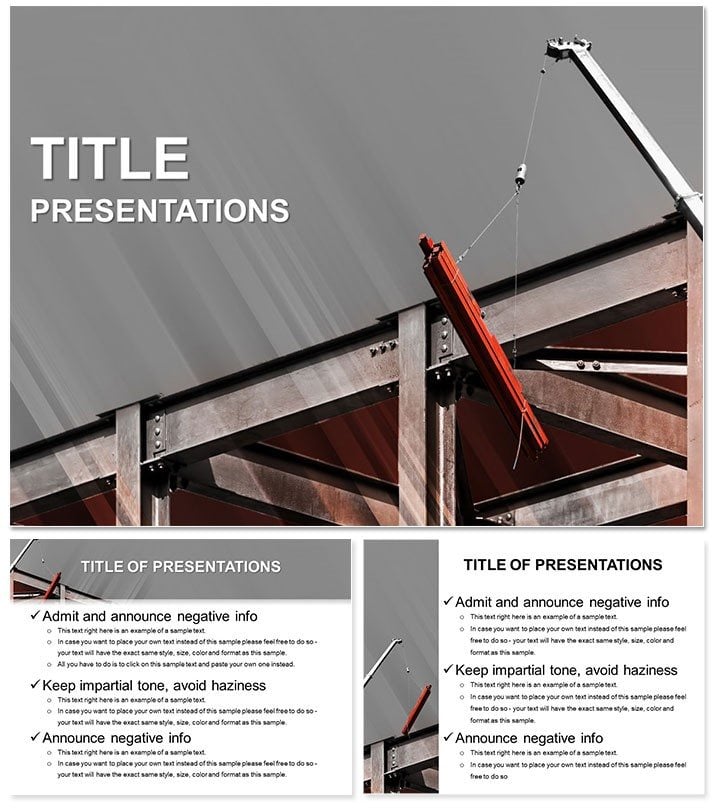
Construction Engineering PowerPoint Template: Blueprint Your Breakthroughs
| Format | .pptx |
| Slides | 3 unique layouts |
| Aspect ratio | 16:9 |
| Compatibility | PowerPoint |
| Animated | No |
| Language | English |
| License | Commercial |
| File size | — |
| Version | v1.0 |
| Last updated | October 2022 |
What's inside
From skyscraper foundations to suburban renovations, construction demands decks that stand as firm as the structures they depict. The Construction Engineering PowerPoint Template lays the groundwork, offering 28 diagrams that scaffold your vision with structural integrity. Timelines track phased builds, network diagrams untangle subcontractor webs, and elevation charts rise like girders to showcase progress. Three masters guide your build - one for site surveys with topographic overlays, another for budgeting breakdowns, and a third for compliance checklists - paired with backgrounds mimicking concrete textures or blueprint grids. Seven color schemes, evoking steel blues or earth tones, harmonize with site safety vests. Widescreen-ready for boardroom projectors, it`s fully editable in PowerPoint 2016+, turning raw specs into persuasive blueprints that secure bids and timelines.
Foundation Features: Elements That Hold Strong
Masters provide consistency, with placeholders for CAD imports or photo grids of progress shots. Diagrams flex from bar schedules sequencing pours to bubble maps zoning material flows, all vector-sharp for zoom-ins during walkthroughs. Animations simulate crane swings or beam placements, adding kinetic proof to static plans. .potx core files pair with .jpg exports for stakeholder emails, and text fields auto-format for legalese or measurements. This template fortifies presentations against scrutiny, embedding hard-hat-ready visuals that speak volumes on feasibility.
Key Constructs: Slides That Frame Your Narrative
- Site Stakeout: Aerial view base with editable lot lines, staking your project`s footprint.
- Phase Pyramid: Hierarchical blocks stacking milestones, adjustable for delays or accelerations.
- Cost Column: Segmented bars auditing expenses, highlighting overruns in red flags.
- Team Topology: Org chart with role icons, linking foremen to architects.
- Finish Facade: Before-after sliders revealing completions, capping with sign-offs.
A project manager could tweak the phase slide for urban infills, inserting zoning icons to address density concerns upfront.
Site-Specific Scenarios: Erecting Success Stories
Developers pitch high-rises using the cost slides to layer financing streams, clarifying ROI for lenders amid market fluxes. Architects employ network diagrams for facade integrations, tracing material paths from quarry to curtain wall. In municipal bids, sustainability experts adapt charts for green certifications, quantifying recycled steel impacts. This template erects in deadline-driven worlds, like retrofit rushes post-storms, where visuals validate variances faster than words. It outbuilds vanilla versions by pre-wiring construction lingo, letting you layer expertise over ready scaffolds.
Build Sequence: Layering Your Deck Layer by Layer
- Foundation File: Open .potx, select master matching your scale - residential or commercial.
- Spec Infusion: Populate timelines with Gantt data, syncing dates to critical paths.
- Dynamic Erect: Animate sequences for demo flows, like pouring foundations in pours.
- Inspect Integrity: Review in outline view, ensuring alignments for printed plans.
- Deploy Design: Share as interactive hyperlinks to 3D models or static for approvals.
Such steps solidify efficiency, underscoring perks like unified team briefs from one source file.
Reinforce and Renovate: Adapting to Your Build
Incorporate AR previews via QR links, bridging slides to virtual tours, or customize icons for specialty trades like HVAC ducts. For heritage projects, tone down colors to sepia for historical contexts, preserving authenticity. A civil engineer might reframe budget slides for infrastructure grants, emphasizing public benefits in callout boxes. The template`s resilience suits expansions, from bridge spans to eco-villages, framing futures with unyielding clarity.
Lay the first stone - snag the Construction Engineering PowerPoint Template for $22 and construct narratives that endure.
Frequently Asked Questions
Can I import CAD drawings?
Yes, placeholders accommodate vector imports for seamless integration.
Are there safety-focused visuals?
Diagrams include hazard mappings and checklist templates for compliance.
Does it support widescreen only?
Optimized for 16:9, but resizes easily to 4:3 standards.
How editable are the timelines?
Fully - adjust dates, dependencies, and milestones with drag tools.
Is it suitable for small-scale projects?
Scalable - simplify diagrams for home renos or expand for megasites.
Good for
- Project roadmaps and sprint plans
- Product launch timelines
- Quarterly or annual review decks
- Company history and milestone summaries
Licence
reviews
I wish there were more chart customization options.
Had to do a product comparison and the table was ready.
My team liked the simplicity of the slides.
The file has some weird master slide issues.
The comparison table with icons for feature vs benefit.
FAQ
Will it work in Google Slides?
Are fonts embedded?
Can I use this for client work?
What's the refund policy?
Do you update the template after purchase?
Similar templates
See all PowerPoint Templates →

All 1 slides