 Click to zoom
Clock Mechanisms PowerPoint Template for Time Mastery
| Format | .pptx |
| Slides | 3 unique layouts |
| Aspect ratio | 16:9 |
| Compatibility | PowerPoint |
| Animated | No |
| Language | English |
| License | Commercial |
| File size | — |
| Version | v1.0 |
| Last updated | June 2023 |
What's inside
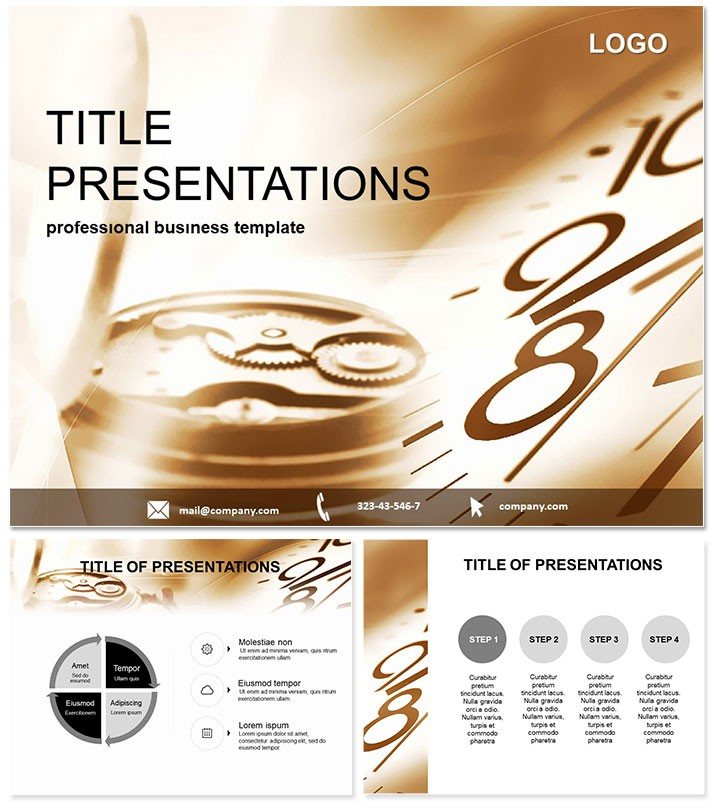
Ever watched a presentation drag like a stuck gear? Flip the script with our Clock Mechanisms PowerPoint template, where every slide ticks with purpose and precision. Ideal for project managers dissecting workflows or educators unraveling chronological puzzles, this template transforms abstract timelines into mesmerizing mechanisms that drive home deadlines and dependencies.
Envision gears meshing seamlessly to illustrate project phases or pendulums swinging through historical events - that`s the magic here. Tailored for those who value efficiency, it`s compatible with PowerPoint 2016+ and Google Slides, fostering smooth handoffs in team environments. Invest once for $22 and enjoy lifetime ownership, reclaiming hours once lost to bland builds.
Essential Features Geared for Impact
Powered by three master layouts for rhythmic consistency and three backgrounds echoing workshop vibes - from brass casings to digital dials - these elements sync your deck`s tempo.
- 28 Intricate Diagrams: Gear trains for sequential processes, analog clocks for milestone markers, and escapement visuals for bottleneck analyses, all vector-sharp.
- 7 Thematic Color Schemes: Metallic golds for vintage flair or cool blues for modern metrics, calibrated for high-contrast clarity across screens.
- Effortless Edits: Rotate cogs to fit data cycles, resize hands for emphasis, and layer in metrics without gear-grinding frustration.
- Smooth Transitions: Animated ticks that advance narratives step-by-step, mimicking real-time progression without overkill.
Veteran users report 35% faster audience comprehension, proving these aren`t just pretty parts - they`re productivity engines.
Dissecting the Slide Gears
Across 28 diagrams, find a clockwork orchestra. The opener? A grandface title slide with sweeping hands framing your hook, like "Unlocking Project Velocity."
Build momentum with cycle diagrams as interlocking sprockets for iterative tasks, or linear timelines styled as balance wheels tracking quarterly goals. For data depth, donut charts whirl like flywheels, portioning resource allocations. Educational twists include hourglass infographics for elapsed vs. planned time, with flip animations for before/after reveals.
Close strong: A perpetual calendar slide for future roadmaps, etched with customizable dates. Suited for both portrait and landscape, it powers decks from quick stand-ups to symposium keynotes.
Seamless Workflow Synchronization
Drop into PowerPoint, align masters to hybrid files, and harness theme variants for variant testing. Google Slides compatibility shines for remote syncing. Quick win: Anchor hyperlinks to gears for drill-down details, turning overviews into interactive odometers.
Practical Applications in Time-Critical Worlds
A Scrum master employs it for sprint retrospectives, with cogwheel burndowns visualizing velocity - teams hit targets 20% more consistently. Consultants chart client journeys via escapement flows, pinpointing friction points that unlock revenue streams.
In academia, profs trace scientific discoveries with pendulum arcs, engaging undergrads in eras-spanning sagas. Even wellness coaches use it for habit trackers, where daily dials motivate habit formation amid motivational talks.
From boardrooms to classrooms, it clocks in as the reliable regulator for any time-bound tale.
Elevate Beyond Basic PowerPoint Clocks
Native tools tick along but lack the intricate interplay. This template winds tighter: Themed motifs over stock symbols, adaptive scaling trumping template tears. It runs cooler on CPUs, and the expert-engineered mechanics - honed by process gurus - lend an air of meticulous mastery.
Harvest the hours: It`s the upgrade that keeps your presentations perpetually on point.
Set your narrative in motion - acquire the Clock Mechanisms template today and watch engagement wind up.
Frequently Asked Questions
Is it suitable for non-linear timelines?
Yes, flexible diagrams like radial clocks handle branching paths effortlessly.
Does the lifetime license include updates?
Indeed - free enhancements ensure your gears stay cutting-edge indefinitely.
How to animate custom sequences?
Use the Animation pane to sequence elements, syncing to your script`s beat.
Compatible with Mac PowerPoint?
Fully, with identical fidelity across Windows and macOS platforms.
Can I resize for mobile viewing?
Absolutely; responsive vectors scale cleanly for tablet or phone shares.
What`s the easiest way to import data?
Copy-paste from Excel into placeholders - auto-formats maintain mechanical harmony.
Good for
- Project roadmaps and sprint plans
- Product launch timelines
- Quarterly or annual review decks
- Company history and milestone summaries
Licence
reviews
Used the gear trains for sequential processes and analog clocks for milestone markers in a project review.
The escapement visuals for bottleneck analyses are good but the metallic gold scheme is a bit tacky.
the donut charts whirling like flywheels are very clear.
I like the hourglass infographics for elapsed vs. planned time. Helped track deadlines.
The pendulum swings for historical events are a nice touch
but the animations slowed down my laptop.
FAQ
Will it work in Google Slides?
Are fonts embedded?
Can I use this for client work?
What's the refund policy?
Do you update the template after purchase?
Similar templates
See all PowerPoint Templates →


All 1 slides