 Click to zoom
Casino Chips PowerPoint Template: Gaming Edge
| Format | .pptx |
| Slides | 3 unique layouts |
| Aspect ratio | 16:9 |
| Compatibility | PowerPoint |
| Animated | No |
| Language | English |
| License | Commercial |
| File size | — |
| Version | v1.0 |
| Last updated | May 2024 |
What's inside
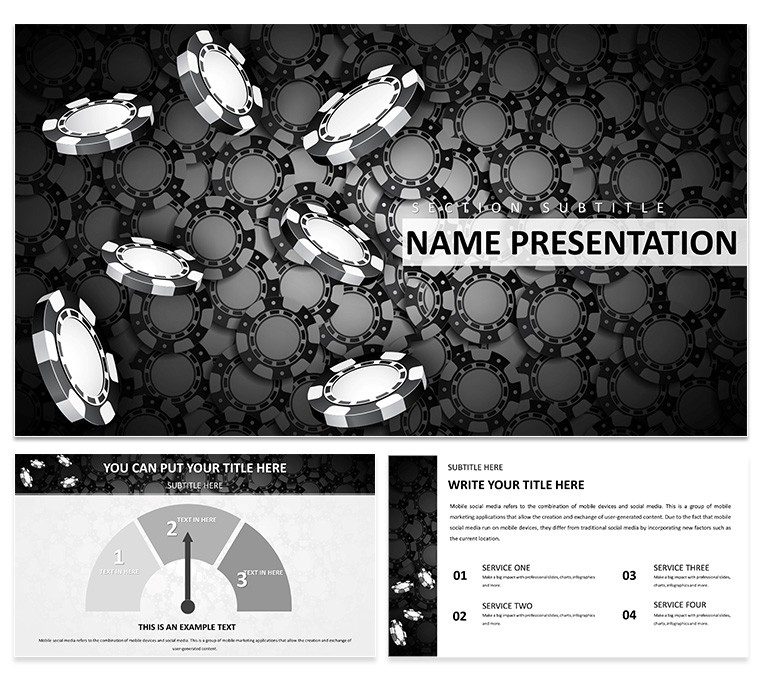
Imagine stepping into a high-stakes boardroom where every slide feels like a winning hand. The Casino Chips PowerPoint Template turns ordinary presentations into thrilling experiences, blending the glamour of the gaming world with professional polish. Designed for marketers, strategists, and entertainment pros, this template packs 28 versatile diagrams across three masters and backgrounds, all ready to customize in PowerPoint. Whether you're pitching a new casino expansion or breaking down quarterly revenue streams, these slides let you stack the deck in your favor - literally, with chip-inspired icons that add a touch of Vegas without overwhelming your message.
At its core, this template solves the dull-data dilemma. Forget flat bar graphs; here, revenue forecasts stack like poker chips, timelines unfold like roulette wheels, and process flows mimic card shuffles. With seven color schemes ranging from classic red-and-black to electric blues, you can match your brand's vibe effortlessly. It's compatible with PowerPoint 2016 and later, ensuring smooth animations and transitions that keep eyes glued. Professionals in the gaming sector, like those crafting investor decks for resort developments, find it invaluable for making complex financials feel fun and accessible.
Let's dive deeper into what makes this template a game-changer. Start with the title slide: a sleek layout where your logo sits atop a subtle chip stack, setting a tone of prosperity from the get-go. Move to content pages, and you'll see how pie charts morph into divided chip piles, perfect for market share breakdowns. One standout is the pyramid diagram - ideal for hierarchy visuals in team structures or escalation plans during a product launch. Each element is vector-based, so resizing won't blur your vision, and the sans-serif fonts keep text crisp even on large screens.
Unlocking the Features That Stack Your Success
The beauty of this template lies in its thoughtful details. With three master slides, you control the global look - swap backgrounds from a minimalist felt table to a glittering light show. The 28 diagrams cover everything from basic infographics to advanced flowcharts. For instance, the cycle diagram uses interlocking chips to illustrate feedback loops in customer service workflows, making abstract concepts tangible.
- Fully Editable Elements: Drag-and-drop icons, recolor schemes on the fly, and tweak text without breaking layouts.
- Animation-Ready: Built-in fades and spins that reveal data progressively, like flipping a card to show results.
- Versatile Layouts: Mix-and-match slides for hybrid presentations, from all-data dives to story-driven narratives.
Customization is a breeze: Open in PowerPoint, select a diagram, and use the integrated color picker to align with your company's palette. Add your own photos - say, event shots from a trade show - into placeholders that auto-adjust. This isn't just a template; it's a toolkit for turning dry stats into stories that resonate, much like how a well-timed bluff builds tension in a game.
Step-by-Step: Building Your Winning Deck
- Select Your Scheme: Choose from seven options; go bold with emerald greens for luxury branding or neutrals for corporate restraint.
- Populate Diagrams: Input data into the chip-stacked bar chart for sales comparisons - watch it animate chip-by-chip for dramatic effect.
- Incorporate Media: Embed short video clips of gaming simulations into slide frames, ensuring seamless playback.
- Refine and Rehearse: Use PowerPoint's presenter view to time transitions, ensuring your delivery matches the high-energy visuals.
- Export and Share: Save as PDF for handouts or video for online pitches, preserving the casino sparkle.
Take a sales director prepping for an industry conference: They swapped default charts for these chip visuals, transforming a routine forecast into an interactive session that sparked questions and deals. It's that level of engagement that elevates from good to unforgettable.
Real-World Applications: Where Chips Meet Strategy
In the fast-paced world of entertainment and business, this template shines in scenarios demanding both flair and clarity. Picture a marketing team unveiling a loyalty program - use the radial diagram to map reward tiers as spinning roulette sections, drawing viewers into the rewards cycle. Or, for financial analysts in hospitality, the line graph overlaid with chip trails tracks seasonal trends, making year-over-year growth pop.
Beyond gaming, adapt it for broader pitches. A startup in event planning could leverage the agenda slide's card-flip design to outline conference flows, keeping attendees hooked. In training sessions, the comparison matrix pits strategies side-by-side like competing bets, fostering discussion. Each use case leverages the theme's energy without forcing it - subtle icons reinforce points, never distract.
Compared to stock PowerPoint tools, this template saves hours on design tweaks. No more aligning shapes manually; everything snaps into place. And for teams collaborating via OneDrive, edits sync in real-time, turning solo prep into group wins.
Tips for Maximum Impact
To truly ace your presentation, pair visuals with concise narration. Limit text to key phrases - let the chips do the talking. Test on different projectors to ensure colors hold true. For virtual meetings, the animations scale well on Zoom, adding polish without lag.
One pro tip: Layer in subtle sound effects via PowerPoint's audio tools, like a soft chip clink on data reveal, but use sparingly to avoid gimmicks. This keeps the focus on your content, amplified by the template's smart aesthetics.
Why Choose This Template for Your Next High-Stakes Pitch?
It's more than slides; it's a strategic ally. With its balance of fun and function, the Casino Chips PowerPoint Template empowers you to present with confidence, turning data dumps into dealer-level deals. Download now for $22 and deal yourself a winning hand in every room you enter.
Frequently Asked Questions
What software is required to use this template?
This template works seamlessly with Microsoft PowerPoint 2016 and newer versions, including Microsoft 365.
Can I customize the colors to match my brand?
Yes, with seven built-in schemes and full editability, you can adjust hues, icons, and layouts to fit any branding guidelines.
Are the diagrams suitable for non-gaming presentations?
Absolutely - the casino elements are thematic accents, easily toned down or swapped for versatile business, marketing, or educational use.
How many slides are included?
The template features three masters, three backgrounds, and 28 ready-to-use diagrams, expandable as needed.
Is customer support available?
Yes, reach out via the ImagineLayout support portal for any customization queries or updates.
Good for
- Project roadmaps and sprint plans
- Product launch timelines
- Quarterly or annual review decks
- Company history and milestone summaries
Licence
reviews
Last minute internal report, the bar charts are straightforward.
Colors are a bit mismatched but i used company colors anyway.
Fast download, no registration hassles.
The slide master is easy to edit, good structure.
Not perfect but i was in a rush.
FAQ
Will it work in Google Slides?
Are fonts embedded?
Can I use this for client work?
What's the refund policy?
Do you update the template after purchase?
Similar templates
See all PowerPoint Templates →

All 1 slides