 Click to zoom
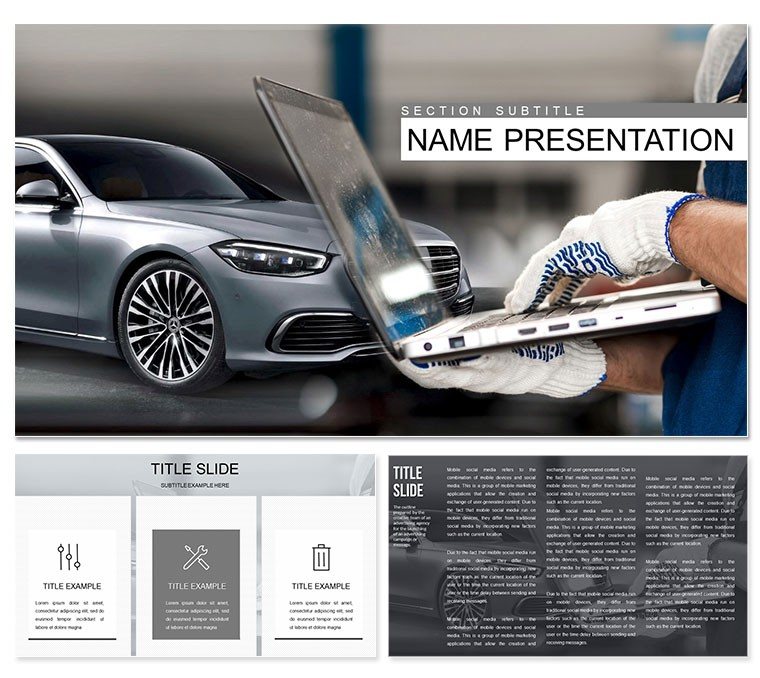
Car Diagnostic Tools PowerPoint Template
| Format | .pptx |
| Slides | 3 unique layouts |
| Aspect ratio | 16:9 |
| Compatibility | PowerPoint |
| Animated | No |
| Language | English |
| License | Commercial |
| File size | — |
| Version | v1.0 |
| Last updated | October 2022 |
What's inside
Imagine walking into a client meeting with visuals that instantly convey the precision and reliability of your diagnostic equipment. The Car Diagnostic Tools PowerPoint template turns complex auto tech into clear, compelling stories. Tailored for mechanics, service managers, and automotive consultants, this set includes 28 meticulously crafted diagrams across 7 versatile color schemes. Whether you're breaking down scanner functionalities or highlighting annual check-up protocols, these slides make your expertise shine without the hassle of starting from scratch.
Built on three master slides and backgrounds, it's fully compatible with PowerPoint 2016 and later versions, ensuring seamless integration into your workflow. From flowcharting diagnostic workflows to infographics on OBD-II compliance, every element is vector-based and editable, letting you swap in your branding or data in minutes. Picture a slide where a layered engine schematic reveals fault codes step by step - your audience follows along effortlessly, building trust in your recommendations.
Unlock Precision in Every Presentation
At the heart of this template are diagrams that mirror real-world diagnostic scenarios. Take the central hub-and-spoke layout for tool ecosystems: position your flagship scanner at the core, with spokes linking to compatible software and hardware add-ons. Edit the icons - perhaps a torque wrench or multimeter - to match your inventory, and animate paths to simulate signal flow during a live demo. This isn't just visual; it's a narrative tool that positions your services as indispensable.
For deeper dives, use the timeline slides to outline service histories. Start with a client's vehicle intake, progress through code scanning phases, and end with resolution metrics. These linear visuals help demystify processes like ECU reprogramming, making even novice stakeholders nod in agreement. And with seven color palettes - from sleek metallic grays to vibrant safety oranges - you can align with dealership standards or workshop vibes.
Streamline Your Workflow with Smart Edits
- Open the .pptx file in PowerPoint and select a master slide to tweak fonts or logos globally.
- Navigate to a diagram, like the comparison chart for dealer vs. aftermarket tools, and replace placeholders with your specs - response times, accuracy rates, you name it.
- Apply animations sparingly: a fade-in for layers in a cross-section engine view keeps focus sharp.
- Export previews as .jpg for quick shares or embed videos of live diagnostics if your setup allows.
This approach saves hours compared to piecing together basic shapes in vanilla PowerPoint, where alignments often fight back. Instead, you're handed polished, scalable vectors that resize without pixelation, ideal for projecting on large screens during trade shows.
Real-World Applications for Auto Pros
Consider a regional garage chain pitching expanded diagnostics to franchise owners. Using this template's pyramid slide, layer capabilities from basic battery tests at the base to advanced ABS module scans at the apex. Each tier's icons pop, drawing eyes to upsell opportunities like subscription-based updates. Or, in training sessions for new techs, the process flowcharts become interactive guides - click to expand on torque specs or error code libraries.
For consultants advising on fleet maintenance, the radial charts excel at risk mapping: spokes radiate from a central vehicle icon to potential failure points, color-coded by urgency. Input your data via simple tables, and watch the automation handle the rest. These aren't abstract; they're grounded in everyday challenges, like explaining why proactive scans prevent roadside breakdowns.
Even in regulatory compliance talks - say, with insurers - the checklist slides provide a clean framework. Bullet out mandates from EPA emissions testing, with checkmarks that toggle on as you verify adherence. It's a subtle way to underscore your shop's thoroughness, turning dry policies into persuasive assets.
Tips to Maximize Impact
- Pair diagrams with high-res photos of your tools in action for a tactile feel.
- Use contrasting colors in schemes to highlight cost-saving insights, like how multi-tool bundles reduce per-job expenses.
- Test on varied devices: the responsive design holds up from laptops to overhead projectors.
Download this template now and transform routine updates into riveting sessions that drive decisions.
Why This Template Stands Out
Unlike generic clipart packs, these diagrams draw from actual diagnostic interfaces - think mimicry of dashboard readouts or wiring harness schematics. Compatible across Windows and Mac, they support hyperlinks for jumping to detailed appendices, keeping long presentations dynamic. And at just $22, it's an investment that pays off in closed deals and streamlined ops.
Envision closing a partnership with a parts supplier: your Gantt-style slide maps integration timelines, from tool procurement to staff onboarding. Stakeholders see the roadmap clearly, accelerating buy-in. Or, for internal audits, the balanced scorecard visuals track KPI progress, blending qualitative notes with quantitative metrics seamlessly.
Customization Deep Dive
Diving into a sample slide: the diagnostic tree branches from symptoms (e.g., check engine light) to root causes, with editable nodes for probabilities or fixes. Resize branches to emphasize frequent issues, or recolor for severity levels. This flexibility turns data dumps into diagnostic dialogues, fostering questions that lead to deeper engagements.
Integrate with tools like Excel for live data pulls - link cells to chart elements for real-time updates during calls. It's a pro move that elevates you from presenter to partner.
Ready to diagnose your next pitch's potential? Grab the Car Diagnostic Tools PowerPoint template today and gear up for success.
Frequently Asked Questions
What formats are included with the template?
The Car Diagnostic Tools PowerPoint template comes in .pptx for full editing, .potx for masters, and .jpg for quick previews.
Is it suitable for both small shops and large fleets?
Yes, scalable diagrams adapt from single-vehicle case studies to enterprise-wide overviews.
Can I add my own animations?
Absolutely - PowerPoint's built-in tools work flawlessly with the vector elements.
How many color schemes are available?
Seven schemes, ranging from professional neutrals to bold accents for varied branding needs.
Does it support hyperlinks?
Yes, easily add links to external resources like tool manuals or video demos.
What's the compatibility range?
Fully compatible with PowerPoint 2016 and newer versions on Windows and Mac.
Good for
- Project roadmaps and sprint plans
- Product launch timelines
- Quarterly or annual review decks
- Company history and milestone summaries
Licence
reviews
The hand and glove graphics are helping. Used this for a "Helping Hand" volunteer slide.
Good for a "Toolkit" resource presentation.
I used the "High Five" slide for team motivation moments.
The puppet strings diagram is a bit creepy for a control metaphor.
The handshake timeline is a great way to show partnership milestones.
FAQ
Will it work in Google Slides?
Are fonts embedded?
Can I use this for client work?
What's the refund policy?
Do you update the template after purchase?
Similar templates
See all PowerPoint Templates →



All 1 slides