 Click to zoom
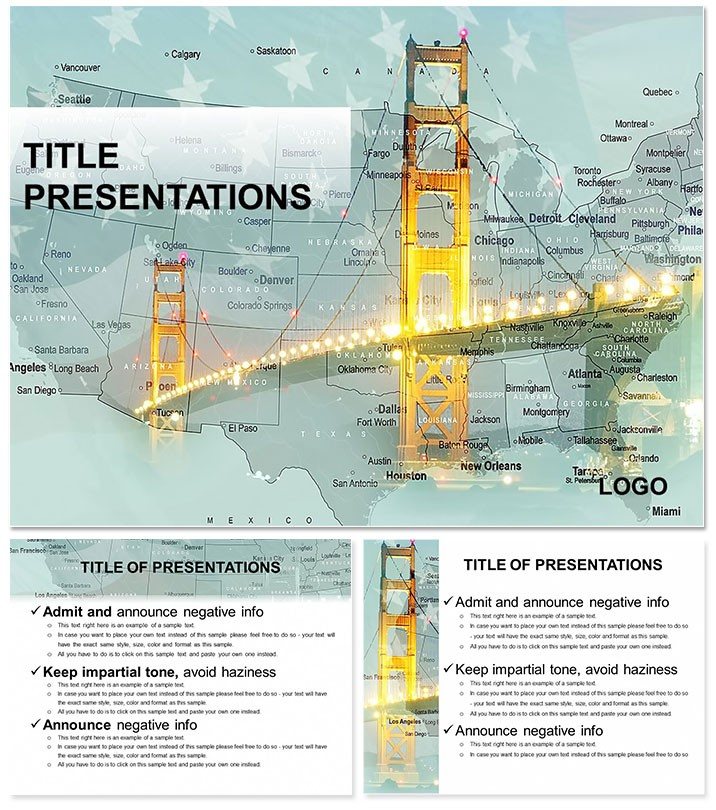
Bridges of USA PowerPoint Template
| Format | .pptx |
| Slides | 3 unique layouts |
| Aspect ratio | 16:9 |
| Compatibility | PowerPoint |
| Animated | No |
| Language | English |
| License | Commercial |
| File size | — |
| Version | v1.0 |
| Last updated | February 2024 |
What's inside
From the graceful arc of the Golden Gate to the sturdy spans of the Brooklyn Bridge, America`s bridges aren`t just feats of engineering - they`re stories of innovation, resilience, and connection. If you`re an architect sketching urban visions, a history teacher igniting classroom curiosity, or an engineer pitching infrastructure upgrades, this Bridges of USA PowerPoint Template turns those narratives into captivating visuals. With 28 dedicated diagrams, it captures the essence of these landmarks, letting you weave facts, timelines, and impacts into slides that hold attention like a well-told tale.
Designed for those moments when words alone can`t convey the scale or significance, the template includes three master layouts for consistent flow and three background motifs evoking steel girders and river vistas. Seven color schemes - from sunset oranges for coastal icons to industrial blues - ensure your deck aligns with any venue, be it a conference hall or virtual webinar. Every element is editable in PowerPoint 2013 onward, so swap in your photos, adjust scales, or highlight stats like load capacities with ease.
Essential Features That Build Strong Presentations
Dive into the diagram collection, starting with slide two`s overview map plotting major U.S. bridges by region - ideal for setting geographic context before zooming into specifics. Slide eight`s cross-section cutaway reveals internal trusswork, perfect for explaining load distribution without technical jargon overload. These aren`t static images; they`re interactive canvases where you layer annotations, like noting the Golden Gate`s 1937 opening amid economic recovery.
The template`s strength shines in its adaptability. For educational use, the timeline on slide 15 chronicles evolution from wooden covered bridges to modern suspension marvels, with milestones you can extend or contract. Engineers will appreciate slide 20`s comparative table, stacking specs like span lengths and materials side-by-side for bids or reports.
- Rich Graphics: Integrated photos of real bridges, plus vector illustrations for clean, scalable details.
- Layout Variety: Mix of full-bleed images, infographics, and text-heavy slides to pace your delivery.
- Accessibility Tweaks: High-contrast options and alt-text ready placeholders for inclusive designs.
Plus, seamless import from design software like AutoCAD means your technical drawings slot right in.
Practical Use Cases Across Disciplines
Envision a civil engineering firm using slide 11`s before-and-after diagram to illustrate seismic retrofits on the Bay Bridge - visually demonstrating enhanced sway resistance post-1989 quake. It transforms data dumps into compelling arguments for funding. Historians might leverage slide 24`s quote-integrated layout, pairing Eero Saarinen`s visionary words with the Gateway Arch`s curve, sparking discussions on design philosophy.
For student projects, the process flowchart on slide 26 outlines bridge construction phases, from surveying to ribbon-cutting, making abstract concepts tangible. A urban planner could adapt slide four`s network graph to show how bridges knit communities, overlaying traffic flows with socioeconomic links for policy briefs.
Integrate into your routine by linking to GIS data for live updates on bridge conditions, or embed videos of wind tunnel tests for dynamic demos. The result? Presentations that not only inform but inspire, much like the structures they celebrate.
Customizing Your Bridge to Success: A Quick Guide
- Pick Your Foundation: Select a master that echoes your theme - vintage for historical talks, modern for tech-focused ones.
- Layer in Details: Drop your custom images into photo frames on slide three, auto-cropping to fit.
- Color the Narrative: Apply a scheme via the theme switcher, previewing how it alters mood from serene to striking.
- Build Engagement: Add fade-ins to reveal stats sequentially, guiding eyes from overview to insight.
- Finalize and Share: Export variants for print or digital, ensuring versatility across formats.
This streamlined process keeps your focus on content, not cosmetics.
Elevating Your Deck Beyond the Basics
What elevates this template is its nod to real-world inspiration - drawing from ASCE reports on infrastructure grades to prioritize impactful visuals. Unlike off-the-shelf packs, it avoids clutter, emphasizing white space that lets bridge majesty breathe. Users in academia note how it simplifies complex hydrodynamics, fostering deeper dives without fatigue.
Versatile enough for environmental talks on sustainable materials or tourism pitches highlighting scenic routes, it grows with your needs. Download the Bridges of USA PowerPoint Template for $22 and construct presentations as enduring as the icons they feature.
Frequently Asked Questions
Are the diagrams fully customizable?
Yes, all 28 diagrams use vector graphics, editable in shape, color, and text via PowerPoint tools.
Does it include real bridge photos?
Pre-loaded high-res images of key U.S. bridges, with space for your own uploads.
What slide sizes are supported?
Widescreen 16:9 primary, with 4:3 and 16:10 options for legacy setups.
Is it suitable for non-U.S. bridges?
Core structure adapts easily - retheme for international icons like London`s Tower Bridge.
Can I add animations?
Basic transitions included; enhance with PowerPoint`s animation pane for custom sequences.
What`s the file compatibility?
Works with PowerPoint 2013+, Google Slides, and Keynote via export.
Good for
- Project roadmaps and sprint plans
- Product launch timelines
- Quarterly or annual review decks
- Company history and milestone summaries
Licence
reviews
Used for a sales territory performance, the heatmap of regions is basic.
The color intensity is a bit off but i adjusted.
Good for a sales review.
Would use a better map next time.
FAQ
Will it work in Google Slides?
Are fonts embedded?
Can I use this for client work?
What's the refund policy?
Do you update the template after purchase?
Similar templates
See all PowerPoint Templates →



All 1 slides