 Click to zoom
Books Learning PowerPoint Template: Ignite Curiosity Through Design
| Format | .pptx |
| Slides | 3 unique layouts |
| Aspect ratio | 16:9 |
| Compatibility | PowerPoint |
| Animated | No |
| Language | English |
| License | Commercial |
| File size | — |
| Version | v1.0 |
| Last updated | November 2024 |
What's inside
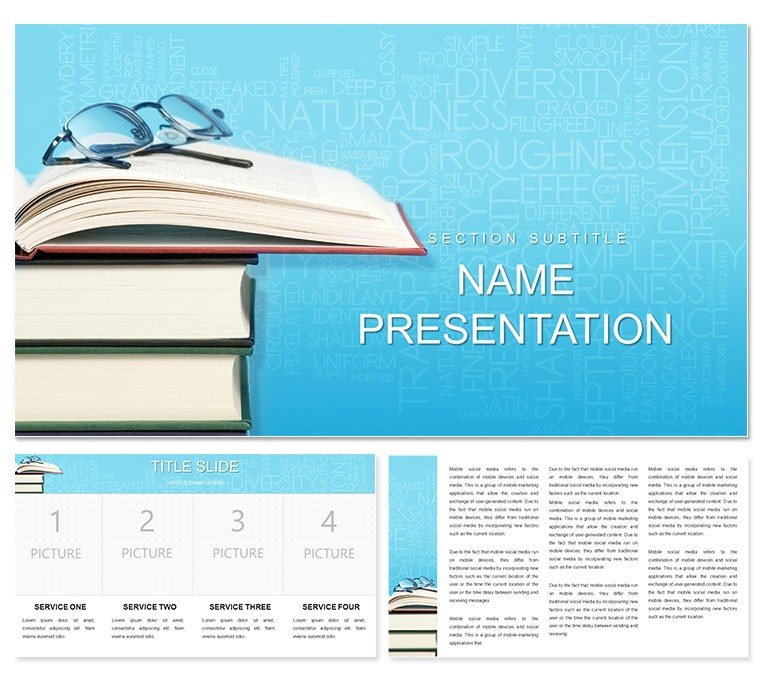
In the realm of education, where attention spans flicker like page turns, your presentations need to pull learners in like a gripping novel. This books learning PowerPoint template does just that, channeling the timeless allure of a well-stocked bookshelf into 28 dynamic diagrams perfect for science breakdowns, history timelines, or literature deep dives. Tailored for teachers, tutors, and lifelong learners, it offers three masters and backgrounds that evoke stacked volumes - think warm wood tones fading into open pages - making abstract knowledge feel inviting and tangible. Compatible with PowerPoint 2016+, you can effortlessly insert excerpts, embed quizzes, or layer in multimedia, turning a standard lecture into an interactive journey. Envision unveiling Darwin's evolution theory via a branching tree diagram, branches labeled with eras, or mapping Shakespeare's plots on a narrative arc slide. The benefits? Deeper engagement, clearer retention, and decks that students actually remember. If you're prepping for a webinar on ancient texts or a classroom session on quantum basics, this template hands you the tools to weave stories that stick. Let's turn your next lesson into a bestseller - start customizing today.
Discover the Building Blocks of Educational Excellence
The template's foundation lies in its thoughtful structure: three masters cater to different lesson vibes - one for lecture overviews with bold title pages, another for activity inserts with ample white space, and a third for recap summaries with bullet-friendly layouts. The three backgrounds mimic library shelves in varying depths - shallow for minimalist math proofs, deeper textures for historical anecdotes - ensuring your slides breathe without clutter. Central to it all are the 28 diagrams, versatile enough for any subject: flowcharts for scientific methods, Venn diagrams for comparative lit, or mind maps for interdisciplinary connections.
Customization flows naturally; with seven color schemes ranging from scholarly sepias to vibrant primaries, align with your curriculum's mood - cool greens for biology, regal purples for royal histories. Fonts default to readable sans-serifs like Helvetica, but swap to Garamond for a literary nod. Insert a video clip of a lab demo into the media placeholder on the experiment slide, and the frame resizes seamlessly. This setup contrasts sharply with vanilla PowerPoint slides, where aligning elements feels like herding cats; here, smart guides snap everything into place, freeing you to focus on content that sparks "aha" moments.
- Multimedia Ready: Dedicated slots for images of rare books or animated GIFs of chemical reactions.
- Interactive Elements: Hyperlink diagram nodes to glossary pop-ups or further reading links.
- Scalable Design: Vectors ensure crispness on any screen, from classroom projectors to laptop screens.
Crafting a Science Lesson: From Hypothesis to Revelation
Begin with the hypothesis funnel slide: narrow the broad question into testable parts using the tapered shape, then color-code variables in the azure scheme for a fresh, exploratory feel. Follow with the data visualization bar graph, inputting results from your class poll - the auto-scaling axes adjust on the fly. Midway, the cause-effect chain links experiments in a linear path, with icons for beakers and charts. Wrap with the conclusion pyramid, stacking insights upward to a key takeaway. Animate the chain to "react" sequentially, mimicking a real lab flow. This method, used by science coordinators for unit overviews, keeps energy high and concepts connected.
- Define your learning objectives: What key idea unlocks the topic?
- Match diagrams to phases: Funnels for intros, graphs for evidence.
- Infuse visuals: Photos of specimens or historical artifacts.
- Test engagement: Run through with a peer for timing.
- Adapt for hybrid: Note virtual share options.
Versatile Scenarios: Tailoring to Books, Science, and Beyond
For literature buffs, the character web radiates from a central figure, spokes detailing traits and arcs - ideal for dissecting Jane Austen's heroines. History teachers leverage the era timeline, plotting events on a horizontal scroll with milestone markers, evoking flipping through chronicles. Science sessions benefit from the periodic table matrix, customizable cells for element properties, or ecosystem cycles in looping arrows. One educator swapped the default icons for custom sketches of fossils, personalizing a paleontology unit that had students buzzing.
Compared to piecing together free clipart, this template's cohesive aesthetic - subtle shadows on "book spines" - creates immersion, like stepping into a study hall. In workshops, use the pros-cons balance scale for debate prep, weighing arguments visually. Or for online classes, the modular agenda builder stacks topics like stacked tomes, easy to rearrange mid-session. These applications ensure your presentations aren't monologues but dialogues, inviting questions and exploration.
Enhancement Hacks for Lasting Impact
Layer audio narrations on key slides for flipped classrooms - record a poem reading over the verse analysis radial. For group activities, duplicate the brainstorming cloud and assign sections. Always prioritize flow: use consistent transitions like page-turn fades to maintain the bookish theme. This template empowers you to experiment, turning potential lecture lulls into lively discussions.
Embrace the Knowledge Narrative
Why settle for static slides when you can curate experiences? This template bridges the gap between textbook and storyteller, equipping you to foster curiosity that lingers. For educators shaping minds or professionals upskilling teams, it's the ally that amplifies your voice. Secure yours for $22 and author lessons that resonate - your audience awaits the next chapter.
Frequently Asked Questions
Are the diagrams fully vector-based?
Yes, all shapes and icons are vectors, allowing infinite scaling without quality loss.
Can I add my own fonts?
Absolutely; the layouts accommodate any TrueType font, with guides to maintain alignment.
Is it optimized for online teaching?
Designed with that in mind - lightweight files and embeddable media for smooth Zoom or Teams delivery.
How do I change the bookshelf background?
Right-click the background in slide master view and select a new image or color fill.
Does it include teacher notes sections?
While not pre-built, you can add speaker notes via PowerPoint's standard feature for hidden guidance.
What's the compatibility with older versions?
Works best with 2016+, but earlier versions can open it with minor feature losses.
Good for
- Project roadmaps and sprint plans
- Product launch timelines
- Quarterly or annual review decks
- Company history and milestone summaries
Licence
reviews
Used the org chart layout for a team restructuring slide.
The photo placeholders were a bit small but functional.
Saved me from drawing boxes for an hour, thanks.
Not the prettiest but HR approved it quickly.
The dotted line reporting option was a nice touch.
FAQ
Will it work in Google Slides?
Are fonts embedded?
Can I use this for client work?
What's the refund policy?
Do you update the template after purchase?
Similar templates
See all PowerPoint Templates →


All 1 slides