 Click to zoom
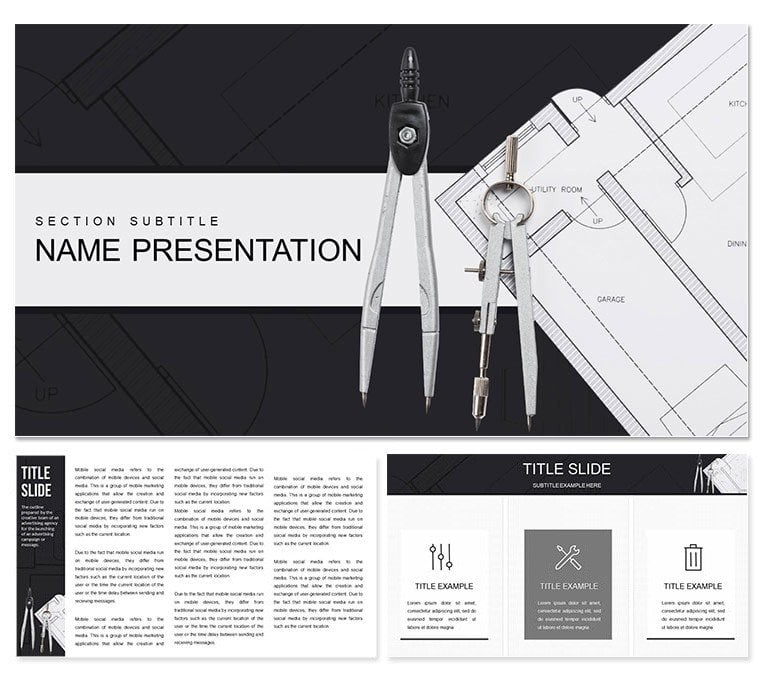
Architectural Thesis Keynote Template: Designing Narratives That Inspire
| Format | .pptx |
| Slides | 3 unique layouts |
| Aspect ratio | 16:9 |
| Compatibility | PowerPoint |
| Animated | No |
| Language | English |
| License | Commercial |
| File size | — |
| Version | v1.0 |
| Last updated | March 2024 |
What's inside
In the realm of architecture, where ideas rise like structures from sketches, your thesis presentation must stand as a blueprint for brilliance. The Architectural Thesis Keynote Template empowers final-year students, emerging architects, and design firms to articulate visions with elegance and depth. It's more than slides - it's a framework that mirrors the iterative beauty of design, helping you layer concepts from site analysis to final elevations in a way that captivates committees and clients alike.
This template offers 28 architecture-tuned diagrams, three master layouts for rhythmic flow, and three background canvases that evoke minimalist studios or urban skylines. Editable in Keynote for Mac, infuse your models, tweak spatial diagrams, or choose from seven color schemes - from cool grays for modern minimalism to warm earth tones for sustainable themes. Animations guide the eye through builds, simulating the reveal of a facade layer by layer.
Its genius is in contextual relevance: slide 10's sectional view diagram slices through building layers, perfect for materiality discussions. Slide 19's site plan radial organizes contextual influences, centering your project amid surroundings.
Key Elements Shaping Your Design Story
Engineered for the design process, this template's features foster creativity without chaos. Smooth animations unfold diagrams progressively, while precise vectors maintain line integrity for print-ready portfolios.
- 28 Concept-Driven Diagrams: Floor plans, elevation charts, and circulation flows customized for thesis depth.
- Seamless Adjustments: Scale tools for models, gradient fills for light studies, and annotation layers for critiques.
- Three Masters: Concept intros, analysis spreads, and synthesis conclusions for narrative arc.
- Seven Palette Options: Harmonies that complement material boards, from industrial to organic.
They create a deck that's as adaptable as your designs.
Building Your Thesis Presentation Step by Step
For a thesis defense, anchor with slide 4's timeline: plot project evolution, animating milestones to show growth. It's your design journey visualized.
- Assemble Inspirations: Import renders and sketches - slots align automatically.
- Select Structure: Use slide 13's matrix for program comparisons, grids filling with spatial data.
- Enhance and Sequence: Apply schemes for mood, animate paths to trace user flows.
- Polish for Presentation: Embed notes for rationale, export to interactive formats for juror feedback.
A student highlighted slide 22's bubble diagram for zoning impacts, bubbles expanding to reveal adjacencies. Firms pitch with slide 28's isometric views, rotating to unveil hidden innovations.
Spotlighting Architectural Diagrams
Slide 7's axonometric projects 3D relationships flatly, ideal for spatial arguments. Slide 25's parti sketch evolves forms organically, tracing conceptual shifts. Each supports thesis rigor.
Value for Aspiring and Seasoned Architects
It accelerates iteration, letting you refine visuals swiftly for tighter deadlines. Keynote synergy means easy merges with research docs, and masters ensure thesis cohesion.
Students build confidence with pro layouts, while pros streamline client reveals. Collaborate via shared files, iterating like a design charrette. Integrate with CAD exports for hybrid workflows, bridging digital to analog.
From studios to symposia, it frames your work as visionary, not just viable.
Construct Compelling Architectural Decks
Foundation laid? Acquire the Architectural Thesis Keynote Template for $22 and erect presentations that endure scrutiny.
Frequently Asked Questions
Does it support importing architectural renders?
Yes, high-res placeholders handle large images without quality loss.
Are diagrams scalable for different project scales?
Absolutely, vector elements resize cleanly for urban or residential focuses.
Can it be used for non-thesis architecture talks?
Yes, versatile for portfolio reviews or firm proposals.
What about animation for design sequences?
Built-in builds reveal layers, mimicking construction phases.
How do backgrounds enhance architectural themes?
Three subtle options, editable to echo your project's aesthetic.
Is it compatible with team editing?
Yes, .key files enable multi-user refinements.
Good for
- Project roadmaps and sprint plans
- Product launch timelines
- Quarterly or annual review decks
- Company history and milestone summaries
Licence
reviews
Tried to customize the pie chart colors but it took longer than I thought.
Good for internal meetings, wouldn't use for anything client-facing though.
The slide transitions are a bit dated but the content placeholders are solid.
Needed a org chart fast, this template had a couple decent options.
A few of the diagram connectors didn't align properly, had to tweak them manually.
FAQ
Will it work in Google Slides?
Are fonts embedded?
Can I use this for client work?
What's the refund policy?
Do you update the template after purchase?
Similar templates
See all Keynote templates →

All 1 slides