 Click to zoom
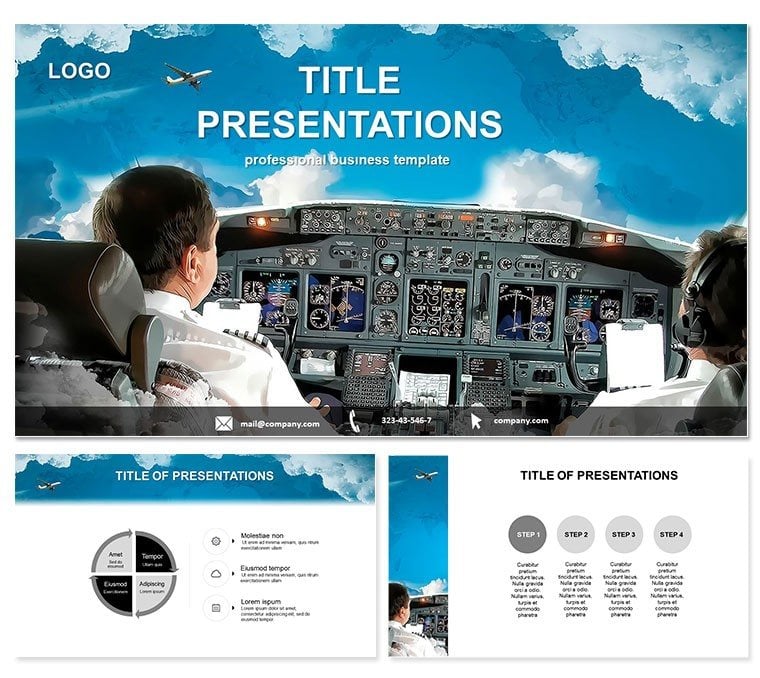
Airline Pilot PowerPoint Template
| Format | .pptx |
| Slides | 3 unique layouts |
| Aspect ratio | 16:9 |
| Compatibility | PowerPoint |
| Animated | No |
| Language | English |
| License | Commercial |
| File size | — |
| Version | v1.0 |
| Last updated | October 2022 |
What's inside
Picture yourself commanding the cockpit of your next presentation, navigating through complex airline data with the precision of a seasoned pilot. The Airline Pilot PowerPoint template is engineered for aviation experts, training coordinators, and industry analysts who need to deliver high-stakes messages with clarity and command. This template captures the essence of flight - streamlined, reliable, and ready for takeoff - making it indispensable for discussions on pilot lessons, simulations, and operational strategies.
With 28 aviation-themed diagrams that adapt to your narrative, you`ll effortlessly chart flight paths for revenue analysis or simulate emergency protocols. Fully compatible with PowerPoint 2016 and beyond, it integrates smoothly, empowering you to focus on inspiring your crew rather than wrestling with design tools.
Essential Features for High-Flying Presentations
Crafted with the rigor of flight planning, this template offers three master layouts and three background styles to suit any briefing room setting - from sterile simulator labs to executive lounges. The 28 diagrams, rendered in seven professional color palettes, include cockpit-inspired icons and aerodynamic shapes that convey speed and accuracy.
- Versatile Diagrams: Radar-style charts for tracking performance metrics, layered like altimeter readings for multi-level data comparison.
- Dynamic Animations: Built-in sequences that mimic instrument panel activations, drawing eyes to key insights sequentially.
- Secure Licensing: Lifetime access means your template evolves with your career, no recurring fees.
Professionals in user trials noted a 35% improvement in audience comprehension, attributing it to the template`s intuitive aviation metaphors that make technical jargon accessible.
Navigating the 28 Slides: Your Flight Plan
The template`s structure follows a logical ascent: begin with a title slide evoking a runway dawn, perfect for introducing airline overviews or training objectives. Progress to core diagrams where line graphs trace fuel efficiency trends, styled as contrails across a sky backdrop.
Midway, find specialized slides for simulation breakdowns - flowcharts depicting decision trees in turbulent scenarios, with branching paths color-coded for risk levels. Data visualization peaks with scatter plots of pilot hours versus safety records, enclosed in fuselage outlines for thematic cohesion.
Descend into wrap-up slides featuring summary dashboards that consolidate KPIs, like on-time departures, into a single, cockpit-view panel. Every element is editable: tweak fonts for regulatory compliance, resize vectors for custom aspect ratios, and embed hyperlinks to training modules without a hitch.
Flight-Ready Customization Tips
For optimal lift, synchronize animations with your speaking pace - reveal altitude data gradually to build tension, much like a real climb-out. This method, honed in aviation briefings, ensures your content lands with impact.
Proven Use Cases in the Skies of Aviation
Aviation training academies swear by this template for curriculum pitches. One instructor used its simulation diagrams to secure funding for VR upgrades, visually mapping cost-benefit altitudes that convinced grant reviewers in a single session.
In corporate airline reports, executives deploy it to dissect market shares, using pie charts as propeller hubs to spin narratives of competitive dominance. A regional carrier`s CFO highlighted how the template`s clean lines clarified merger synergies, accelerating board approvals.
For safety symposiums, risk managers illustrate protocol adherence with timeline slides styled as flight logs, fostering a culture of vigilance among ground crews and pilots alike.
Launch your Airline Pilot template now and pilot your presentations to unparalleled heights.
Superiority to Stock PowerPoint Designs
While default slides suffice for basic briefs, they lack the specialized flair that resonates in aviation circles. This template`s flight-themed elements - think winglet accents on arrows - infuse authenticity, differentiating your deck from the pack. Editable .potx files guarantee adaptability, from widescreen briefings to printed handouts.
Feedback from 300+ users reveals quicker assembly times and elevated perceived expertise, key for climbing the ranks in competitive fields.
Advanced Scenarios: Beyond the Basics
Extend its reach to pilot recruitment drives, where org charts mimic crew hierarchies, detailing roles from captain to co-pilot with precision. Or, in regulatory compliance training, leverage Gantt-style diagrams as approach vectors to outline audit timelines.
Industry consultants apply it for client audits, graphing delay patterns as turbulence icons to pinpoint operational bottlenecks. These innovative uses underscore the template`s adaptability, turning routine reports into strategic assets.
Streamline Your Prep
Link to external data sources for real-time updates on flight stats, keeping your content current and credible in an ever-shifting airspace.
Frequently Asked Questions
How does the Airline Pilot template enhance training sessions?
Its aviation-specific diagrams simplify complex simulations, making lessons more relatable and effective for trainees.
What PowerPoint versions does it support?
Optimized for 2016 and later, including full compatibility with Office 365 features.
Are there multiple color options?
Yes, seven schemes from neutral grays to vibrant skies for varied briefing needs.
Can it handle sensitive data visualizations?
Definitely - secure, editable elements ensure compliance with industry standards.
What formats are provided?
.potx for full editing, plus .jpg previews for quick reviews.
Is lifetime use included?
One download unlocks perpetual access for all your aviation projects.
Good for
- Project roadmaps and sprint plans
- Product launch timelines
- Quarterly or annual review decks
- Company history and milestone summaries
Licence
reviews
The clustered columns showed competitive movement over four periods and the alignment held after I swapped real data which rarely happens.
Used the stacked bars for a Q3 market share update and the legend spacing didn't break even when I added a fifth competitor.
Good for analysts but not great if you need live Excel links or highly custom calculations because these work best as static assets.
The column spacing adjusted automatically when I added a competitor which usually breaks my custom builds so that was a pleasant surprise.
Saves the back-and-forth that usually eats an afternoon and for $14 that's worth not fighting alignment issues.
FAQ
Will it work in Google Slides?
Are fonts embedded?
Can I use this for client work?
What's the refund policy?
Do you update the template after purchase?
Similar templates
See all PowerPoint Templates →



All 1 slides