 Click to zoom
Abstract Yellow Sheet Keynote Template: Infuse Texture into Your Narratives
| Format | .pptx |
| Slides | 3 unique layouts |
| Aspect ratio | 16:9 |
| Compatibility | PowerPoint |
| Animated | No |
| Language | English |
| License | Commercial |
| File size | — |
| Version | v1.0 |
| Last updated | October 2022 |
What's inside
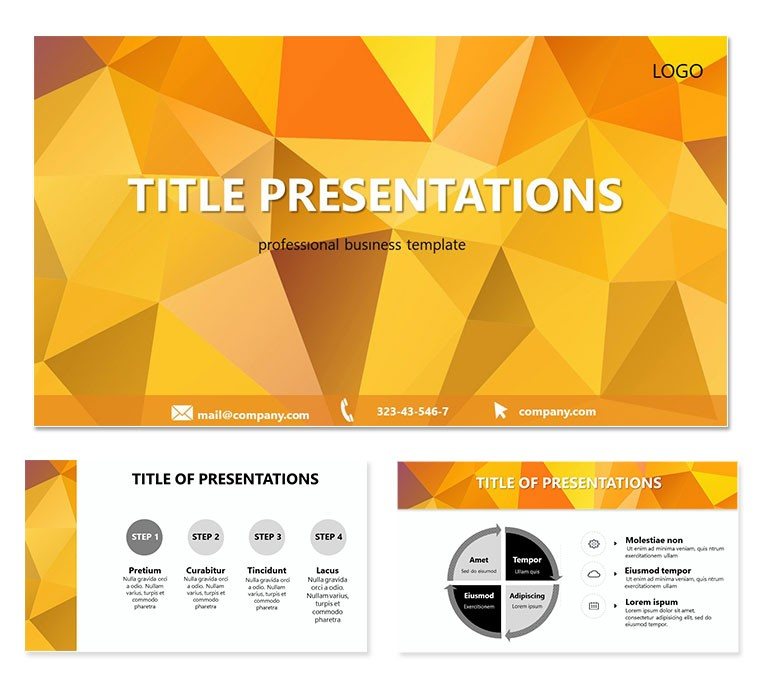
Ever felt your slides blend into the background, lacking that tactile spark? The Abstract Yellow Sheet Keynote Template changes that, drawing inspiration from the subtle folds of crumpled paper bathed in warm yellow tones and volumetric shading. Perfect for designers, marketers, and storytellers who want to evoke a sense of organic creativity, this template turns flat presentations into multidimensional experiences. With 28 diagrams ready to layer your ideas, it`s your shortcut to decks that feel handcrafted yet professionally polished.
Think of it as a canvas where ideas unfold like a sketchpad - ideal for brainstorming sessions or client mood boards. The crumpled effect adds a layer of intrigue without distracting from your message, while the shading creates depth that guides the eye naturally. Fully editable in Keynote, with .key files for deep customization and .jpgs for inspiration, it`s designed for those moments when you need to impress without overcomplicating. At just $22, it`s an investment in slides that linger in minds.
Delving into the Template`s Textured Toolkit
This template`s foundation rests on three master slides and three background variations, each capturing the essence of textured paper in soft yellow hues. The backgrounds aren`t static; their shading responds to light, mimicking real-world crumples for a premium feel. The real magic unfolds in the 28 diagrams, from swirling abstract flows for concept mapping to layered charts that echo paper`s folds.
- Dynamic Diagrams: Scatter plots that mimic ink blots or radial menus resembling torn edges - each visual reinforces the abstract theme.
- Seven Color Palettes: From sunny yellows to muted earth tones, adapt to moods like energetic pitches or reflective reviews.
- Layered Editability: Adjust opacity on shading elements or reorder layers to reveal hidden depths in your data stories.
A favorite is the process diagram, where steps cascade like unfolding paper, perfect for illustrating creative workflows from ideation to execution.
Blending Abstraction with Practical Flow
For marketing teams, integrate this into campaign overviews: Use the textured backgrounds to frame mood images, then overlay funnel diagrams that warp gently like creased sheets. It`s reminiscent of how agencies like Ogilvy use subtle textures to humanize big ideas, making abstract concepts tangible. Keynote`s masking tools pair beautifully here, letting you clip photos into crumpled shapes for bespoke visuals.
Practical Scenarios: Where Texture Meets Purpose
Envision a design firm pitching a rebrand. Open with an abstract title slide, the yellow sheet evoking fresh starts. Progress to Venn diagrams showing overlapping brand values, their edges softened by the theme`s shading. By mid-deck, timeline visuals track project phases, each milestone "crumpled" into view for emphasis.
- Setup: Apply the theme via .kth file; it auto-formats your existing deck.
- Refine: Tweak diagram colors to echo your client`s palette - yellow accents for optimism.
- Animate: Add subtle fades to mimic paper smoothing out, revealing content organically.
- Share: Export with embedded fonts to preserve the textured look across devices.
Educators find it invaluable for literature classes, using abstract flows to map plot twists or character arcs, the paper motif underscoring narrative folds.
Crafting Immersive Workshops and Reviews
In workshop settings, the template facilitates interactive segments: Blank diagram pages become collaborative canvases, shaded areas prompting annotations. Compared to plain white slides, this adds warmth and invitation, encouraging participation. For annual reviews, stack bar graphs with volumetric shadows to highlight growth, turning numbers into a story of unfolding success.
Customization shines with Keynote`s shape libraries - overlay custom crumples on masters for a signature touch. Ensure scalability by using vectors; even enlarged, the shading holds its form.
Pro Tips for Mastering the Abstract Aesthetic
To elevate further, experiment with blending modes on diagram overlays, creating hybrid textures that blend paper with gradients. For humor-infused creative decks, add light-hearted icons like doodle margins. Limit text to key phrases; the visuals carry the weight, allowing your voice to shine during delivery.
Accessibility-wise, pair high-contrast text with the softer backgrounds - test in Keynote`s color inspector. This template`s modularity means you can mix elements across projects, building a library of abstract assets over time.
Elevate Your Deck`s Depth Today
The Abstract Yellow Sheet Keynote Template isn`t just slides - it`s a tactile journey that makes your ideas unforgettable. From concept to close, it wraps your content in layers of intrigue. Secure yours for $22 and let your presentations unfold with style.
Frequently Asked Questions
How editable is the crumpled background in this template?
Fully adjustable - change colors, opacity, and shading via Keynote`s inspector panel.
What Keynote versions support this template?
It`s optimized for Keynote 09 and newer on macOS.
Are there pre-built animations for the diagrams?
Yes, subtle builds are included; customize further with Magic Move.
Can I adapt this for digital vs. print exports?
Definitely - the vector elements ensure crisp results in both PDF and on-screen views.
Does it include icon packs?
Basic abstract shapes are there; supplement with Keynote`s built-in library for more.
Good for
- Project roadmaps and sprint plans
- Product launch timelines
- Quarterly or annual review decks
- Company history and milestone summaries
Licence
reviews
Used for school slides and it worked well
Not very creative but practical
FAQ
Will it work in Google Slides?
Are fonts embedded?
Can I use this for client work?
What's the refund policy?
Do you update the template after purchase?
Similar templates
See all Keynote templates →
All 1 slides